


When I first started working in sales and marketing, I remember spending way too much time hunting for the right email addresses: guessing formats, checking LinkedIn, and hoping my cold emails didn’t bounce.
That’s when I stumbled upon Hunter.io.
Back then, it felt like a superpower – a tool that could instantly find verified contacts and save hours of manual work.
Fast-forward to 2026, and Hunter.io is still one of the go-to platforms for anyone serious about outreach. It’s evolved, but its core purpose hasn’t changed: helping teams connect with the right people faster. The real magic, though, isn’t just in the email finder. It’s in the Hunter API, which quietly powers countless automations behind the scenes.
For developers, growth marketers, and anyone scaling b2b leads generation, it’s become almost indispensable.
In this review, I’ll walk you through what’s new and what still works well, from key features and data quality to pricing, user experience, and how it stacks up against the competition. If you’re into B2B outreach, lead generation, or targeted email campaigns, this will hit close to home.
Here’s what you can expect:
- Straight talk on Hunter API pricing and features
- Honest takes on data accuracy and user-friendly design
- A few side-by-side moments where we’ll see how Generect can complement (or even replace) parts of your Hunter workflow
By the end, you’ll have a clear sense of whether Hunter.io still deserves a spot in your toolkit or if it’s time to mix in something fresh like Generect.
And let’s start with the foundation.
What products and tools does Hunter.io offer?
First off, Hunter.io’s core product is the Email Finder.
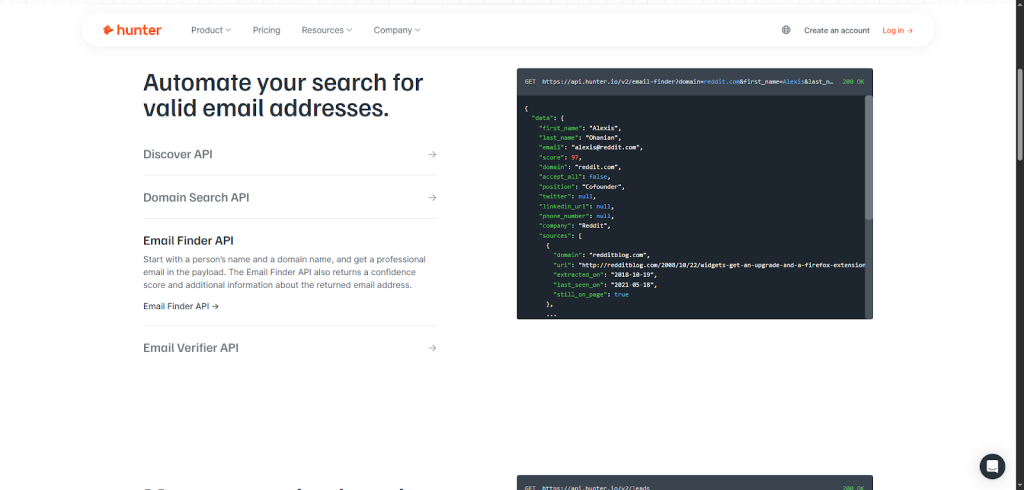
It works two ways: you can search by domain (for instance, “@company.com”) or by person (name plus company). Behind the scenes, it uses pattern recognition and crawls public data to guess the right email format.
This means you don’t have to spend hours guessing email addresses. It’s all automated and pretty darn accurate.
Out of the blue, it’s also worth noting how Generect’s API approach complements Hunter’s offerings. Generect functions as an automated lead generation system, handling search, real-time verification, and enrichment inside your workflows, without the usual hassle of exporting and importing CSVs.
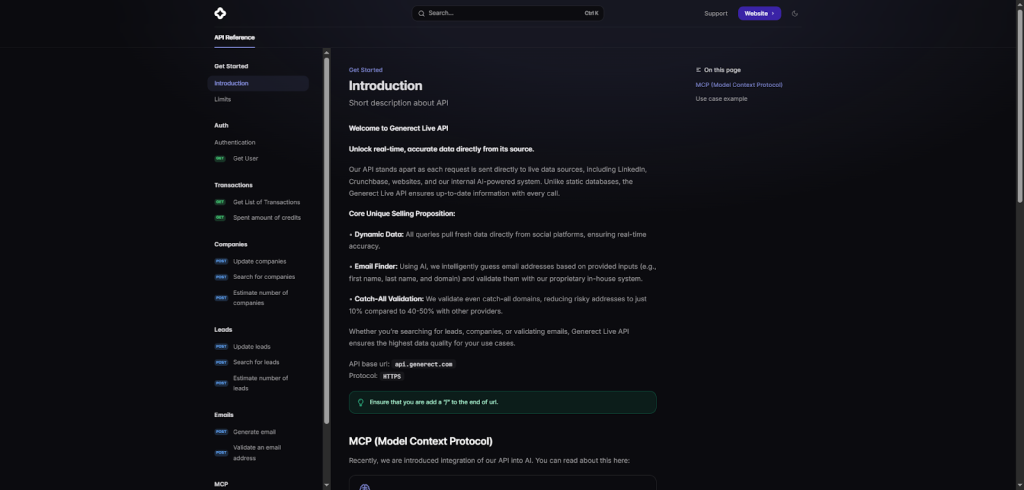
This means your pipeline fills directly in your CRM with verified decision-makers and intent data that reduces bounce rates and boosts conversion. It’s a great fit for sales, marketing teams, and agencies looking for more precision and less busywork.
Still, finding emails is just step one. Verifying them is where the real value kicks in. Here’s what the Email Verifier does:
- Checks emails in real time to confirm whether they’re valid, deliverable, or risky.
- Uses SMTP checks and smart algorithms to detect outdated or fake addresses.
- Reduces bounce rates and improves your sender reputation automatically.
- Integrates easily via the Hunter Email Verifier API, so developers can build verification directly into their own tools or CRMs.
Next up is Domain Search. This lets you pull a list of emails tied to a particular company domain in just a few clicks. It’s perfect when you want a broad snapshot of decision-makers or key contacts inside a business.
And if you want to drill deeper into companies by specific criteria like industry, size, or location, the Discover tool has you covered. It helps you sift through thousands of profiles and find the right companies to target.
Once you have your leads, Hunter’s Campaigns tool lets (the feature x use cases):
| Feature | What it does | Practical use case |
| Cold email sending | Send personalized emails directly from Hunter. | Reach out to new leads without switching tools. |
| Email sequencing | Automate follow-ups for non-responders. | Save time while keeping your outreach consistent. |
| Open tracking | See who opened your emails and when. | Identify engaged leads and prioritize them. |
| Reply detection | Track who replied to your campaigns. | Know when to stop follow-ups and move to the next step. |
| Scalable personalization | Keep emails personal while automating the process. | Manage large campaigns without losing the human touch. |
Another gem is their AI Writing Assistant for cold emails. This tool helps you craft personalized, engaging messages quickly.
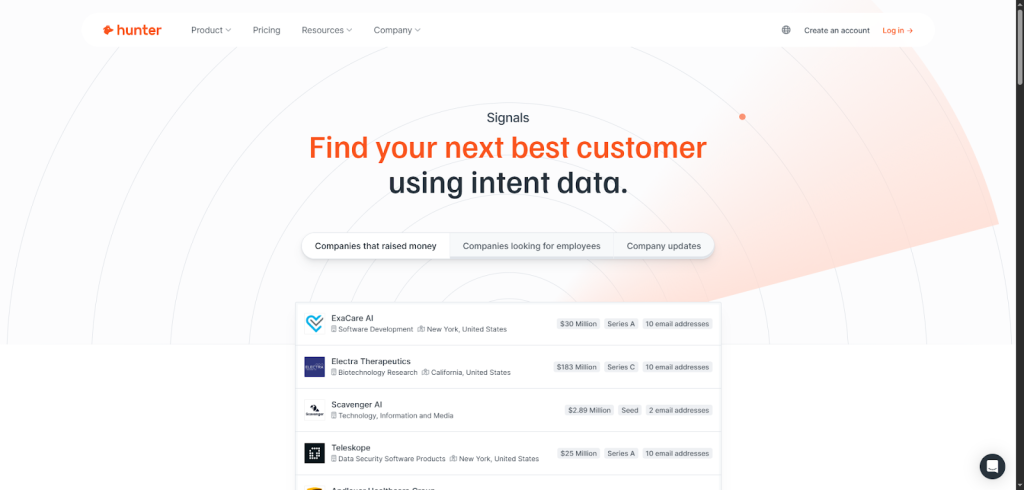
Hunter also offers Signals, which delivers intent data – basically, it highlights prospects showing buying signals or active interest. This helps you prioritize who to contact first.
Meanwhile, TechLookup reveals the technology stack a company uses. Knowing what software or platforms a target company runs can be a game-changer for tailoring your pitch.
If you need to process large amounts of data, Hunter supports bulk tasks across these products. Whether it’s verifying thousands of emails or gathering domain data for dozens of companies, the bulk feature saves tons of manual work.
Speaking of convenience, Hunter extends its power through several add-ons. There are browser extensions for Chrome, Firefox, and Edge that show emails right on LinkedIn profiles or company websites.
You also get a Google Sheets add-on to enrich lists without leaving your spreadsheet. Plus, the Mailtracker extension lets you track when recipients open your emails, right from Gmail.
Here’s how all these tools slot into a smooth outreach flow:
- Use Domain Search or Discover to build your initial lead list by company or criteria.
- Run emails through the Email Verifier to clean your list and reduce bounces.
- Craft messages with the AI Writing Assistant for personalization.
- Launch outreach via Campaigns, using sequencing and auto-follow-ups.
- Keep tabs on engagement through tracking features and prioritize hot leads using Signals.
One aspect I appreciate is Hunter’s multi-source data enrichment. They tap into public sources, company websites, and pattern algorithms to keep contact info fresh and reliable. It’s not magic, but the results often feel close.
Now that you know what Hunter.io brings to the table, let’s dive into how its API actually works—and how you can use it to automate your email-finding tasks.
Stop searching, start closing
Why waste hours chasing leads when you could let Generect do it for you? Our API finds, verifies, and sends leads straight to your CRM, automatically.
How does the Hunter.io API work, and what can you do with it?
If you’re like me and handle email outreach or lead management daily, you know the hassle of hunting down accurate contact details. That’s where the Hunter.io API steps in.
Think of it as the backbone powering automated email workflows, helping you seamlessly find, verify, and manage emails without manual legwork.
In this section, you’ll learn how Hunter’s API works, what it offers, and practical tips to get the most out of it.
Authentication and security
First things first, the Hunter.io API requires authentication to keep everything secure. You authenticate with an API key, which acts like your digital ID card. This key can be sent in multiple ways:
- Query parameter → adding your API key directly in the URL.
- Header → including it as a header field in your request.
- Bearer token → using it as a bearer token in the authorization header for extra security.
The best practice? Always use headers or bearer tokens over query parameters to avoid accidentally exposing your key in logs or shared URLs. Also, rotate your API keys regularly to keep your data safe.
Core API endpoints and what they do
Hunter.io offers a suite of endpoints designed to cover almost every part of your email and lead generation needs.
Here’s a simple breakdown:
| API name | What it does | Best for / Practical use case |
| Discover API | Search for companies using filters or natural language queries. | Finding specific company types, e.g., “startups in Berlin” or “SaaS firms in fintech.” |
| Domain Search API | Lists all professional emails associated with a domain or company. | When you know the company but need a list of key contacts. |
| Email Finder API | Finds a person’s professional email using their name + domain or LinkedIn profile. | Quickly locating verified emails for targeted outreach – the “superstar” of Hunter APIs. |
| Email Verifier API | Checks if an email is valid and gives a deliverability confidence score. | Reducing bounce rates and improving sender reputation before sending. |
| Enrichment APIs | Add extra data about emails, companies, or both. | Getting richer profiles for your leads and improving personalization. |
| Leads API | Create, update, organize, and filter leads programmatically. | Keeping track of lead status and managing CRM-style workflows at scale. |
| Campaigns API | Manage cold email campaigns: recipients, status, and results. | Automating outreach tracking without leaving your system. |
| Email Count API | Estimates how many emails exist for a given domain. | Prioritizing domains with higher contact potential before deeper research. |
Adding structure, Hunter lets you create custom attributes and leads lists so your data stays organized and easy to navigate.
Navigating rate limits and errors
Hunter.io isn’t a free-for-all; they have rate limits to keep servers happy. Always plan your requests mindfully. If you hit limits, you’ll get error codes letting you know when to pause or retry.
Here’s a quick sample of what a GET request to the Email Finder API looks like:
GET https://api.hunter.io/v2/email-finder?domain=example.com&first_name=John&last_name=Doe&api_key=YOUR_API_KEY
And a typical JSON response:
{
“”data””: {
“”email””: “”[email protected]””,
“”score””: 95,
“”confidence””: “”high””,
“”status””: “”valid””
}
}
Pretty straightforward, right?
Developer tools and wrappers to speed you up
If coding isn’t your favorite part, don’t worry.
Hunter offers official client libraries in Ruby, Python, Node.js, Go, R, and Laravel. Plus, if you want to automate without code, it integrates beautifully with Zapier, letting you plug Hunter into hundreds of apps with zero hassle.
One exciting new frontier is integrating Hunter with large language models (LLMs) through the Model Context Protocol (MCP). This means you can use advanced querying and natural language to extract insights in even smarter ways.
And, while Hunter is fantastic, let me tell you about Generect (yep, one more time!) – a newer player shaking things up. Its lead generation api combines real-time lead searching, email verification, enrichment, and even syncing verified leads directly into your CRM pipeline automatically.
That means no more manual data juggling.
What I love about Generect is its pay-as-you-go pricing model. Unlike traditional credit systems that can confuse users, you simply pay per valid email found or exported. This keeps costs transparent and fair.
Developers appreciate its clean docs and client libraries, plus out-of-the-box integrations with Salesforce, HubSpot, Pipedrive, and custom stacks. Whether you’re an agency juggling multiple clients, a startup testing markets rapidly, or a big enterprise enriching huge databases, Generect fits right in with unified API endpoints. Plus, Generect MCP, just in case.
It also performs proactive email verification during the search itself – cutting bounce rates and boosting deliverability from the get-go.
If you want to explore Generect’s full capabilities, including seamless CRM syncing and automated lead enrichment, take a look at their Email Finder Tool.
Cool, right? But an API is only as good as the data behind it. So, how reliable and complete is Hunter.io’s data? Let’s find out.
Get data you can actually trust
Stop wasting time on bounced emails and bad lists. Generect delivers verified, real-time B2B contacts with up to 98% accuracy.
How good is Hunter.io’s data quality and coverage?
When it comes to finding reliable emails, you want to be sure the data you’re using is solid. Hunter.io shines here because of its robust data sourcing and quality checks.
They gather emails from publicly available web pages (think company websites, blogs, press releases, social media profiles) you name it. These emails are then organized into an extensive database with millions of contacts, mainly focusing on the US and European markets, especially the software sector.
This regional and industry focus means if you’re targeting software companies in those areas, Hunter.io has your back.
But how do you know their data is trustworthy? That’s where Hunter’s smart metrics come in. Each email gets a confidence score, which tells you how likely that email is valid. High confidence scores mean you’ve hit the jackpot: emails ready to use with minimal risk. Medium and low scores suggest you should be a bit careful or consider verifying before you reach out.
Hunter also provides detailed verification status for every email:
- SMTP check → confirms if the email address actually exists by pinging the mail server.
- Disposable email flag → detects temporary or throwaway addresses (great for filtering out low-quality leads).
- Risk score → warns you about addresses that might bounce or harm your sender reputation.
Adding to this, Hunter regularly updates its data through weekly website sweeps and ongoing source validation. This keeps the emails fresh and relevant.
Hunter also provides enriching data beyond just emails. You’ll get insights into company technology stacks, job titles, and social profiles. It’s like getting a mini dossier on your prospects before you even say hello. This helps tailor your messages and increases your chances of a positive response.
Now, no tool is perfect. Hunter’s main limitation is its international reach outside the US and Europe. While their coverage is extensive in those hotspots, they lag a bit in regions like Asia and Africa. So, if global reach is what you need, that’s something to keep in mind.
Let me share a quick list of how Hunter’s confidence scoring works in practice:
- High confidence (80-100%) → email almost certainly valid – go ahead and use it confidently in your campaigns.
- Medium confidence (50-79%) → potentially valid but verify if possible before sending.
- Low confidence (below 50%) → risky to use without thorough verification; bounce risk is higher.
If you’re curious how Hunter stacks up against others (a bit earlier than I wanted to talk about it, but still), here’s a neat comparison with Generect. The latter pulls real-time data from social media and public sources, making their leads super fresh when you request them.
They also have in-house email validation tech boasting a 70%+ find rate and under 2% bounce rate, even for tricky accept-all domains. According to customer testimonials, their verified decision-maker contacts have a 98%+ validity rate, which is impressive.
Generect really emphasizes freshness and verification to improve campaign ROI, especially in US and European markets.
Once you know what kind of data you’re getting, the next question is obvious—what’s it going to cost you? Let’s look at Hunter.io’s pricing and plans.
Ready to outgrow Hunter.io?
Hunter.io’s great, but Generect’s faster, smarter, and built for teams that want more than just email addresses.
How much does Hunter.io cost and what do plans include?
Let’s talk money, because getting the right Hunter.io plan can save you loads of hassle (and cash). No matter if you’re a solo founder or part of a 20+ seat sales team, knowing exactly what you’re paying for is key.
Hunter.io offers several subscription tiers, starting with a Free plan that gives you a crash course in email searching.
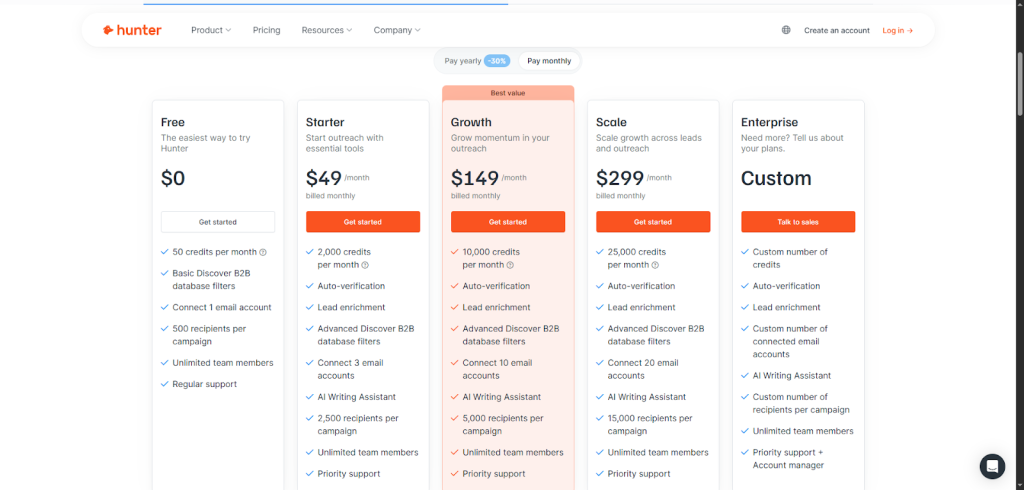
From there, you step up to Starter (~$49/mo), Growth (~$149/mo), Business/Scale (between $299 and $399/mo), and finally Enterprise plans designed for heavy hitters who need custom solutions and dedicated support.
Here’s a quick breakdown of what you get per tier:
- Monthly credits → these cover your email searches and verifications. For example, Starter comes with a few hundred credits, Growth doubles that, and Business scales up accordingly.
- Campaign recipients → higher tiers allow sending outreach campaigns to more contacts monthly.
- Multi-user seats → starting with Growth, you can add multiple team members. Super handy for collaboration.
- API access → usually an add-on, but it’s included or available at discounted rates for bigger plans.
Credits matter here.
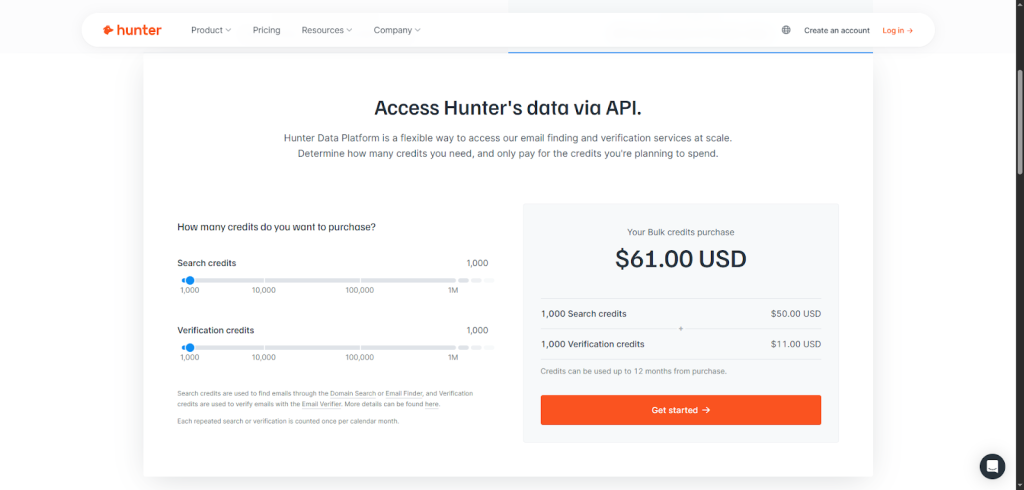
A single email search or verification typically costs one credit each. So if you look up 500 emails and verify all 500, expect to spend 1,000 credits. Overshooting your credits will cost you $0.10 per extra credit. To avoid surprise bills, watch your usage dashboard closely or buy add-on credits in advance.
If you’re a nonprofit, Hunter offers discounts, and you can choose between monthly or annual billing. The latter usually saves you around 20%.
One friendly tip: Hunter gives free API keys for testing, making it easy to experiment before committing to a paid plan.
Still, beware of hidden costs: adding seats, extra API calls, or campaign recipients can add up fast. Many new users get caught out by these extras, so align your plan carefully with your actual usage.
Speaking of options, if you want no monthly fees and prefer pay-as-you-go, consider Generect. It’s a fresh take on email finding.
You get free searches, pay just $0.03 per valid email found, and $0.02 per export, with no costs for invalid or missing data. They even toss in a free $5 credit so you can test drive features risk-free.
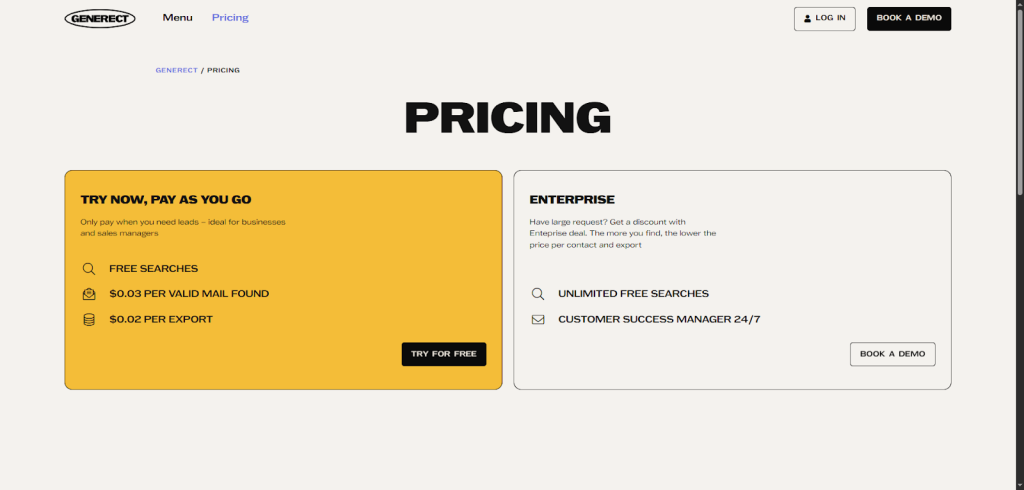
Plus, Generect offers diverse payment methods, including Stripe-supported cards, Apple/Google Pay, local options, and even crypto on request.
Generect’s transparent per-lead pricing makes it especially attractive for startups or agencies with fluctuating workloads. No surprises from unused credits or unexpected overages.
Numbers tell part of the story, but user feedback fills in the rest. Here’s what real users think after putting Hunter.io to the test.
Let’s build your dream pipeline
Tired of manual prospecting? Generect delivers verified leads in seconds — so you can close more deals, not open more tabs.
What do users say about Hunter.io?
If you’re curious about what real users think of Hunter.io, you’re in the right place. The feedback is pretty clear: Hunter.io stands out for its accuracy, ease of use, and smooth integration with popular CRM and marketing tools.
Many users praise how much time they save hunting for verified emails, making outreach far more efficient. It’s the kind of tool that quickly becomes a daily staple if you rely on email for sales or networking.
Here’s a quick look at the most common pros users mention:
- Accuracy → Hunter.io’s email verification API consistently delivers reliable contact details, reducing bounce rates significantly.
- Ease of use → the interface is clean and simple, even for those not tech-savvy.
- Smooth integrations → it effortlessly connects to your existing tools, like Salesforce, HubSpot, and more.
- Time saved → users often mention they get a ton more done without wasting hours searching manually.
Of course, no product is perfect, and the feedback highlights a few areas for improvement:
- Limited access to LinkedIn emails compared to some competitors.
- No phone number lookup feature.
- Occasionally, some emails turn out outdated.
- Customer support relies on an email ticket system, with no phone support available, leading to some delays.
Ratings across platforms like Capterra and G2 back this up. Hunter.io generally holds strong scores around 4.5 stars, signaling solid satisfaction but some room for growth.
Speaking of support, the Hunter.io team is responsive, especially through their email ticket system, but be ready for a wait. No live calls here. On the bright side, the development team regularly updates the platform, sharing release notes and actively engaging on GitHub. This keeps the product fresh and aligned with user needs.
On a related note, many users now turn to Generect as a comprehensive sales enablement platform, especially for sales funnel construction. Generect’s real-time data scraping and verified lead delivery are game-changers, boasting a 98%+ data validity rate that drives major ROI improvements.
Developers and non-tech teams alike applaud its API simplicity and quick onboarding process. Although a few users want deeper integrations and UI tweaks, Generect listens closely and updates fast. Plus, 24/7 support access for enterprise clients sets it apart in customer success.
User opinions give great insight, but how does Hunter.io hold up when you compare it to other tools in the space? Let’s see how it performs against the competition.
How does Hunter.io stack against alternatives?
When it comes to email finding tools, the market’s pretty packed, and Hunter.io is definitely one of the big players. But how does it actually compare to other popular options like Generect, Fullenrich, Skrapp.io, Apollo.io, ZoomInfo, and Snov.io? You’re about to get a clear picture so you can pick what fits you best.
Let’s start by painting the landscape.
Generect is all about live data. Fullenrich is known for its waterfall enrichment system and affordable pricing. Skrapp.io nails LinkedIn email extraction, making it a favorite among recruiters. Apollo.io offers multi-channel outreach beyond just finding emails, including calls and social messages.
ZoomInfo takes things to an enterprise level with massive datasets and intent data, and Snov.io balances email finding with campaign automation at a decent price.
Now, what really matters? Accuracy of email finder, LinkedIn integration, phone numbers availability, campaign capabilities, CRM integrations, and pricing.
To keep it practical, here’s a quick comparative summary:
| Feature | Hunter.io | Generect | Fullenrich | Skrapp.io | Apollo.io | ZoomInfo | Snov.io |
| Email finder accuracy | High | Very High (98% validity rate) | Moderate | Moderate-High | High | Very High | Moderate |
| Data freshness | Pulled on demand | Real-time, live verification | Periodic | Static | Updated | Massive but static | Mixed |
| LinkedIn integration | Yes | Strong (real-time LinkedIn data scraping) | No | Excellent | Yes | Yes | Limited |
| Phone numbers available | Limited | Yes (validated business contacts) | Yes | No | Yes | Extensive | Limited |
| Campaign tools | Solid (email focus) | Integrated sales tools + sender integrations | No | Basic | Advanced (multi-channel) | Advanced | Good |
| CRM integrations | Good | Seamless API + real-time sync | Moderate | Basic | Excellent | Excellent | Moderate |
| Lead enrichment | Basic to Moderate | AI-powered, ICP-based enrichment in real time | Excellent | Limited | High | High | Good |
| Pricing | Tiered, mid-range | Pay-as-you-go, $0.03 per valid email | Budget-friendly | Affordable | Mid to high | Premium enterprise | Budget-friendly |
What makes Hunter.io stand out? First off, its API flexibility is top-notch. Whether you’re a developer or a marketer, you’ll appreciate the easy-to-use but powerful Hunter API and Hunter email verifier API.
Its product ecosystem is robust, covering everything from email discovery to verification and domain search. Plus, the data feels fresh. It’s pulled on demand rather than relying solely on static databases.
And I love their AI writing assistant that helps craft outreach emails right inside the platform. But it wouldn’t be fair without highlighting what others bring to the table.
- Fullenrich’s waterfall enrichment process ensures you can layer data to polish your leads, and they do this at a price point that’s friendlier on smaller budgets.
- Skrapp’s strength is digging emails straight out of LinkedIn profiles, a gold mine if you live there daily.
- Apollo.io shines for teams that want to do more than just find emails. They offer built-in dialers and social touches, a feature Hunter doesn’t have natively.
- ZoomInfo is solid if you’re an enterprise with a healthy budget needing deep B2B datasets, especially with its vast intent data for targeting prospects actively researching solutions.
But if you want a modern, real-time alternative built for speed, precision, and flexibility, this is where Generect stands out. It’s not just catching up. It’s reshaping how teams think about lead generation.
Let’s keep things real and quick with a practical side-by-side checklist to help you evaluate platforms by your priorities:
- Data quality → accuracy and freshness matter most here. Hunter.io and ZoomInfo have long led the pack, but Generect now rivals both with its 98% data validity and live verification model.
- User interface → Hunter.io offers a polished, beginner-friendly experience. Generect, however, feels faster and more workflow-driven, especially for teams automating lead discovery through APIs or CRMs.
- Scalability → ZoomInfo and Hunter.io are proven for volume, but Generect is built for dynamic scaling, handling real-time enrichment and validation without sacrificing speed.
Now, let’s talk user types.
If you’re a startup or small agency, Generect delivers the perfect balance of accuracy, automation, and cost control, thanks to its pay-as-you-go pricing and real-time data.
- Recruiters might still lean toward Skrapp or Fullenrich for their LinkedIn and enrichment features.
- Marketers and sales teams needing multi-channel campaign tools will like Apollo.io or Snov.io.
- And large enterprises chasing extensive intent data? ZoomInfo remains their go-to.
Summing up reasons to stick with Hunter.io: it still offers a flexible API, a reliable verifier, and a broad ecosystem ideal for developers who want stability and proven scalability. But if your priority is real-time verified data, fewer bounces, and a workflow that adapts to your pace, Generect is the smarter, leaner alternative.
Instead of relying on static or periodically updated databases, Generect’s live scraping and enrichment engine ensures your leads reflect the latest web activity, instantly. Its transparent pricing, deep CRM integrations, and automation-first design make it especially appealing for teams that value precision and efficiency over legacy systems.
In short:
- Hunter.io is the seasoned veteran with a strong all-in-one toolkit.
- Generect is the agile innovator = faster, fresher, and built for the next wave of B2B lead generation.
You’ve seen what Hunter.io offers, how it works, and how it compares. Now, let’s bring it all together and answer the big question—is it still the best email finder in 2026?
Meet the API that does prospecting for you
Forget scraping or messy CSVs. Generect’s smart automation fills your pipeline with verified, ready-to-talk leads in real time.
Is Hunter.io the best email finder in 2026?
After putting Hunter.io through its paces, here’s what I’ve found.
Hunter.io shines with a comprehensive API that’s easy to integrate, strong data quality, and handy AI-powered features. Its user-friendly design makes it a breeze to use, especially if you’re running small to mid-sized teams focused on US and Europe leads.
Plus, the Hunter combined enrichment API makes data lookups smoother. On the flip side, costs can climb quickly if you scale up, and there are still gaps around LinkedIn and phone lookups. Support can feel a bit slow too.
Here’s a quick rundown of what to expect:
- Strengths: reliable data, solid integrations, AI enhancements, easy user experience
- Limitations: pricey at volume, limited LinkedIn/phone data, slower support
If you need a wider data range or more channels, you might want to explore alternatives. For instance, Generect is gaining a lot of buzz as a fresh, cost-effective real-time API-focused option, packed with strong data verification and smooth CRM integration.
If your team values automation, clear pricing, and instant lead delivery, comparing Hunter.io with Generect could uncover some real practical benefits.
The key takeaway?
Don’t just take marketing at face value. Try the free plans or APIs yourself, run them through your workflows, and see what fits your volume, budget, and priorities best. Hunter.io remains a solid choice, well-positioned for the evolving industry, but a direct, hands-on test will always be your best guide.
And if you’re curious how Generect stacks up in your actual workflow, book a free demo or try the API here. Experience real-time verified B2B leads, pay-as-you-go pricing, and automation built for scale, without the guesswork.

