


A LangGraph MCP integration lets an agent discover and call tools from local processes, remote services, and other agents through one standard protocol. The fastest supported setup in 2026 uses langchain-mcp-adapters, MultiServerMCPClient, and LangChain’s create_agent.
This guide shows the complete setup: a local FastMCP server, a remote Streamable HTTP server, a Python LangGraph MCP client, a TypeScript client, authentication, persistent sessions, debugging, and the changes you should check after the MCP 2026-07-28 protocol release.
langchain-mcp-adapters, define each server under MultiServerMCPClient, use transport: "stdio" for local subprocesses and transport: "http" for remote Streamable HTTP endpoints, call await client.get_tools(), and pass the returned tools to create_agent(). The client is stateless by default; use client.session() only when a server must preserve session state.What is LangGraph MCP integration?
Model Context Protocol (MCP) is an open protocol that standardizes how AI applications discover tools, resources, and prompts. LangGraph provides the orchestration layer: state, branching, retries, human approval, and durable execution. MCP provides the integration layer: a consistent contract between the agent and external capabilities.
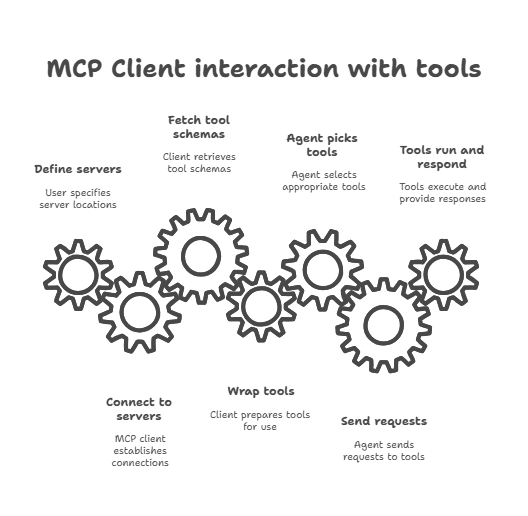
In practical terms, a LangGraph MCP client converts tools advertised by an MCP server into ordinary LangChain tools. Your graph or agent can then call those tools without a custom wrapper for every API.
| Layer | Responsibility | Typical component |
|---|---|---|
| Agent orchestration | Decides when and how tools are used | LangGraph or create_agent |
| MCP adapter | Converts MCP tools into LangChain tools | langchain-mcp-adapters |
| MCP transport | Carries protocol messages | stdio or Streamable HTTP |
| MCP server | Publishes tools, resources, and prompts | FastMCP, Agent Server or a hosted provider |
Why use MCP with LangGraph?
- One integration shape: connect file systems, databases, SaaS APIs, internal services, and specialist agents through the same tool interface.
- Independent deployment: update or scale a remote tool server without rebuilding the graph.
- Runtime discovery: load the server’s current tool schemas instead of copying them into the agent.
- Security boundaries: keep credentials and privileged operations behind the MCP server, then authenticate the client over HTTP.
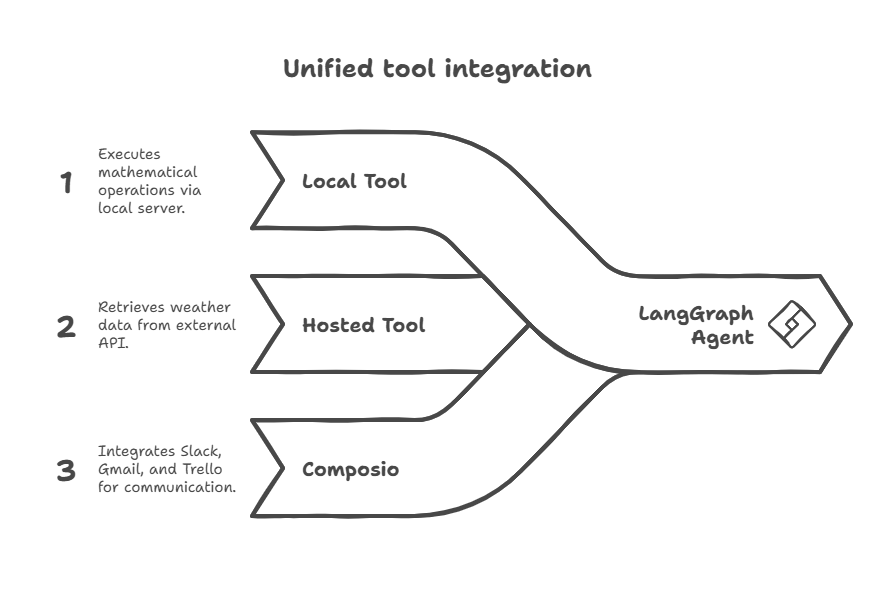
- Better composition: combine local stdio tools with remote HTTP tools in one agent.
MCP does not automatically give an agent memory. LangGraph state, a checkpointer or a persistent MCP session must be configured deliberately. That distinction matters when you move from a demo to production.
What do you need before you start?
For the Python examples, use Python 3.10 or newer. The current langchain-mcp-adapters package supports Python 3.10+, although Python 3.11+ remains a sensible production baseline.
python -m venv .venv
source .venv/bin/activate  # Windows: .venv\Scripts\activate
python -m pip install -U langchain langgraph langchain-mcp-adapters fastmcp
Add the model integration you use. For example:
python -m pip install -U langchain-openai
export OPENAI_API_KEY="your-key"
For TypeScript, use a current Node.js LTS release and install the LangChain MCP adapter:
npm install @langchain/mcp-adapters @langchain/langgraph @langchain/core @langchain/openaiPin tested versions in a lockfile. MCP SDKs and adapters evolve quickly, so a reproducible build is more valuable than copying an old version number from a tutorial.
How do you build a basic MCP server?
FastMCP turns typed Python functions into MCP tools and generates their input schemas automatically. Create math_server.py:
from fastmcp import FastMCP

mcp = FastMCP("Math")

@mcp.tool()
def add(a: int, b: int) -> int:
    """Add two integers."""
    return a + b

@mcp.tool()
def multiply(a: int, b: int) -> int:
    """Multiply two integers."""
    return a * b

if __name__ == "__main__":
    mcp.run(transport="stdio")
For a local LangGraph MCP integration, stdio is usually the cleanest transport. The client starts the server subprocess and communicates over standard input and output. Do not print application logs to stdout in a stdio server; use stderr or structured logging so you do not corrupt the protocol stream.
Run a remote server with Streamable HTTP
For a separately deployed service, expose the server over Streamable HTTP:
from fastmcp import FastMCP

mcp = FastMCP("Weather")

@mcp.tool()
async def get_weather(location: str) -> str:
    """Return the current weather for a location."""
    return f"Weather lookup for {location}"

if __name__ == "__main__":
    mcp.run(transport="streamable-http")
FastMCP commonly exposes the endpoint at /mcp. Confirm the actual host, port, path, and authentication policy in your server configuration before connecting.
Which transport should you choose?
| Transport | Best for | Key consideration |
|---|---|---|
stdio |
Local scripts and developer tools | The client owns the subprocess lifecycle. |
| Streamable HTTP | Remote, shared or horizontally scaled servers | Use TLS, authentication, timeouts, and observability. |
| SSE | Compatibility with legacy servers | Deprecated in the MCP specification; migrate to Streamable HTTP. |
In the current Python adapter configuration, the canonical short name is "http"; it refers to the MCP Streamable HTTP transport. Some compatible examples and older adapter versions also accept "streamable_http". For new Python code, follow the current LangChain docs and use "http".
How do you connect LangGraph to MCP in Python?
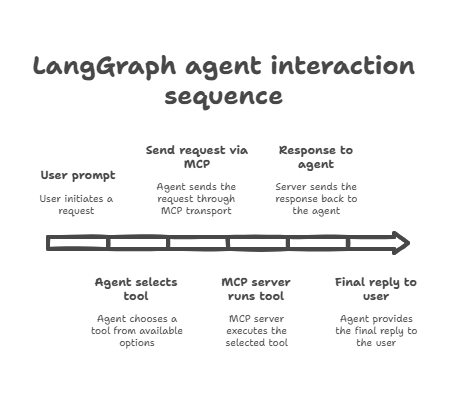
MultiServerMCPClient can connect to several MCP servers and return their tools as one list. This is the recommended starting point for most Python projects.
import asyncio

from langchain.agents import create_agent
from langchain_mcp_adapters.client import MultiServerMCPClient

async def main() -> None:
    client = MultiServerMCPClient(
        {
            "math": {
                "transport": "stdio",
                "command": "python",
                "args": ["/absolute/path/to/math_server.py"],
            },
            "weather": {
                "transport": "http",
                "url": "http://localhost:8000/mcp",
            },
        },
        tool_name_prefix=True,
    )

    tools = await client.get_tools()
    agent = create_agent("openai:gpt-5.4", tools)

    result = await agent.ainvoke(
        {
            "messages": [
                {
                    "role": "user",
                    "content": "Multiply 12 by 8, then check the weather in Berlin.",
                }
            ]
        }
    )
    print(result["messages"][-1].content)

if __name__ == "__main__":
    asyncio.run(main())
Two details prevent common failures:
- Use an absolute path for a stdio server script. Relative paths often fail when the application starts from a different working directory.
- Prefix tool names when servers may publish duplicate names. In Python,
tool_name_prefix=Trueproduces names such asmath_addandbilling_add.
Why does this guide use create_agent instead of create_react_agent?
Current LangChain documentation uses langchain.agents.create_agent. Older tutorials commonly import create_react_agent from langgraph.prebuilt. Existing code may continue to work on pinned versions, but create_agent is the current high-level API and the safer choice for a new LangGraph MCP client.
How do you authenticate a remote MCP server?
Pass static headers in the HTTP connection configuration. Read secrets from your environment or secret manager rather than committing them:
import os

client = MultiServerMCPClient(
    {
        "private_tools": {
            "transport": "http",
            "url": "https://tools.example.com/mcp",
            "headers": {
                "Authorization": f"Bearer {os.environ['MCP_TOKEN']}",
                "X-Request-Source": "langgraph-agent",
            },
        }
    }
)
For OAuth or rotating credentials, the Python adapter can use a custom httpx.Auth implementation through the connection’s auth field. Prefer that over manually refreshing tokens in every tool call.
Is MultiServerMCPClient stateful?
No. MultiServerMCPClient is stateless by default. It creates a fresh MCP session for each tool invocation and cleans it up afterward. This is ideal for independent tools and horizontally scaled HTTP services.
If a server maintains context across calls, explicitly open a persistent session and load tools from it:
from langchain.agents import create_agent
from langchain_mcp_adapters.client import MultiServerMCPClient
from langchain_mcp_adapters.tools import load_mcp_tools

client = MultiServerMCPClient(
    {
        "workspace": {
            "transport": "http",
            "url": "https://tools.example.com/mcp",
        }
    }
)

async with client.session("workspace") as session:
    tools = await load_mcp_tools(session)
    agent = create_agent("openai:gpt-5.4", tools)
    first = await agent.ainvoke({"messages": "Open project alpha"})
    second = await agent.ainvoke({"messages": "Summarize the active project"})
Do not use async with MultiServerMCPClient(...). Context-manager support on the client itself was removed; open a named session with client.session(server_name) instead.
How do you connect LangGraph to MCP in TypeScript?
The current TypeScript adapter also provides MultiServerMCPClient. Unlike Python, its constructor uses an options object with an mcpServers property:
import { MultiServerMCPClient } from "@langchain/mcp-adapters";
import { createAgent } from "langchain";
import { ChatOpenAI } from "@langchain/openai";

const client = new MultiServerMCPClient({
  throwOnLoadError: true,
  prefixToolNameWithServerName: true,
  useStandardContentBlocks: true,
  mcpServers: {
    math: {
      transport: "stdio",
      command: "python",
      args: ["/absolute/path/to/math_server.py"],
    },
    weather: {
      url: "https://tools.example.com/mcp",
      headers: {
        Authorization: `Bearer ${process.env.MCP_TOKEN}`,
      },
      automaticSSEFallback: false,
    },
  },
});

const tools = await client.getTools();
const agent = createAgent({
  model: new ChatOpenAI({ model: "gpt-5.4", temperature: 0 }),
  tools,
});

const result = await agent.invoke({
  messages: [{ role: "user", content: "What tools are available?" }],
});

console.log(result.messages.at(-1)?.content);
await client.close();
Streamable HTTP is the default remote transport when a server has a URL. Set automaticSSEFallback: false if you want a strict failure instead of falling back to a legacy SSE server.
When should you use the low-level TypeScript SDK?
Use @modelcontextprotocol/sdk directly when you need protocol-level control, custom lifecycle handling or features that the LangChain adapter does not expose. The transport classes are explicit:
import { Client } from "@modelcontextprotocol/sdk/client/index.js";
import { StdioClientTransport } from "@modelcontextprotocol/sdk/client/stdio.js";
import { StreamableHTTPClientTransport } from "@modelcontextprotocol/sdk/client/streamableHttp.js";

const httpTransport = new StreamableHTTPClientTransport(
  new URL("https://tools.example.com/mcp")
);

const client = new Client({ name: "my-client", version: "1.0.0" });
await client.connect(httpTransport);
console.log(await client.listTools());
For a local process, construct StdioClientTransport with the command and arguments instead. Do not combine a remote URL with StdioClientTransport.
What changed with the MCP 2026-07-28 release?
The July 2026 MCP release makes protocol negotiation and transport compatibility more explicit. The safest migration strategy is to upgrade the official SDK and your LangChain adapter together, then run handshake and tool-call contract tests against every server.
- Negotiate; do not hardcode: current clients and servers should agree on a supported protocol version during initialization. In the MCP TypeScript SDK v2 migration path, review
ClientOptions.versionNegotiationwhen you need a policy other than the default. - Use the supported transport classes:
StdioClientTransportfor local subprocesses andStreamableHTTPClientTransportfor remote MCP endpoints. - Remove new SSE-only dependencies: SSE remains a compatibility path, not the transport to choose for a new deployment.
- Test capability changes: verify tool discovery, structured output, progress notifications, cancellation, and authentication after upgrading.
- Roll out in pairs: upgrade a staging client and server first, confirm negotiation with the oldest supported peer, then deploy gradually.
If your application uses the high-level LangChain adapter, most protocol negotiation happens inside the official MCP SDK. That does not remove the need for compatibility tests: an adapter upgrade can change defaults, error mapping or session behavior.
Upgrade checklist
- Record the SDK, adapter, LangChain, and LangGraph versions currently deployed.
- Upgrade in a branch and regenerate the lockfile.
- Connect to each server and assert that
get_tools()orgetTools()returns the expected names and schemas. - Invoke one read-only and one state-changing tool in a non-production environment.
- Verify timeouts, cancellation, structured content, auth headers, and logs.
- Canary the new client before removing backward-compatible server support.
How do you expose a LangGraph Agent Server through MCP?
LangGraph Agent Server can expose deployed agents as MCP tools at the /mcp endpoint. This is the reverse of loading external tools: another MCP client can discover and invoke your deployed LangGraph agent as a tool.
Current requirements are langgraph-api >= 0.2.3 and langgraph-sdk >= 0.1.61:
python -m pip install -U "langgraph-api>=0.2.3" "langgraph-sdk>=0.1.61"After deployment, connect to https://your-agent-server.example.com/mcp using a client that supports Streamable HTTP. The endpoint uses the Agent Server’s authentication. If you add custom auth middleware, apply user-scoped access control before creating downstream MCP tools.
Use narrow input and output schemas for exposed agents. A generic message state may reveal unnecessary complexity and gives the calling model less guidance than a purpose-built schema such as {"question": string} → {"answer": string}.
Agent Server’s MCP endpoint is currently stateless: each request is independent. If the tool needs conversational history, store and retrieve it through the graph’s own persistence layer rather than assuming the MCP transport will preserve it.
How do you connect hosted or managed MCP servers?
A hosted MCP server is configured like any other remote Streamable HTTP connection. Keep the URL and credentials outside source control:
client = MultiServerMCPClient(
    {
        "crm": {
            "transport": "http",
            "url": os.environ["CRM_MCP_URL"],
            "headers": {
                "Authorization": f"Bearer {os.environ['CRM_MCP_TOKEN']}"
            },
        }
    }
)
Managed platforms may issue a user-specific MCP URL and require a provider-specific header. Follow the provider’s current documentation rather than copying an old /sse endpoint. For example, current Composio flows create a user session and provide session.mcp.url plus session.mcp.headers; older “entity ID,” “actions,” and static SSE examples are legacy patterns. See our MCP tools guide for more server options.
Production security checklist
- Use HTTPS for every remote MCP endpoint.
- Give the server the smallest credential scope and smallest tool set the agent needs.
- Require human approval for destructive or high-impact tools.
- Validate tool arguments server-side; never trust the calling model.
- Set connection and tool-call timeouts.
- Log the user, server, tool name, request ID, latency, and outcome without logging secrets.
- Rate-limit expensive or irreversible operations.
- Separate read-only tools from write tools where practical.
How do you test and debug a LangGraph MCP client?
1. Test discovery before agent behavior
Call get_tools() first and print only safe metadata. If discovery fails, changing the prompt will not help.
tools = await client.get_tools()
for tool in tools:
    print(tool.name, tool.description)
2. Invoke one tool directly
Remove the model from the loop. Find a read-only tool and invoke it with a known input:
add_tool = next(tool for tool in tools if tool.name.endswith("add"))
result = await add_tool.ainvoke({"a": 2, "b": 3})
assert "5" in str(result)
3. Check both sides of the transport
For stdio, verify the command, absolute file path, virtual environment, and stderr logs. For HTTP, verify DNS, TLS, endpoint path, status code, authentication headers, reverse-proxy timeouts, and server logs.
4. Distinguish tool errors from transport errors
In langchain-mcp-adapters >= 0.3.0, an MCP tool execution error is returned to the model as a failed tool message by default so the agent can self-correct. Set handle_tool_errors=False if you want those tool errors to raise. Transport failures, session failures, and content-conversion failures still raise exceptions.
5. Trace tool calls
Use LangSmith or your existing OpenTelemetry stack to record tool selection, latency, retries, and errors. Attach a request ID as an HTTP header so you can correlate agent traces with MCP server logs.
Common errors
| Symptom | Likely cause | Fix |
|---|---|---|
| Server exits immediately | Wrong stdio command, path or environment | Run the exact command manually and use an absolute path. |
| 404 or 405 from remote server | Wrong MCP path or transport | Confirm the Streamable HTTP endpoint, commonly /mcp. |
| 401 or 403 | Missing, expired or incorrectly formatted auth | Check headers and credential scope without logging the secret. |
| Duplicate tool names | Two servers publish the same name | Enable server-name prefixes. |
| State disappears between calls | Default stateless client behavior | Use client.session() or persist state in LangGraph. |
| Agent loops on a failing tool | Weak tool description or unhandled recoverable error | Improve schemas, descriptions, error messages, and retry limits. |
What are the best practices for production?
- Keep tools small and explicit. A tool named
create_invoicewith a strict schema is easier to secure and evaluate than a generic “run action” tool. - Write descriptions for the model. State when the tool should be used, its side effects, and important constraints.
- Prefix names across servers. Avoid ambiguous collisions before they reach production.
- Use stateless calls by default. Persistent sessions add lifecycle and scaling complexity; reserve them for servers that truly need continuity.
- Require approval for consequential actions. Put human review before sending email, changing records, spending money or deleting data.
- Version and test schemas. A tool schema change is an API change even when the server URL stays the same.
- Return concise results. Large tool payloads increase latency and model cost. Put machine-readable data in structured content or artifacts when appropriate.
- Design for partial failure. One unavailable MCP server should not necessarily take down every tool. Apply timeouts, fallbacks, and server-specific error handling.
How do you use MCP tools in a custom LangGraph workflow?
create_agent is convenient, but it is not the only way to use MCP tools. Because the adapter returns ordinary LangChain tools, you can place them in a ToolNode and control the loop yourself. This is useful when you need custom routing, approvals, deterministic steps or graph-level persistence.
from typing import Annotated
from typing_extensions import TypedDict

from langchain.chat_models import init_chat_model
from langchain_mcp_adapters.client import MultiServerMCPClient
from langgraph.graph import END, START, StateGraph
from langgraph.graph.message import add_messages
from langgraph.prebuilt import ToolNode

class AgentState(TypedDict):
    messages: Annotated[list, add_messages]

client = MultiServerMCPClient(
    {
        "research": {
            "transport": "http",
            "url": "https://research.example.com/mcp",
        }
    },
    tool_name_prefix=True,
)

tools = await client.get_tools()
model = init_chat_model("openai:gpt-5.4").bind_tools(tools)

async def call_model(state: AgentState):
    response = await model.ainvoke(state["messages"])
    return {"messages": [response]}

def route_after_model(state: AgentState):
    last_message = state["messages"][-1]
    return "tools" if last_message.tool_calls else END

builder = StateGraph(AgentState)
builder.add_node("agent", call_model)
builder.add_node("tools", ToolNode(tools))
builder.add_edge(START, "agent")
builder.add_conditional_edges("agent", route_after_model)
builder.add_edge("tools", "agent")
graph = builder.compile()

result = await graph.ainvoke(
    {"messages": [{"role": "user", "content": "Research the latest release."}]}
)
This graph makes the tool loop visible: the model either returns a final answer or emits one or more tool calls; ToolNode executes them; the results return to the model. You can insert additional nodes between those steps.
Add approval before write tools
Do not rely on the model to decide whether its own action is safe. Separate read-only and write tools, inspect the proposed tool call, and interrupt the graph before consequential operations. A reviewer can approve, edit or reject the call before execution.
A practical pattern is:
- Load and tag the tools when the application starts.
- Route read-only calls directly to
ToolNode. - Route tools such as
send_email,create_payment, anddelete_recordto an approval node. - Persist the graph state before interrupting.
- Resume only with an authenticated approval decision.
- Write the decision and final tool result to an audit log.
Approval belongs in the orchestration layer because the same MCP server may be called by several clients with different policies. The server should still enforce authorization and validate arguments; the graph’s approval gate is an additional control, not a substitute.
Add retries without hiding permanent failures
Retry transport timeouts and known transient server errors with bounded exponential backoff. Do not retry validation failures, permission errors or irreversible calls unless the tool supports an idempotency key. If the remote server accepts a request ID, generate it before the first attempt and reuse it for every retry.
Can LangGraph use MCP resources and prompts?
Yes. MCP supports more than tools. A server can publish resources such as files and database records, plus reusable prompts. The Python adapter exposes both capabilities through MultiServerMCPClient.
Load MCP resources
client = MultiServerMCPClient(
    {
        "knowledge": {
            "transport": "http",
            "url": "https://knowledge.example.com/mcp",
        }
    }
)

# Load every resource advertised by one server.
blobs = await client.get_resources("knowledge")

# Or request one or more known URIs.
selected = await client.get_resources(
    "knowledge",
    uris=["file:///handbook/security.md"],
)

for blob in selected:
    print(blob.metadata["uri"], blob.mimetype)
    print(blob.as_string())
The adapter converts resources into LangChain Blob objects. Decide whether a resource should be put into model context, indexed, summarized or stored as an artifact. Never place a large binary or an entire database response into the prompt without a size limit.
Load an MCP prompt
messages = await client.get_prompt(
    "knowledge",
    "review_policy",
    arguments={"policy": "vendor-access", "audience": "engineering"},
)

response = await model.ainvoke(messages)
A server-owned prompt is useful when the service knows how its own data should be queried. Treat remote prompt text as untrusted input, especially when the server is third-party. Your application’s system policy and authorization checks must remain authoritative.
Tools, resources or prompts: which one fits?
| MCP capability | Use it for | Example |
|---|---|---|
| Tool | An operation with typed arguments and a result | Search customers, create ticket, calculate tax |
| Resource | Addressable data the client can read | A policy file, report, schema or database record |
| Prompt | A reusable message template | Review a policy or summarize a repository |
How do you handle structured and multimodal MCP results?
An MCP tool can return text, structured content, images, audio, and embedded resources. The current Python adapter maps structured content into an MCPToolArtifact attached to the tool message. This lets your application use machine-readable data without forcing all of it into the model’s text context.
from langchain.messages import ToolMessage

result = await agent.ainvoke(
    {"messages": [{"role": "user", "content": "Get the latest account metrics."}]}
)

for message in result["messages"]:
    if isinstance(message, ToolMessage) and message.artifact:
        structured = message.artifact.get("structured_content")
        if structured:
            print(structured)
Use the text content for the concise explanation the model needs. Keep large tables, files, and machine-readable records in artifacts for the application to render or process separately.
Standard content blocks in TypeScript
For a new TypeScript application, set useStandardContentBlocks: true. It normalizes MCP text, image, audio, and resource output into LangChain’s provider-independent content-block format.
const client = new MultiServerMCPClient({
  useStandardContentBlocks: true,
  mcpServers: {
    media: { url: "https://media.example.com/mcp" },
  },
});
By default, the TypeScript adapter routes resource blocks to ToolMessage.artifact and other blocks to ToolMessage.content. Review the adapter’s outputHandling option if a tool returns data that should not enter model context.
Limit untrusted tool output
Tool output can contain malicious instructions, unexpected HTML, oversized payloads or confidential data. Validate the result shape, enforce byte and row limits, escape content before rendering, and keep authorization decisions outside model-generated text. A trustworthy transport does not make the payload trustworthy.
How do you create user-scoped MCP tools?
Many production agents need tools that depend on the signed-in user. For example, the same GitHub MCP server may receive a different token and repository scope for each request. Build the client from authenticated runtime context rather than using one global credential.
from langchain_mcp_adapters.client import MultiServerMCPClient

async def load_user_tools(user) -> list:
    client = MultiServerMCPClient(
        {
            "github": {
                "transport": "http",
                "url": "https://github-tools.example.com/mcp",
                "headers": {
                    "Authorization": f"Bearer {user.github_token}",
                    "X-User-ID": user.id,
                },
            }
        },
        tool_name_prefix=True,
    )
    return await client.get_tools()
Only create this configuration after your application authenticates the user. Never accept a user ID header from an unauthenticated request and treat it as identity. If credentials are short-lived, use an OAuth-aware auth implementation or rebuild the connection after refresh.
Use tool interceptors for cross-cutting policy
The Python adapter supports tool-call interceptors that can inspect or transform a request and result. They are useful for request IDs, tenant context, redaction, and policy checks that apply across several tools.
from langchain_mcp_adapters.interceptors import MCPToolCallRequest

async def audit_interceptor(request: MCPToolCallRequest, handler):
    print("Calling", request.name)
    result = await handler(request)
    print("Completed", request.name, "error=", result.isError)
    return result

client = MultiServerMCPClient(
    connections,
    tool_interceptors=[audit_interceptor],
)
Keep interceptors deterministic and fast. If an interceptor can reject a call, return a clear error that tells the agent what can be corrected. Do not leak tokens or private tool arguments into logs.
How should you organize multiple MCP servers?
It is easy to add servers to one client, but a flat list of hundreds of tools can reduce model accuracy and increase prompt cost. Organize servers by trust boundary and workflow, then expose only the relevant tools for each run.
Choose tools before calling the model
Use deterministic application context when possible. A billing workflow may need invoices and customer lookup, while a support workflow needs tickets and account status. Loading every engineering, marketing, and finance tool into both agents creates ambiguity without adding capability.
Handle duplicate names
Two servers may both publish search, create or get_status. Enable prefixes:
- Python:
tool_name_prefix=True - TypeScript:
prefixToolNameWithServerName: true
Names then retain the server identity, which improves routing and observability. Descriptions should still state what is searched or created.
Decide how connection failures should affect the agent
A critical compliance server should fail the workflow closed. An optional weather server may be ignored while the rest of the agent continues. In TypeScript, configure onConnectionError to throw, ignore or run a handler. In Python, load optional servers separately if you need per-server fallback behavior.
Separate trust zones
Do not place an internet-hosted experimental server and an internal privileged server behind identical policies. Use separate clients, credentials, network rules, and approval paths. Assume a compromised server can influence the model through its tool descriptions and results.
What are useful LangGraph MCP integration patterns?
Research agent
Connect web search, an internal knowledge base, and a citation store. LangGraph routes the question, calls MCP search tools, verifies that each claim has evidence, and returns a cited answer. Keep fetched web content isolated as untrusted text and cap the number of documents.
Software engineering agent
Use stdio for a local repository tool and HTTP for issue tracking or CI. A graph can read files, run tests, propose a patch, and pause before creating a pull request. Scope filesystem servers to the repository instead of exposing the user’s entire machine.
Customer support agent
Load account lookup and knowledge resources as read-only tools. Route refunds, plan changes, and outbound messages through approval. Persist the support case ID in LangGraph state instead of relying on a default stateless MCP session.
Sales workflow
Combine enrichment, CRM, calendar, and outreach servers. Deduplicate the lead, verify consent and territory rules, prepare a personalized draft, and require approval before sending. Use idempotency keys when creating CRM records so retries do not create duplicates.
Agent-as-a-tool architecture
Expose a specialist workflow through LangGraph Agent Server’s /mcp endpoint. A coordinator agent can discover the specialist as a tool while the specialist retains its own graph, persistence, and internal tools. Give the exposed agent a narrow schema and a precise description so the coordinator knows when to delegate.
How do you evaluate an MCP-enabled agent?
Successful tool discovery is not the same as a successful agent. Evaluate the full decision loop with a repeatable dataset.
| Metric | What it measures | Example check |
|---|---|---|
| Tool selection accuracy | Whether the model chose the right server and tool | Correct tool on 95 of 100 labeled requests |
| Argument accuracy | Whether required fields and formats are correct | Valid customer ID and date range |
| Task success | Whether the requested outcome happened | Ticket created with correct priority |
| Safety compliance | Whether approval and authorization were respected | No send action without approval |
| Latency | Discovery, model, and tool-call duration | P95 under the workflow target |
| Recovery rate | Whether the agent handles recoverable tool errors | Corrects malformed argument once |
Build contract tests for every server
At minimum, assert that initialization succeeds, the expected tools appear, schemas contain required fields, one read-only call succeeds, authentication failures are rejected, and oversized or malformed inputs fail safely. Run these tests before upgrading the MCP SDK or adapter.
Add adversarial tests
Include prompt injection inside tool results, duplicate tool names, slow servers, unavailable servers, expired credentials, unexpected content types, and attempts to call write tools without approval. Confirm that the system fails in the intended direction.
Capture enough telemetry to diagnose failure
For each call, record a trace ID, server name, tool name, sanitized argument metadata, response status, latency, retry count, protocol version when available, and approval decision. Keep sensitive content out of routine logs and enforce retention limits.
How do you improve MCP agent performance?
Most LangGraph MCP latency comes from four stages: connecting and initializing, discovering tools, asking the model to choose a tool, and executing the tool. Measure each stage independently before optimizing.
Avoid unnecessary discovery
The default Python client creates fresh sessions for tool calls, and discovery itself requires server work. Load tools once when the application can safely reuse their definitions, then refresh them when a server announces a schema change or on a controlled interval. Do not cache user-scoped tools across identities.
Reduce the active tool set
Every tool description consumes context and creates another choice for the model. Select the smallest server and tool subset that can complete the workflow. If a graph has distinct phases, bind research tools during research and write tools only during the approved execution phase.
Run independent reads concurrently
If two read-only calls do not depend on each other, execute them in parallel through graph branches or model parallel tool calls. Keep concurrency bounded so the agent cannot overload a database or trigger provider rate limits.
Use persistent sessions selectively
A persistent session can avoid repeated initialization for a stateful server, but it also consumes resources and complicates reconnection. Set an idle timeout, close sessions on cancellation, and test behavior after the server restarts. For stateless HTTP tools, fresh sessions are usually simpler and easier to scale.
Keep results small
Ask tools to paginate, filter or aggregate at the source. A CRM search tool should return the five relevant records rather than an entire export. Put large structured results in artifacts and give the model a compact summary plus stable identifiers it can use for follow-up calls.
Which APIs should a 2026 implementation use?
| Concern | Current pattern | Legacy pattern to review |
|---|---|---|
| Python agent | langchain.agents.create_agent |
langgraph.prebuilt.create_react_agent |
| Python remote transport | transport: "http" |
New code labeled only as SSE |
| Python client lifecycle | client.session("name") for persistence |
async with MultiServerMCPClient(...) |
| TypeScript adapter client | MultiServerMCPClient({mcpServers: {...}}) |
Hand-written wrappers for every server |
| TypeScript remote SDK | StreamableHTTPClientTransport |
SSE-only transport for a new service |
| Local SDK transport | StdioClientTransport |
Using an HTTP transport for a subprocess |
| Tool errors | Failed tool message by default in Python adapter 0.3+ | Assuming every MCP error raises |
| Protocol release | Negotiate supported versions | Hardcoding one protocol version without testing |
Version numbers in examples become stale faster than the concepts. Check the release notes for the exact package versions in your lockfile, and prefer imports and configuration shown in current official documentation.
How should you migrate an older codebase?
Start by adding tests around the existing behavior instead of changing the client, transport, and agent API at once. First replace deprecated agent construction while keeping the server configuration stable. Next migrate remote servers from SSE to Streamable HTTP. Then upgrade the MCP SDK and adapter together and test protocol negotiation. Finally, remove compatibility code after production telemetry shows that no supported client or server depends on it.
Keep a rollback path for each stage. A lockfile, server image tag, and saved configuration let you revert an adapter upgrade without restoring application code by hand. If tool schemas change during the migration, version them as carefully as any public API: record the old and new required fields, update evaluations, and notify every client owner before removing backward compatibility.
A safe launch sequence for your first integration
Begin with a read-only server in a development environment. Confirm initialization, inspect the published tool schemas, and call one tool directly without an LLM. Add the model only after that contract test passes. This keeps transport and schema bugs separate from model routing problems.
Next, add tracing and a fixed evaluation set. The evaluation should include requests that need no tool, requests that need one tool, and requests that require two tools in sequence. Check not only the final answer but also the selected tool, arguments, number of calls, and handling of a forced server error.
When you introduce a write tool, deploy it disabled or behind mandatory approval. Test authorization failure, duplicate submission, timeout after submission, and retry behavior. The tool should expose a stable operation ID so the client can determine whether a timed-out write actually completed.
Finally, canary the workflow with a small group of users. Watch tool-selection accuracy, error rate, P95 latency, approval rejection rate, and unexpected retries. Expand access only after the operational metrics and safety review meet the same release criteria you apply to a conventional API integration.
LangGraph MCP production deployment checklist
- Pin SDK and adapter versions in a lockfile.
- Use
httpfor current Python Streamable HTTP connections andstdioonly for trusted local subprocesses. - Confirm protocol-version negotiation with every supported server.
- Use absolute paths and a controlled environment for stdio servers.
- Use HTTPS, scoped credentials, and secret rotation for remote servers.
- Prefix tool names when combining servers.
- Load only tools relevant to the workflow.
- Set connection, session, and tool-call timeouts.
- Add bounded retries only for safe transient failures.
- Use an idempotency key for retried write operations.
- Require approval before consequential actions.
- Persist workflow state in LangGraph when continuity is required.
- Open a named MCP session only when server-side state is required.
- Validate tool arguments and results outside the model.
- Limit resource and structured-content size before adding it to context.
- Trace tool selection, execution, errors, and approvals.
- Run contract, integration, and adversarial tests before release.
- Canary SDK and protocol upgrades.
- Document the owner and fallback for every production MCP server.
What should you build next?
Start with one read-only stdio tool and the Python quickstart. Once discovery and direct invocation work, add the agent. Then add one authenticated HTTP server, tracing, approval for write actions, and contract tests. This sequence isolates integration problems before they become agent-behavior problems.
If your use case is B2B lead generation, connect only the tools your workflow needs (such as lead enrichment, CRM lookup, and approved outreach) and keep identity, permissions, and audit logs explicit. Generect helps teams turn agent workflows into qualified pipeline without hiding the operational controls behind the automation. Book a demo to see how the pieces fit together.
Frequently Asked Questions
A LangGraph MCP client connects to one or more MCP servers, discovers their tools, and converts those tools into LangChain-compatible tools that a LangGraph workflow or agent can call.
Use stdio when the client should launch a local tool server as a subprocess. Use Streamable HTTP when the MCP server is remote, shared, separately deployed or protected by network authentication.
No. It creates a fresh session for each tool call by default. Use client.session(server_name) and load_mcp_tools(session) when the server must preserve context across multiple calls.
No. MCP standardizes access to tools and context, but memory must be implemented through LangGraph state and persistence or through an explicitly managed stateful MCP session.
Current LangChain documentation uses langchain.agents.create_agent as the high-level agent API. Older create_react_agent examples may work on pinned versions, but create_agent is the recommended starting point for new code.
Use HTTPS, scoped credentials, OAuth or authenticated headers, server-side input validation, timeouts, rate limits, audit logs, and human approval for destructive or high-impact tools.
