


You’ve probably been there, staring at a contact record in HubSpot thinking, Who is this person? Is this info even right? You want to follow up, but you’re missing key details: job title, company size, maybe even their real name.
So you dig through LinkedIn, Google, company websites… and suddenly, 45 minutes are gone.
That’s where data enrichment changes everything.
Last updated: July 2026. HubSpot’s core contact and company enrichment now fills and refreshes eligible CRM records without consuming HubSpot Credits. Buyer Intent and Smart Properties are separate, credit-consuming features.
TL;DR: Turn on automatic enrichment for new records, use continuous enrichment for monthly refreshes, protect rep-entered values with field-level overwrite rules, and add a specialist provider only where HubSpot’s native coverage leaves gaps.
Imagine your CRM filling in those blanks for you. Job titles, LinkedIn profiles, company revenue, all pulled in automatically. No guessing, no Googling, no tabs all over your screen.
That’s why we’re here.
In this guide, we’ll walk through how to build a powerful automated lead generation system and make that your reality. You’ll learn how to:
- Clean up messy records before enriching
- Try tools like Generect to pull in fresh data
- Set up HubSpot data enrichment workflows
- Keep your data clean without constant babysitting
- Avoid common issues like API limits and mismatched data
It’s not hard, but it works. Let’s get started with the foundation.
What is data enrichment, and why does it matter?
It’s Monday and your sales rep is about to call a lead. They’ve got a name, an email… and not much else. No company size, no job title, no clue if this person’s a good fit. That’s where data enrichment comes in.
Data enrichment means adding valuable, missing info to the contact records in your CRM: things like company size, industry, LinkedIn profiles, tech stack or location. You’re basically turning raw data into b2b leads that are sales-ready.
Why does this matter for sales teams? Because better data = better decisions. When reps know more, they sell smarter. Enriched data helps you:
- Target the right accounts → focus on leads who actually match your ideal customer profile.
- Personalize outreach → say the right thing to the right person, at the right time.
- Convert faster → no more wasting time on unqualified leads.
And the best part? HubSpot makes it easy. You can enrich data automatically using its internal features or integrations with tools like Generect (we’ll show you the details a bit later).
Now that you know why enrichment matters, let’s get specific. What kind of data can you actually enrich inside HubSpot? But, before we dive too deep…
Don’t just read about it. Try it
Test Generect’s real-time data enrichment for free. It’s like giving your CRM superpowers (without blowing your budget).
What types of data can be enriched in HubSpot?
Let’s make this super clear: enriched data is the fuel that powers smarter outreach, better targeting, and faster results. And in this section, you’ll see exactly what kind of data you can enrich in HubSpot, and how to actually do it without the tech headaches.
Here’s a quick breakdown of what types of HubSpot data enrichment matter most and where each one fits into your sales workflow.
| Data type | What it includes | Why it matters | How to enrich HubSpot data |
| Contact data | Name, job title, email, LinkedIn, phone | Personalize your outreach, qualify faster | Forms, Generect, manual or workflow enrichment |
| Company data | Industry, size, revenue, location, tech stack | Understand buying power and tailor messaging | HubSpot Insights, Generect, BuiltWith |
| Behavioral data | Page views, email clicks, form fills | Prioritize leads showing real-time interest | HubSpot tracking, Breeze, workflows |
| Intent signals | Tech changes, org growth, new funding, job promotions | Reach out when timing is right | Generect, custom alerts |
And here are some details:
Contact data
Picture this: a lead fills out a form with just their name and email. Not super helpful, right? But once enriched, that bare-bones record turns into a full profile.
You can add:
- Job title = understand their role so you can tailor your pitch.
- LinkedIn or Twitter profiles (better both) = great for personalizing your intro.
- Company info = fill in missing org names or departments.
How to do it? Easy!
When someone submits a form, HubSpot’s built-in tools (like Breeze Intelligence) or integrations like Generect match their email and auto-fill missing details. Want to enrich existing contacts? You can do it manually or in bulk using workflows or import tools.
The result: every email or call feels relevant and personal, not generic.
Company data
Selling to someone? You need to know the company behind them. Enriching company records helps you tailor your outreach to match their world.
Add insights like:
- Industry = Tech, retail, finance? Your messaging should reflect that.
- Size & revenue = Are they a lean startup or a big enterprise?
- Tech stack = Know what tools they use (and where you fit in).
- Funding status = VC-backed or bootstrapped? That tells you a lot.
All you need is to use HubSpot’s default company insights or connect tools like Generect and/or BuiltWith. These sync up automatically and pull in firmographic data, so you always know who you’re talking to and whether they’re a fit.
Behavior & intent data
This one’s about timing. You want to reach out when leads are already showing interest, not days later.
Track things like:
- Page views = what content are they checking out?
- Form submissions = are they asking for a demo or downloading content?
- Email & content engagement = who’s clicking, reading, and watching?
You first step? Set up tracking in HubSpot. Then layer in tools like Breeze to surface high-intent behavior automatically. Leads visiting your pricing page five times? That’s your cue.
Your team gets alerts and can jump in while interest is still high.
Here’s how to bring everything to life:
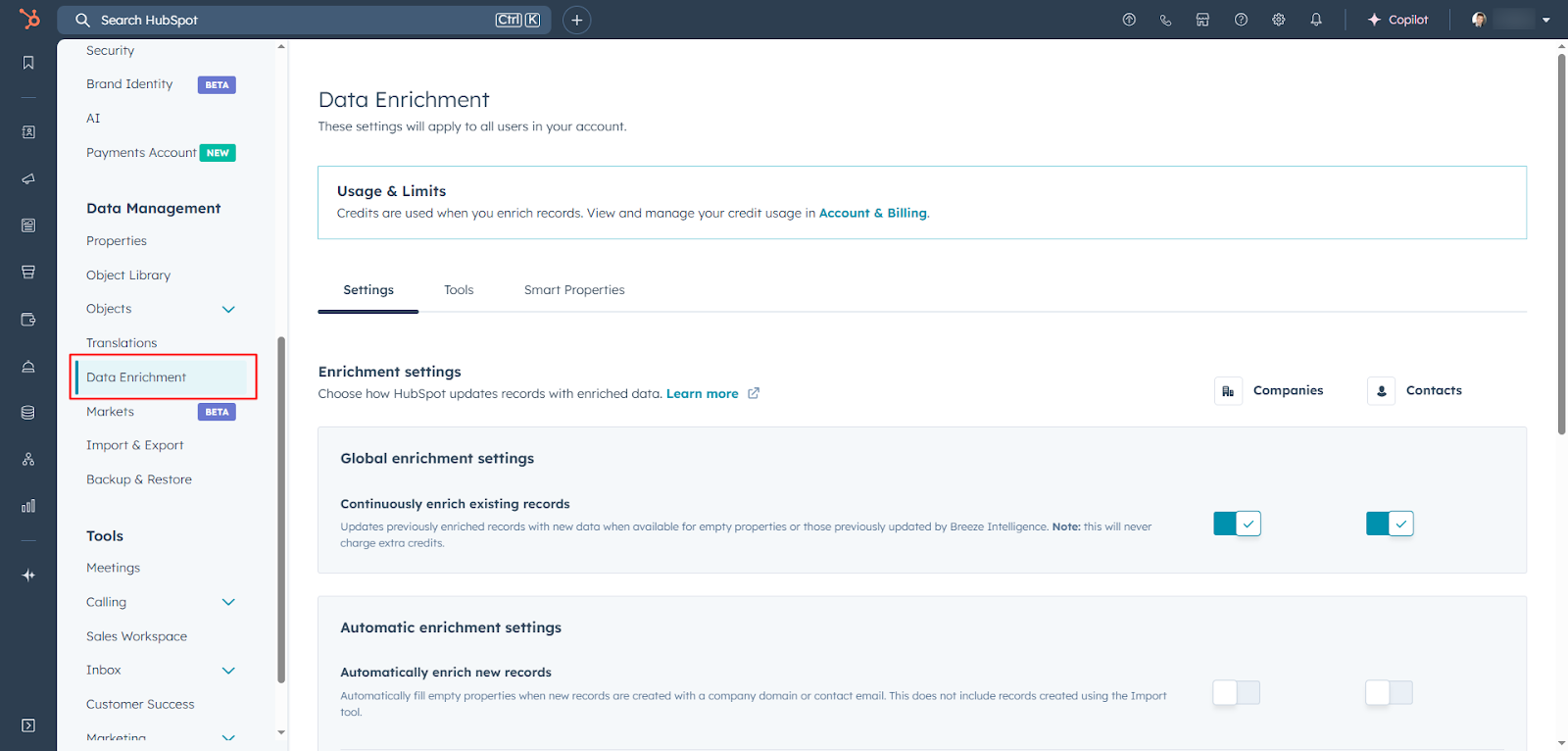
- Turn on enrichment → go to HubSpot Settings → Data Management → Data Enrichment. Enable contact and company enrichment (automatic or manual).
- Trigger enrichment:
- New leads: Auto-enriched when they fill out a form.
- Existing records: Enrich manually or in bulk via lists or workflows.
- Overlay intent data → Use Breeze or similar tools (remember = Generect) to highlight leads with strong buying signals (e.g., repeat visits, pricing page views).
- Prioritize & personalize → now you’re ready to:
- Send relevant emails (“Saw you were checking out our demo page…”)
- Focus on leads showing intent
- Customize messages based on industry, role or company size
Understanding the types of data is just the first step. Next, we’ll look at how HubSpot enriches this data using its built-in tools.
How does native HubSpot data enrichment work?
HubSpot data enrichment uses a contact’s first name, last name, and business email (or a company’s domain) to match verified business information from HubSpot’s commercial dataset, third-party providers, and public web sources. Contacts with only a personal email address and companies without a domain are not eligible.
As of July 2026, contact and company enrichment is available with Marketing, Sales, Service, Data or Content Hub Starter, Professional, and Enterprise subscriptions; Smart CRM and Revenue Hub require Professional or Enterprise. A Super Admin configures enrichment, while a Super Admin or a user with Data enrichment access can run it.
The four enrichment modes
- Automatic enrichment: fills blank properties on newly created contact and company records. It is off by default and must be enabled separately for each object.
- Continuous enrichment: refreshes properties previously filled by enrichment each month when newer data is available. If a user or another system edits a value, continuous enrichment stops updating that property.
- Manual enrichment: lets an authorized user choose properties from a record’s Intelligence tab and decide whether to fill blanks or overwrite existing values.
- Bulk enrichment: runs from a contact or company index page, segment, import or workflow. Index-page batches are limited to 100 records at a time.
How to turn it on safely
- Go to Settings → Data Management → Data Enrichment.
- On the Settings tab, enable Automatically enrich new records and, if useful, Continuously enrich existing records.
- On the Mapping tab, set each field to Fill empty values only, Fill and overwrite or Do not fill. Start conservatively for names and other rep-verified fields.
- Test a small segment, then inspect the enrichment activity log and individual record timelines before expanding the rollout.
Existing values are not blindly overwritten. Automatic enrichment fills blanks; manual enrichment can overwrite only when you choose it; and field-level mapping rules govern future updates. Workflow action settings can override those mapping rules, so review them before activating a workflow.
Official references: HubSpot’s enrichment overview, enrichment settings and overwrite rules, and manual and bulk enrichment instructions.
Need data beyond HubSpot’s native fields?
Use Generect as a targeted top-up for verified contacts and exports while keeping HubSpot as the CRM source of truth.
When should records be enriched?
Timing matters with data enrichment. If you wait too long, your info goes stale. If you enrich too early, you might miss the full picture. So when should you enrich HubSpot data?
Let’s make it easy.
1. Enrich automatically, right when records are created
This is your default move. As soon as a new contact or company hits your CRM (via a form, chat, import or integration), HubSpot can enrich the record instantly using Breeze Intelligence.
Why it matters? You start with a complete picture. That means better segmentation, faster qualification, and smarter follow-up, without lifting a finger.
The thing to keep in mind is that you need to make sure auto-enrichment is enabled in your settings.
2. Refresh records regularly
HubSpot Breeze data enrichment also updates existing records monthly. That’s important. People change jobs. Companies grow. Data gets old fast.
When this helps:
- Your sales cycle is long
- You rely on firmographics or roles that can change
- You’re revisiting leads from earlier campaigns
So…just set it and forget it. HubSpot handles this automatically once it’s turned on.
Enrich HubSpot data manually or in bulk = when you need extra control
Sometimes, you need to enrich HubSpot data on-demand, like before a big outreach push or when reviewing stale leads.
Two ways to do this:
- Manual enrichment: Open a record → click “Enrich”
- Bulk enrichment: Use HubSpot lists or workflows to select multiple records and update them all at once. Or consider using Generect to do it with the real-time data and native integration.
Best for: data audits, campaign prep or SDR list building.
So, here’s the sweet spot:
- Let HubSpot enrich new records automatically
- Let Breeze refresh older ones in the background
- Use manual or bulk enrichment with Generect when you need to take action fast
While HubSpot’s native enrichment can cover a lot, it’s not the only option. If you want more control, here are the best external tools that play nicely with HubSpot in 2026.
What are the best data enrichment tools in 2026?
Let’s explore the most powerful add-ons, what they do best, and why they matter.
1. Generect
Best for: Teams that want clean contact data directly injected into HubSpot without manual signup forms.
You’re using HubSpot. Your CRM is solid. But let’s be honest: keeping your contact data clean, fresh, and complete is a daily struggle. That’s where Generect steps in. It’s one of the best external tools for lead data enrichment for HubSpot in 2026, and it’s built for busy sales teams like yours.
Why you need Generect for HubSpot…here’s the hard truth: over 40% of CRM data goes stale every year. People change jobs. Emails bounce. Leads slip through the cracks. When your CRM is messy, deals die quietly. Generect changes that.
Think of it as your CRM’s personal assistant = always watching for gaps, always filling in the blanks. It connects directly with HubSpot to keep your leads up-to-date and sales-ready.
Here’s exactly how Generect helps your sales team stay ahead:
- Define your perfect prospect → Start by telling Generect who you want to target. You can filter by job title, industry, location, company size, and more. It syncs beautifully with your HubSpot lead scoring system, so only high-fit leads make it through.
- Let Generect do the digging → No more scrolling through LinkedIn or buying outdated lead lists. Generect uses AI to scrape real-time data from the web and find verified contacts who match your ideal customer profile.
- Fill in the blanks automatically → Got leads in HubSpot already? Generect enriches them instantly. Missing emails, outdated titles, incomplete records…it patches everything with GDPR-compliant data enrichment. You get full contact profiles without lifting a finger.
- Send leads straight to HubSpot → With one click, new and enriched contacts are pushed into HubSpot. No copy-pasting. No CSV imports. Just clean, complete data ready for outreach.
- Close more deals → Now you’re ready to go. Your marketing automation workflows kick in, your emails get more replies, and your reps spend less time searching and more time selling.
So, let’s say your sales team targets marketing managers at mid-sized SaaS companies.
Instead of guessing who’s who, Generect finds verified decision-makers in real time and sends them straight into HubSpot, complete with job titles, emails, LinkedIn profiles, and company info. Your rep gets notified, opens the contact record, and sends a personalized email, all within minutes.
That’s personalized outreach in HubSpot, minus the grunt work. Ready to try?
Tired of guessing who your leads really are?
Generect fills in missing job titles, LinkedIn profiles, and company info instantly, right inside HubSpot. No more tab chaos.
Generect doesn’t stop at HubSpot. It also integrates with tools you already use = like email outreach platforms and LinkedIn automation tools. That means your sales and marketing teams stay aligned across the entire funnel. Fewer silos, more wins.
Bottom line? If you’re serious about HubSpot CRM data enhancement, Generect is a no-brainer. It’s fast, accurate, and built to help you sell more with less effort.
We truly believe Generect, combined with lead data enrichment for HubSpot, gives you everything you need, but if you’re exploring other options, here are just a few worth checking out.
2. Hublead (LinkedIn ↔ HubSpot)
Best for: SDRs at small-to-mid-sized businesses who aren’t using Sales Navigator.
If you’re living in LinkedIn every day, Hublead is a game changer. It’s a Chrome extension that lets you import LinkedIn profiles, connections, and even message threads straight into HubSpot, with one click.
How to use it:
- Install the Chrome extension
- Connect your HubSpot account
- While browsing LinkedIn, hit “Add/Enrich”
- Boom: contact added and enriched in your CRM
3. LinkedIn Sales Navigator
Best for: Sales Hub Pro or Enterprise users with advanced Sales Navigator licenses.
For teams with more budget and structure, Sales Navigator offers a robust two-way sync. You can view LinkedIn profiles directly in HubSpot, log InMails, and sync messaging activity.
How to use it:
- Install the integration from the HubSpot Marketplace
- Connect each rep’s Navigator account
- Use LinkedIn data inside contact and company records
4. ZoomInfo
Best for: Enterprise sales teams focused on complex accounts.
Need detailed org charts, funding rounds or decision-maker data? ZoomInfo has it. It enriches contacts and companies with deep firmographics, intent signals, and buying committee insights.
How to use it:
- Add the ZoomInfo app via the HubSpot Marketplace
- Map the fields you want to sync
- Enable enrichment on inbound leads
5. Apollo
Best for: Sales teams who want one tool for both prospecting and follow-up.
Apollo combines enrichment, email sequencing, and list building in one platform. You can sync it with HubSpot using native integrations or via Zapier-style tools.
How to use it:
- Choose between Apollo’s native connector or use automation tools like Albato or Zapier
- Sync leads into HubSpot, enrich them, and track engagement
6. BuiltWith
Best for: Tech sales teams who tailor pitches based on existing tools.
BuiltWith adds technographic data to your CRM: basically, what tools a company is already using. This is gold if you sell software or tech services.
How to use it:
- Install from the HubSpot App Marketplace or connect via API
- Auto-populate company tech fields in HubSpot
7. Datagma
Best for: Teams that need specialized or AI-powered enrichment.
Datagma is newer and less documented, but it appears to focus on specific firmographic or intent-driven data. If you’re after custom insights or niche industry data, this may be worth exploring.
How to use it:
- Search Datagma in the HubSpot Marketplace
- Follow setup instructions from the app listing
8. Zapier (and other iPaaS)
Best for: Teams that want flexible, tailored HubSpot data enrichment integration without developers.
Finally, if none of the above tools fit perfectly, tools like Zapier, n8n or Make let you build custom workflows between HubSpot and hundreds of apps…no coding needed.
How to use it:
- Pick a prebuilt template (like “Apollo → HubSpot”)
- Customize the trigger (e.g. new contact in Apollo) and the action (e.g. create/update in HubSpot)
- Turn it on and let it run in the background
To help you choose, we’ve put together a quick comparison table so you can see how they stack up side by side.
| Tool | Key feature | Ideal use case |
| Generect | Fast lead capture with verified email in real time | Inbound-heavy teams needing clean, auto-imported contacts AND outbound-heavy teams expecting deeply personalized outreach |
| Hublead | LinkedIn import & enrich | SMB SDRs using LinkedIn without Sales Navigator |
| LinkedIn Sales Navigator | InMail, profile insights, activity logging | Teams with paid Sales Hub & Navigator licenses |
| ZoomInfo | Firmographics + intent | Enterprises needing comprehensive, validated data |
| Apollo | Enrichment + sequences | Teams wanting all-in-one outreach & data tool |
| BuiltWith | Technographics | Sellers tailoring offers based on tech stack |
| Datagma | Niche data / AI enrichment | Companies needing specialized dataset |
| Zapier / iPaaS | Workflow automation | Flexible team setups integrating various apps |
Now that you’ve seen the options, here’s a simple checklist to help you figure out which tool is the right fit for your sales team:
- Define your goal → What do you need most? Email accuracy, technographic insights, LinkedIn syncing?
- Match the tool → Check the table to see which fits your need.
- Install and configure → Head to HubSpot Marketplace or install a Chrome extension.
- Map data smartly → Ensure key properties (e.g., email, job title, tech stack) sync correctly.
- Test & refine → Import a few records, review results, adjust mapping or filters.
- Train your team → Show reps how to use new insights daily, like InMail from HubSpot or enriching contacts mid-LinkedIn.
Tools are great, but budgets matter. Let’s break down what enrichment costs across platforms and how credit systems actually work.
How much does enrichment cost and how are credits managed?
Core HubSpot contact and company enrichment does not consume HubSpot Credits. That includes automatic enrichment, manual and bulk enrichment, and monthly continuous enrichment for eligible subscriptions. This is the most important pricing change to understand in 2026.
Do not confuse core enrichment with adjacent products. Buyer Intent and Smart Properties can consume HubSpot Credits, and third-party enrichment apps use their own subscriptions, credits or pay-as-you-go billing.
| Option | 2026 pricing model | Best use | Main trade-off |
|---|---|---|---|
| HubSpot contact/company enrichment | Included with eligible HubSpot subscriptions; no HubSpot Credits consumed | Native CRM field completion and monthly refreshes | Limited to HubSpot’s supported fields and match coverage |
| Generect | Pay as you go: free searches, $0.03 per valid email found, $0.02 per export; $5 onboarding grant | Verified contact discovery and targeted top-ups | Separate wallet and integration workflow |
| Apollo | Subscription and usage limits | Prospecting plus outbound engagement | Another system and data policy to manage |
| ZoomInfo | Annual contract | Enterprise data, intent, and go-to-market workflows | Higher commitment and procurement overhead |
The practical cost-control strategy is simple: use HubSpot’s no-credit native enrichment first, measure which records remain incomplete, then pay a specialist provider only for the gaps that matter to pipeline. Track each provider’s match rate, verified-field rate, and cost per sales-ready record, not just the nominal cost per credit.
Generect’s current public pricing is published here. HubSpot documents the no-credit treatment for core enrichment in its official enrichment overview.
Only pay for the leads you actually need
Generect’s pay-as-you-go model means no monthly subscription: search for free and pay when you unlock or export useful data.
How do you build an enrichment workflow?
Before you start enriching your HubSpot data, you need a clean slate. Think of it like painting a wall: you wouldn’t start before scraping off old paint, right?
Step 1: Audit and clean your CRM
Start by reviewing your existing contacts and companies. Look for duplicates, outdated info, and incomplete records. HubSpot’s built-in deduplication tool is a good starting point; use it to merge duplicates quickly.
Also, scan for fake email addresses (like [email protected]) and outdated job titles. Clear out junk so you’re not enriching garbage.
Step 2: Choose the right data enrichment tools for HubSpot
There’s no one-size-fits-all here. Ask yourself:
- Do you need firmographics (like industry, size, revenue)?
- Or are you after contact-level data (job titles, phone numbers, LinkedIn profiles)?
If you’re focusing on B2B, tools like Generect work well with HubSpot. Want free or simpler options? Try HubSpot’s own enrichment properties or use integrations via Zapier.
Pick tools that integrate directly into your CRM. That saves time and avoids copy-pasting.
Step 3: Set up enrichment workflows
Now, automate the magic.
Start by creating auto-enrich triggers:
- When a contact fills out a form
- When a new company is added
- When a deal reaches a specific stage
Use HubSpot Workflows to kick off enrichment based on those triggers. For example, when a lead fills out a demo request, you can auto-enrich their company info and route them to the right sales rep.
Also build in manual checks:
- Set reminders for reps to confirm key data (like direct dials or LinkedIn profiles)
- Create task queues or Slack alerts for human review when auto-enrichment doesn’t find enough info
By combining automation with light manual oversight, you’ll get a reliable, scalable enrichment workflow that actually helps your sales team close faster.
You’ve got your enrichment workflow set up. Awesome! But what does that actually look like in action? Here’s a quick breakdown of the key components in a healthy, high-performing enrichment flow.
| Step | What happens | Tools/Settings to use |
| New lead submits form | Contact is auto-enriched immediately | HubSpot Form + Breeze or Generect integration |
| Lead hits qualification score | Triggers further enrichment or routing | Lead scoring rules + workflows |
| Manual check by rep | Rep fills in missing data or flags record | Task queue, Slack alerts or HubSpot task |
| Weekly bulk enrichment | Batch update for incomplete records | HubSpot Lists + Manual enrich or Generect bulk sync |
| Alerts for stale data | Reps alerted to re-verify records with old info | Workflows + contact date filters |
Okay, you might be ready to put this into action…
Plug Generect into your workflow in 10 minutes
Enrich leads, sync to HubSpot, personalize outreach. No dev work. No guesswork.
A good workflow is a strong foundation. But to keep your CRM healthy long-term, you’ll need to follow a few key best practices.
What are best practices for keeping data clean?
So, you’ve enriched your CRM data; great start! But clean data doesn’t stay clean forever. People change jobs, emails go stale, and duplicates creep in when no one’s looking. Keeping your data fresh takes regular attention.
Here’s how to stay on top of it without drowning in admin work.
Build a simple audit routine
Don’t wait until things get messy. Set a recurring schedule to review your CRM. Monthly or quarterly works for most teams. Start small: pick one segment at a time. For example, check all leads added in the last 30 days.
Look for missing fields, outdated job titles or incomplete company info. HubSpot’s filters and custom views make this easy to scan.
Handle duplicates early and often
Duplicates confuse your sales reps and mess with your reports. Use HubSpot’s deduplication tool regularly. It catches exact and fuzzy matches.
You can also set up alerts when a contact or company is added with a matching domain or email. This helps your team merge records before things spiral.
Keep an eye on stale data
Not all bad data is obvious. People get promoted, change companies or ditch old emails. Watch for signals:
- Email bounces
- No engagement for 6+ months
- Sudden drop in open rates
When you spot these, take action. Use workflows to flag stale contacts or enroll them in reactivation campaigns. Or even better, automate updates with tools that track job changes and contact updates.
Cleaning data isn’t a one-time thing. It’s a habit. But if you build it into your workflow and make it part of your team’s routine, it becomes way less painful.
You’ve got the basics down, but what’s next? Let’s look at the trends that are shaping the future of data enrichment in 2026 and beyond.
What future trends are shaping data enrichment?
Data enrichment isn’t standing still and neither should you. The way sales teams gather and update data is changing fast. What worked last year might feel slow or outdated today.
Let’s look at the key trends shaping enrichment in 2026 and how you can use them to stay ahead.
| Trend | Why it matters | How to act on it |
| Real-time enrichment | Follow up instantly while leads are hot | Use Generect or HubSpot Breeze data enrichment on form fills |
| Signal-based timing | Reach out when buyers are ready, not just active | Track pricing page views, job changes, tech shifts |
| AI-assisted data scoring | Prioritize what matters most | Use Generect filters + HubSpot lead scoring |
| Minimalist stacks | Fewer tools, deeper integrations | Use multi-function tools like Generect + HubSpot |
| Sales + marketing alignment | Everyone works from the same enriched source of truth | Shared workflows, enrichment properties, and dashboards |
Of course, no system is perfect. Before you scale your enrichment efforts, here are some challenges to plan for, and how to handle them.
What challenges should teams expect?
Data enrichment is powerful, but it’s not always smooth sailing. If you’re running enrichment in HubSpot, there are a few common bumps to watch out for. Knowing what to expect helps you avoid headaches later.
Let’s break down two of the big ones.
1. Juggling multiple data sources
Using more than one enrichment tool? You’re not alone. Many teams blend tools like Generect for company insights and for LinkedIn data plus Phantombuster for lead scraping.
But here’s the problem: what happens when two tools give you different info?
Keeping everything in sync is tricky. You might end up with conflicting job titles or outdated company names if data isn’t managed carefully.
Here’s how to stay in control:
- Choose a primary source of truth = decide which tool overrides the others.
- Use HubSpot’s property history to track changes.
- Set clear rules in your workflows (e.g., only update a job title if the field is blank or older than 90 days).
2. Watching third-party API limits and credits
HubSpot’s core contact and company enrichment does not use HubSpot Credits, but connected enrichment providers still have their own API limits, wallets or record allowances. If every new contact triggers every provider, those external costs and limits can still rise quickly.
Here’s how to manage it:
- Set up enrichment triggers carefully = only enrich leads who meet certain criteria (like form fills or specific lifecycle stages).
- Monitor usage in your integrations dashboard.
- Use batch enrichment for big imports instead of triggering enrichment one-by-one.
Smart enrichment isn’t about using every tool all the time. No-no-no. It’s about using the right data, at the right time, in the right way.
Once you’ve tackled the challenges, it’s time to focus on the payoff: helping your sales reps close more deals with less guesswork. Let’s talk about how to make that happen.
You’ve seen the tools, the strategies, and the road ahead. Let’s wrap it all up and talk about what to do next to put this guide into action.
Frequently Asked Questions
No. HubSpot’s core contact and company enrichment does not consume HubSpot Credits. Buyer Intent and Smart Properties are separate features that can use credits.
Data enrichment is available with Marketing, Sales, Service, Data or Content Hub Starter, Professional, and Enterprise subscriptions. Smart CRM and Revenue Hub require Professional or Enterprise.
A contact needs a business email address, and a company needs a company domain. HubSpot only enriches records when matching property values are available.
Automatic enrichment fills blank values. Manual enrichment can overwrite when you choose it, while continuous enrichment updates only properties previously filled by enrichment and stops after a user or another system edits the field.
When continuous enrichment is enabled, HubSpot checks previously enriched records monthly and updates supported fields when newer data is available.
Yes. You can bulk enrich from an object index page, a segment, an import or a workflow. Index-page selection is limited to 100 records at a time.
Add one after measuring native coverage. Use it for missing contact details, specialist datasets, real-time verification or waterfall enrichment where the expected pipeline value exceeds the added cost and operational complexity.
What you’ve learned + why Generect matters
Enriching your HubSpot data isn’t just about having more info. It’s about giving your sales team what they need to work smarter, not harder.
With the right setup, you’ll:
- Cut down on manual research
- Spot high-quality leads faster
- Personalize outreach with confidence
Start by cleaning your CRM, testing tools like Generect, and building simple workflows that grow with your team. Don’t try to do everything at once…just take the first step.
Sales in 2026 will move fast. The teams who win will be the ones with clean, real-time, and smart data at their fingertips. That can be you.
So why wait? Fire up your HubSpot, run a Generect with its free pricing tier, and start enriching. Your future pipeline will thank you.