


The Apollo Enrichment API turns partial person or company identifiers into structured records. In 2026, the engineering decisions that matter are endpoint choice, match confidence, credit cost, and whether you opt into asynchronous waterfall enrichment.
Updated October 2026
This guide was checked against Apollo’s current producer documentation. It covers the four enrichment endpoints, API-key and OAuth authentication, 2026 credit rules, match-confidence fields, plan-specific rate limits, and the two-stage response contract created by optional waterfall enrichment.
TL;DR
- Use
POST /api/v1/people/matchfor one person andPOST /api/v1/people/bulk_matchfor up to 10. - Use
GET /api/v1/organizations/enrichfor one company andPOST /api/v1/organizations/bulk_enrichfor up to 10. - Standard people enrichment costs 1–9 credits only when credit-consuming data is found: 1 for demographics or email, plus 8 when a mobile phone is returned.
- Waterfall is optional, not the default. Enabling
run_waterfall_emailorrun_waterfall_phonechanges the flow: Apollo returns initial match data immediately, then sends the waterfall result later by webhook or polling. - A
200means the request completed, not necessarily that Apollo found a confident match. Inspectmatch_confidence,matches, and the aggregate result fields.
What is the Apollo enrichment API?
Apollo’s enrichment API accepts identifiers you already have—such as a work email, person name plus company domain, or company domain—and attempts to return a matched person or organization record. It is designed for programmatic CRM cleanup, lead routing, account research, and data-quality workflows rather than manual CSV processing.
The base URL is https://api.apollo.io/api/v1. Apollo users authenticate with an API key in the x-api-key header. Partners building integrations for mutual customers can use OAuth 2.0 Bearer tokens with endpoint-specific scopes. Keep either credential server-side.
Enrichment does not guarantee a result. Apollo uses the identifiers in the request to select a record and reports how confident that match is. That distinction matters: successful HTTP transport and successful identity resolution are separate outcomes.
When is the API a good fit?
- Enrich on ingest: add firmographic or role data before routing a new lead.
- Nightly backfill: process stale or incomplete CRM rows in controlled batches.
- Account qualification: enrich organizations by domain before scoring or territory assignment.
- Selective contact reveal: request email or phone data only after a record clears your qualification gate.
If you need a provider-independent workflow, compare Apollo’s match yield and cost per usable record against alternatives using the same held-out sample. Generect’s lead generation API is one option to include in that test.
Don’t settle for just Apollo
Apollo good, but Generect API is built for speed, accuracy, and scale. Fresh, verified leads flow into your CRM, no extra steps.
Which Apollo enrichment endpoints matter?
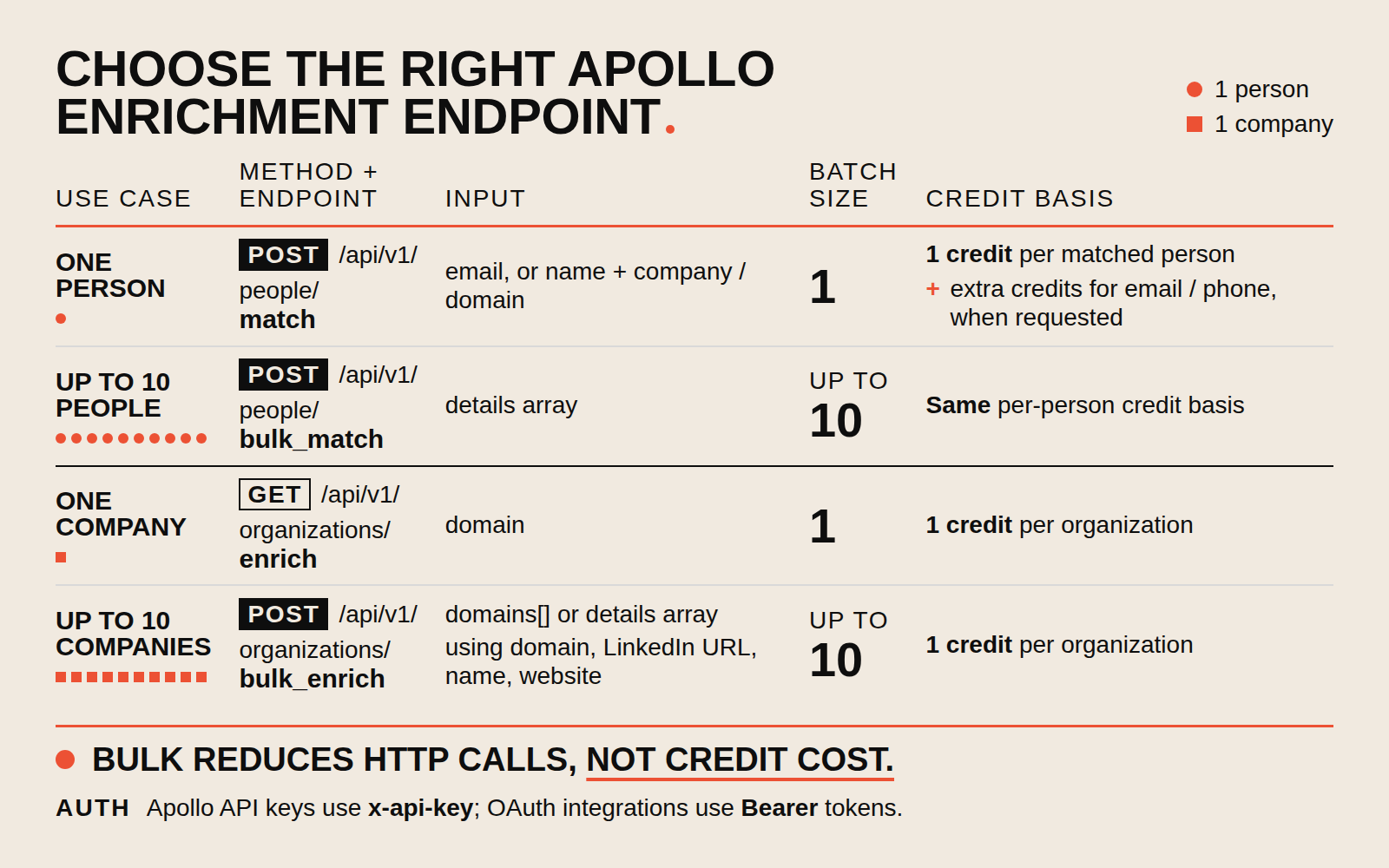
Choose the endpoint by entity type and batch size. Bulk endpoints reduce HTTP overhead, but they do not reduce the per-record credit basis.
| Use case | Method and endpoint | Primary input | Maximum | Credit basis |
|---|---|---|---|---|
| One person | POST /api/v1/people/match | Email or a combination such as name plus company/domain | 1 person | 1–9 credits when qualifying data is found |
| People batch | POST /api/v1/people/bulk_match | details[] | 10 people | Same per-person logic |
| One company | GET /api/v1/organizations/enrich | Domain, LinkedIn URL, or website; name can improve the match | 1 organization | 1 credit per organization |
| Company batch | POST /api/v1/organizations/bulk_enrich | Domains or organization details | 10 organizations | 1 credit per organization |
For people, send the strongest identifiers available rather than relying on a name alone. For organizations, Apollo’s current reference requires a domain, LinkedIn URL, or website as an identifying field; a name can be included to improve accuracy.
Implementation note: preserve input order or attach your own correlation key before submitting a bulk request. Treat every returned row independently because a successful batch may contain matched and unmatched entries.
What data can Apollo.io API return?
With everything you know so far you can call Apollo Enrichment API, and suddenly the blanks in your CRM start filling themselves in. A lead’s job title appears. A company’s size pops up. Emails, phones, funding rounds, all dropping neatly into place.
So, what exactly do you get back? Let’s break it down.
For people
When you hit the People enrichment API, Apollo returns the essentials that turn a name into a full profile:
- Identity basics → first name, last name, and full name.
- Work details → job title and company affiliation.
- Contact info → if you’ve enabled those flags, Apollo can also return work or personal emails and phone numbers.
Instead of a flat list of names, you now have rich profiles, complete with ways to reach out directly.
For companies
With the Organization enrichment API, Apollo helps you see the bigger picture. Here’s what you’ll get:
- Industry → what space the company plays in.
- Revenue estimates → a quick snapshot of financial scale.
- Employee count → headcount helps you gauge size and maturity.
- Location details → where the business is based.
- Funding data → rounds, raises, and context on growth.
- Main phone number → the front door to their business.
It’s not just “who they are,” but also “how big they are” and “where they’re going.”
Of course, good data depends on good matching. Here’s how Apollo figures out who’s who. And, so you know, Apollo search API isn’t the only option…
Apollo ≠ only option
If enrichment is mission-critical, Generect gives you cleaner, faster, always-updated leads.
How does Apollo person matching work?
Apollo compares the identifiers you submit with its person records. More specific, consistent identifiers generally give it a better basis for selecting one person. An email is stronger than a name alone; a name combined with a company domain is more useful than an unqualified name.
Read match_confidence instead of inferring match quality from the HTTP status. Current people-enrichment responses can report high, medium, low, or none. In standard bulk responses, unmatched entries may be null; waterfall responses can use match_confidence: none.
| Signal | What your workflow should do |
|---|---|
high | Accept if the returned company/person also passes your business rules. |
medium or low | Route to a stricter validation step before outreach or CRM overwrite. |
none, null, or no enriched record | Do not loop blindly. Add a reliable identifier or send the record to manual review. |
HTTP 200 | Treat as transport success only; inspect the result-level fields. |
Store the submitted identifiers, returned Apollo ID, confidence, credit fields, and enrichment timestamp. That audit trail makes low-confidence overwrites, duplicate records, and unexpected credit use diagnosable.
How do you reveal emails and phones safely?
People enrichment does not return personal emails or phone numbers by default. Request them explicitly with reveal_personal_emails=true and reveal_phone_number=true. Reveal only after qualification so you do not spend credits on records your team will not use.
Without waterfall, Apollo documents 1–9 credits per person when credit-consuming data is found: 1 credit for demographics or email, plus 8 credits if a mobile phone is returned. If no credit-consuming data is found, the request uses 0 credits. Demographic charging depends on match confidence; email and mobile charging do not.
reveal_phone_number=true is asynchronous: provide a public HTTPS webhook_url, and Apollo sends phone details after the main enrichment response. Make the receiver idempotent because Apollo may retry webhook delivery.
A cost-controlled reveal policy
- Match and qualify the person using demographics and firmographics.
- Reject or review low-confidence matches before requesting contact data.
- Reveal email for records that pass the gate; request mobile only when the channel and value justify the additional cost.
- Record the completed payload’s credit fields and compare cost per usable contact, not cost per API call.
How do you authenticate?
Apollo users send an API key in the x-api-key request header. Do not put the key in a URL, browser bundle, source repository, or log. Create a key that has access to the endpoint you need—such as api/v1/people/match—or use a Master API key only when a narrowly scoped key will not work.
Partners building integrations on behalf of mutual customers use OAuth 2.0 Bearer access tokens with endpoint-specific scopes; people enrichment uses people_match. Validate access with GET /api/v1/auth/health before sending records.
curl --fail-with-body --silent --show-error \
  'https://api.apollo.io/api/v1/auth/health' \
  --header "x-api-key: $APOLLO_API_KEY"
Most endpoints are available across Apollo plans. Free accounts need a work-email registration for affected search, enrichment, and record-retrieval endpoints, and additional eligibility requirements may apply. Treat 401 and 403 as configuration failures, not retryable transport errors.
Why work with stale data?
Generect delivers real-time, verified enrichment = zero bounces, zero wasted outreach.
How are limits and quotas handled?
Apollo does not publish one universal request rate for every workspace. Limits vary by plan and endpoint, are shared across the team, and are enforced across minute, hour, and day windows. Check the API Keys > Usage page or the API usage-stats endpoint for your current allowance rather than copying a static plan table.
Each response can expose rate-limit headers for the applicable windows. On 429, follow Apollo’s structured error_details.suggestions[].retry_after_seconds when present, or the response reset guidance; add jitter and reduce concurrency. Queue traffic by endpoint so one busy integration cannot consume the team’s entire allowance.
What does it cost in credits?
For people enrichment without waterfall, Apollo documents 1–9 credits per person only when credit-consuming data is found: 1 credit for demographics or email, plus 8 credits if a mobile phone is returned. A request that returns no credit-consuming data uses 0 credits. Apollo does not charge the demographic credit when match_confidence is none; email and mobile charging is not determined by match confidence.
Single and bulk organization enrichment use 1 credit per organization. Bulk calls reduce request overhead but keep the per-record credit basis. With email or phone waterfall enabled, cost depends on returned data and the vendors configured in your waterfall; some vendors can charge per lookup even when they find nothing.
| Operation | Documented credit rule | Cost control |
|---|---|---|
| People enrichment, no waterfall | 0 if no credit-consuming data; otherwise 1–9 per person | Match and qualify before revealing contact data |
| Mobile phone returned | Adds 8 credits to the native people-enrichment charge | Request only when the record value supports the channel |
| Organization enrichment | 1 credit per organization | Deduplicate domains before single or bulk calls |
| Email/phone waterfall | Varies by returned data and configured vendors | Inspect the completed credit fields; measure cost per usable record |
Credit pools and commercial plan prices can change independently of the endpoint contract. Budget from the usage screen and completed response data—not an old price table embedded in a guide.
One API, all leads. Cheaper.
Forget spreadsheets. Generect enriches and delivers leads directly to your system.
How do you test Apollo enrichment calls?
First call GET https://api.apollo.io/api/v1/auth/health to validate access. Then test one non-sensitive staging record with the people endpoint. Keep the key in an environment variable and send it in x-api-key, not the query string.
curl --fail-with-body --silent --show-error \
  --request POST \
  --url 'https://api.apollo.io/api/v1/people/match' \
  --header 'Content-Type: application/json' \
  --header "x-api-key: $APOLLO_API_KEY" \
  --data '{
    "first_name": "Jordan",
    "last_name": "Blake",
    "domain": "example.com"
  }'
Use a real, authorized staging record for an end-to-end match test; fake identities are useful for validating error handling but are not evidence of match quality. A 200 still requires a result check:
body=$(curl --fail-with-body --silent --show-error \
  --request POST \
  --url 'https://api.apollo.io/api/v1/people/match' \
  --header 'Content-Type: application/json' \
  --header "x-api-key: $APOLLO_API_KEY" \
  --data '{"email":"[email protected]"}')

jq -e '.person != null and (.match_confidence | IN("high","medium"))' <<<"$body"
These examples were syntax-tested locally with a mock HTTP receiver to verify the POST method, JSON body, and x-api-key header. They were not sent with a live Apollo credential, so they intentionally make no claim about match yield. Validate one authorized record in your own workspace before scaling.
How do you handle rate limits and errors?
Apollo rate limits vary by endpoint and plan, so a static number copied from an example response is not a safe production limit. View your workspace limits under API Keys > Usage or call the API usage endpoint, then pace each endpoint independently.
| Outcome | Interpretation | Action |
|---|---|---|
200 with no match | Request completed but identity resolution failed | Improve identifiers or route to review; do not repeat unchanged |
400/422 | Invalid or incompatible parameters | Fix the payload; for polling, stop on invalid_request_id |
401/403 | Missing credential, wrong key access, or missing OAuth scope | Fix authorization; do not retry automatically |
429 | A plan/endpoint limit window was exhausted | Honor reset or retry guidance, add jitter, and reduce concurrency |
5xx | Temporary service-side failure | Retry with bounded exponential backoff and idempotency protection |
404 result_pending from polling | Asynchronous enrichment is still running | Wait retry_after_seconds, then poll again |
For asynchronous results, stop polling on terminal outcomes: request_id_unknown (404), request_id_expired (410), and invalid_request_id (400). Apollo retains pollable webhook results for up to 30 days.
- Queue calls instead of launching unbounded parallel requests.
- Log Apollo’s structured error code, endpoint, status, and correlation ID, but never log API keys or raw contact PII.
- Use idempotent writes so webhook retries and job retries cannot create duplicate CRM updates.
- Alert on match rate, missing-record rate, credit use per successful record, 429 frequency, and asynchronous completion lag.
Skip the CSVs and errors
Tired of manual uploads? Generect API auto-fills your CRM with verified leads.
How do you integrate with your stack?
You can snap it directly into your CRM, or use connectors like Zapier, Pipedream, or Workato to build bigger towers. The best approach depends on how much control you want and how complex your flow needs to be.
Direct CRM sync
If you’re using Salesforce, HubSpot, or another CRM Apollo supports, you can connect straight from Apollo settings.
Just map the fields once, and enriched data flows into your CRM automatically. It’s the simplest route, no extra tools needed.
Middleware automation tools
If you want flexibility, middleware lets you design your own enrichment flow. Popular options include:
- Pipedream → Listen to Apollo events (like “new contact created”), enrich records in real time, then push the results anywhere. It supports hundreds of apps and custom code in JavaScript or Python.
- Zapier → Build no-code workflows. For example: when a new lead is created in Apollo, enrich it, then send it to Google Sheets or Slack.
- Workato → More enterprise-grade. It supports bulk enrichment and comes with pre-built connectors. Great for larger teams managing complex automations.
Just in case, Generect plugs in directly: its white-label API runs invisibly in your stack, so you keep the credit while leads sync instantly into CRMs, outreach tools, or analytics platforms.
Once you pick your path (no matter if direct or middleware), you’ll want to decide how enrichment fits into your workflow. Here are three proven patterns:
- Enrich-on-Ingest → Enrich new leads the moment they hit your system. Example: a new contact enters Apollo → Pipedream triggers enrichment → the enriched data is pushed instantly into Salesforce or your database.
- Nightly Backfill → Run a daily job that cleans up stale or incomplete records. Use bulk endpoints to enrich 10 records at a time, loop through your backlog overnight, and wake up with fresh data in your CRM or warehouse.
- Pre-Send Verification → Before sending an email campaign, enrich the contact list to verify emails and add firmographic details. Zapier or Pipedream can do this automatically so your outreach lands stronger.
And since Apollo isn’t the only player in town, it helps to know how it compares and when to pair it with others.
How does Apollo waterfall enrichment work in 2026?
Waterfall enrichment is optional. Standard requests leave run_waterfall_email and run_waterfall_phone false. To search the third-party sources configured by your Apollo admin, set one or both parameters to true.
That opt-in changes the response contract. Apollo immediately returns demographic and firmographic match data plus a waterfall status and request_id. Email or phone results arrive later. Use a public HTTPS webhook_url, or set poll_only=true and omit the webhook URL. Supplying both returns a 400 WEBHOOK_URL_WITH_POLL_ONLY error.
In a bulk waterfall response, the initial payload omits unique_enriched_records, missing_records, and credits_consumed because work is still running. With email waterfall enabled, initial matches also omit email and email_status. Reconcile the later webhook or poll response with the original job by request_id; this signed 64-bit value may be negative, so preserve it unchanged.
What does waterfall cost?
There is no single fixed waterfall price. Cost depends on the data returned and the vendors in your team’s waterfall configuration; some vendors charge per lookup even when they find nothing. Apollo says email waterfall typically uses 1–4 credits and phone waterfall typically 8–25, but some configurations or higher-cost matches can exceed 20 credits for email or 45 for phone. Treat those as documented ranges, not a quote for your workspace.
- Run a small representative sample.
- Wait for completed waterfall payloads rather than estimating from the initial response.
- Review
credits_consumedand Apollo’s credit history. - Scale only after calculating match yield and cost per usable email or phone.
How should you compare Apollo with alternatives?
Do not compare providers by database-size or accuracy claims alone. Test each service on the same recent, representative records and measure the result your workflow can actually use.
| Metric | Definition | Why it matters |
|---|---|---|
| Confident match rate | Accepted matches ÷ records submitted | Separates broad response coverage from usable identity resolution |
| Verified contact yield | Usable emails or phones ÷ records submitted | Measures the output your campaign can act on |
| Cost per usable record | Total credits or spend ÷ usable outputs | Normalizes different credit and waterfall models |
| Freshness failure rate | Wrong role/company or invalid contact details ÷ returned records | Shows the downstream cleanup burden |
| Completion model | Synchronous, webhook, polling, or mixed | Determines queue, timeout, and reconciliation complexity |
| Governance | Scopes, deletion controls, retention, auditability, and lawful use | Limits security and privacy exposure |
Apollo can fit teams already using its prospecting platform and willing to manage per-plan limits and optional waterfall workflows. A specialist such as Generect may fit a workflow centered on target-company discovery, lead search, email finding, and validation. The defensible choice is the provider—or staged combination—that wins your held-out test.
What does a production-safe Python implementation look like?
This compact client keeps transport success separate from match success, retries only transient failures, and honors Apollo’s structured retry_after_seconds guidance when present.
import os, random, time
import requests

BASE = "https://api.apollo.io/api/v1"
TRANSIENT = {429, 500, 502, 503, 504}


def enrich_person(*, email=None, first_name=None, last_name=None, domain=None):
    payload = {k: v for k, v in {
        "email": email, "first_name": first_name,
        "last_name": last_name, "domain": domain,
    }.items() if v}
    if not email and not (first_name and last_name and domain):
        raise ValueError("send email or first_name + last_name + domain")

    for attempt in range(5):
        response = requests.post(
            f"{BASE}/people/match",
            headers={"x-api-key": os.environ["APOLLO_API_KEY"]},
            json=payload,
            timeout=(3.05, 30),
        )
        if response.status_code not in TRANSIENT:
            response.raise_for_status()
            data = response.json()
            person = data.get("person")
            confidence = data.get("match_confidence", "none")
            return person if person and confidence in {"high", "medium"} else None

        if attempt == 4:
            response.raise_for_status()
        error = response.json().get("error_details", {}) if response.content else {}
        suggested = [x.get("retry_after_seconds") for x in error.get("suggestions", [])]
        delay = next((x for x in suggested if isinstance(x, (int, float))), 2 ** attempt)
        time.sleep(delay + random.uniform(0, 0.25 * delay))

    return None
The example was compiled and exercised against mocked 200, unmatched, 429, and 503 responses. In a real pipeline, put calls behind a bounded queue; store your input correlation ID, Apollo ID, confidence, and completion timestamp; and make CRM writes idempotent.
- Do not log secrets or raw contact PII. Redact payloads before error reporting.
- Do not overwrite on low confidence. Route ambiguous matches to review.
- Treat waterfall as a second job. Match the webhook or poll result by
request_idbefore writing contact fields. - Measure outcomes. Track confident match rate, verified-contact yield, 429 rate, completion lag, and credits per usable record.
What is the practical 2026 takeaway?
A reliable Apollo integration treats enrichment as a measured data pipeline, not a single lookup. Pick the correct endpoint, submit strong identifiers, inspect match-level outcomes, request expensive contact fields selectively, and reconcile every asynchronous result before writing to your CRM.
The most important 2026 detail is the waterfall contract: it is opt-in, it can use a variable number of credits, and its final result arrives after the initial response. If your implementation assumes one synchronous payload, it can silently write incomplete records and undercount spend.
Frequently Asked Questions
It is Apollo’s REST interface for matching and enriching person or organization records from identifiers such as email, name plus company domain, or company domain.
Use POST /api/v1/people/match for one person, POST /api/v1/people/bulk_match for up to 10 people, GET /api/v1/organizations/enrich for one company, and POST /api/v1/organizations/bulk_enrich for up to 10 companies.
Without waterfall enrichment, Apollo documents 1–9 credits per person when qualifying data is found: 1 credit for demographics or email and 8 additional credits when a mobile phone is returned. An unmatched request can use 0 credits.
No. You opt in with run_waterfall_email or run_waterfall_phone. Apollo returns initial match data immediately and delivers waterfall email or phone results later by webhook or polling.
Yes. HTTP 200 means the request completed. Inspect match_confidence, matches, missing_records, and related result fields to determine whether Apollo identified a usable record.
Read the endpoint and plan limits shown in Apollo’s API Usage view or usage endpoint, queue requests, cap concurrency, and retry 429 responses only after the applicable window or retry guidance.
Apollo users send their API key in the x-api-key header. Partners acting for mutual customers can use OAuth 2.0 Bearer tokens with the scopes required by each endpoint.
