HubSpot API Guide 2026: Auth, Endpoints & Rate Limits
Build HubSpot integrations with the 2026-09 API: working cURL examples, Service Keys vs OAuth, CRM endpoints, pagination, errors and current rate limits.
 Updated
17 min read
Quick answer: the HubSpot API lets an app read, create, update, search and associate CRM records over https://api.hubapi.com/. For a new integration in November 2026, use HubSpot’s latest date-based API version (2026-09), a Service Key for a lightweight single-account integration or OAuth for multiple accounts. Do not start a new build on legacy /v1/, /v2/, /v3/ or /v4/ paths.
Last updated: November 23, 2026. Verified against HubSpot’s 2026-09 API reference, authentication documentation and API usage guidelines.
Technical review: Marharyta Sevostianenko, GTM & Content at Generect. The review covered every endpoint, authentication recommendation, limit and executable example in this guide.
| HubSpot API quick reference | Current contract |
|---|---|
| Root URL | https://api.hubapi.com/ |
| Current version for new builds | 2026-09 |
| Single-account system integration | Service Key on a Projects-based app |
| Multiple-account app | OAuth 2.0 |
| Authentication header | Authorization: Bearer YOUR_ACCESS_TOKEN |
| Official reference | HubSpot 2026-09 API reference |
This guide starts with a valid first request, then covers endpoints, authentication, rate limits, data quality and production safeguards. The examples distinguish current date-based APIs from legacy routes so you can build or migrate without mixing contracts.
HubSpot API quick start
The HubSpot CRM API is a JSON-over-HTTPS interface for CRM objects such as contacts, companies, deals, tickets, custom objects and their associations. A script can use it to sync records, search by property values, update lifecycle fields or connect HubSpot to another system.
Here is a current read request using the 2026-09 Contacts API. Replace the placeholder with a Service Key or OAuth access token that has the required contact-read scope.
curl --request GET \
  --url 'https://api.hubapi.com/crm/objects/2026-09/contacts?limit=10&archived=false' \
  --header "Authorization: Bearer $HUBSPOT_ACCESS_TOKEN"
A successful list response includes a results array and, when another page exists, paging.next.after. Store the cursor and request the next page instead of guessing offsets. For filtered CRM searches, send a POST request to a path such as /crm/objects/2026-09/contacts/search.
- Read: retrieve records or properties with the narrowest required scope.
- Write: create or update records only after validating field names and ownership rules.
- Search: use CRM search for property filters, while respecting its separate limits.
- Sync: combine pagination, webhooks, checkpoints and reconciliation instead of repeatedly pulling the full CRM.
Why automate CRM tasks with the HubSpot API
API automation is useful when the same event should produce the same CRM change every time. Typical triggers include a form submission, a qualified lead, a meeting, a payment or a product event. The integration can create or update a record, assign ownership, attach an association and log the outcome without asking a user to copy fields between systems.
- Consistency: apply the same required fields, naming rules and ownership logic to every record.
- Freshness: move an approved change when the source event happens, not during a weekly cleanup.
- Traceability: log the source, request, response status and HubSpot correlation ID.
- Control: queue, retry or reject a write when validation fails instead of silently accepting bad data.
Automation is not a reason to write every available field. Decide which system owns each property, use stable identifiers for matching and make each job safe to retry.
How HubSpot API requests work
A request combines an HTTPS method, a versioned endpoint, an authorization header and, for writes or searches, a JSON body. Follow the endpoint’s contract instead of applying generic HTTP assumptions: HubSpot uses different methods for different resource families, including association operations.
| Task | Current example path | Method |
|---|---|---|
| List contacts | /crm/objects/2026-09/contacts | GET |
| Create a contact | /crm/objects/2026-09/contacts | POST |
| Update a contact | /crm/objects/2026-09/contacts/{contactId} | Use the method documented for this endpoint |
| Search contacts | /crm/objects/2026-09/contacts/search | POST |
Set the token in your shell, then run the request. These examples use normal ASCII quotes and valid JSON.
export HUBSPOT_ACCESS_TOKEN='replace-with-your-token'

curl --request GET \
  --url 'https://api.hubapi.com/crm/objects/2026-09/contacts?limit=10&archived=false' \
  --header "Authorization: Bearer $HUBSPOT_ACCESS_TOKEN"
curl --request POST \
--url 'https://api.hubapi.com/crm/objects/2026-09/contacts' \
--header "Authorization: Bearer $HUBSPOT_ACCESS_TOKEN" \
--header 'Content-Type: application/json' \
--data '{"properties":{"email":"[email protected]","firstname":"Alex"}}'For lists, read paging.next.after and send that cursor in the next request. For searches, keep filter groups narrow, expect API-specific limits and stop when the query reaches its documented result ceiling. For batch writes, keep a source-side key or objectWriteTraceId so partial failures can be matched to input records.
Handle errors by category: refresh or replace invalid credentials after 401; inspect scopes and account access after 403; honor 429 throttling; retry eligible 423 and transient 5xx responses with bounded exponential backoff and jitter; and log HubSpot’s correlation ID. A batch can also return 207 Multi-Status, so do not treat one HTTP response as proof that every item succeeded.
HubSpot applies different limits by app distribution and product tier. The following figures were checked against the official API usage guidelines on November 23, 2026.
| App type or tier | Requests per 10 seconds | Requests per day |
|---|---|---|
| Publicly distributed OAuth app | 110 per installing account | HubSpot’s public OAuth rule is stated as a burst limit; check API-specific limits |
| Private, Free or Starter | 100 per app | 250,000 per account |
| Private, Professional | 190 per app | 625,000 per account |
| Private, Enterprise | 190 per app | 1,000,000 per account |
| Private with API Limit Increase | 250 per app | 1,000,000 additional calls per account for each increase |
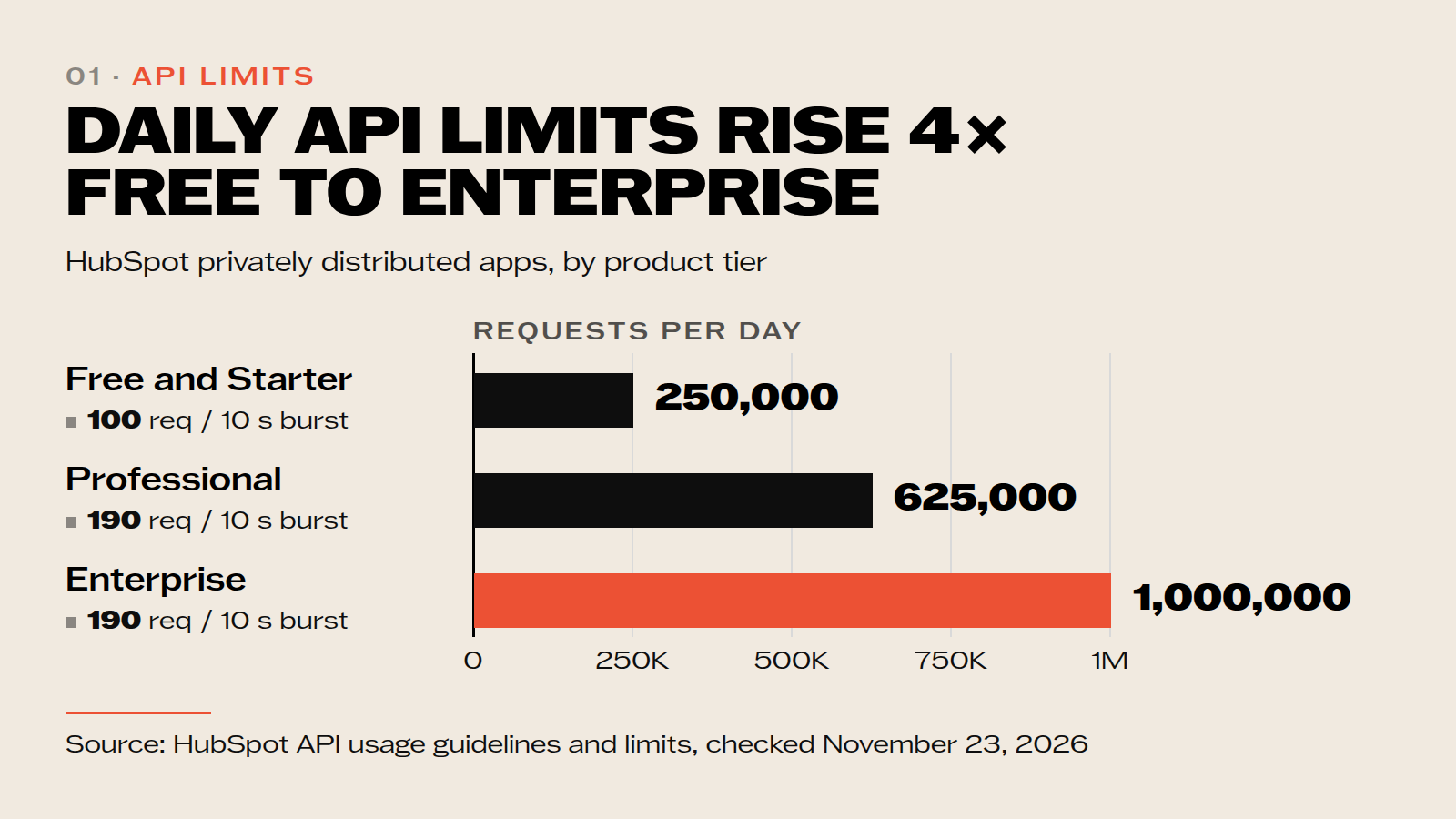
The daily private-app limit is shared across apps in the HubSpot account, while the 10-second burst limit applies per app. CRM Search has separate rules and does not return the normal rate-limit headers. Build throttling around X-HubSpot-RateLimit-Max, X-HubSpot-RateLimit-Remaining and the interval header, then retry eligible 429 and transient 5xx responses with bounded exponential backoff and jitter.
Do not assume all API features are available on every subscription. Check HubSpot’s API-by-tier documentation and the specific endpoint guide before making a product commitment.
A production HubSpot integration blueprint
A reliable integration is a state-management system, not a chain of API calls. Before writing code, define the owner of each property, the identifier used to match records, the events that trigger updates and the evidence stored for each decision.
1. Define the data contract
- Object: contact, company, deal, ticket or custom object.
- Owned properties: fields this integration may create or update.
- Match key: a stable unique identifier, not a display name.
- Conflict rule: which source wins when HubSpot and the external system disagree.
- Audit fields: source, observed timestamp, verification state and last successful sync.
Fetch the target object’s property schema before sending writes. HubSpot uses internal property names in API payloads, which can differ from labels shown in the UI. If your integration relies on a custom unique identifier, configure and test idProperty according to the object endpoint’s documentation.
2. Choose authentication by distribution
| Authentication | Use it when | Production obligation |
|---|---|---|
| Service Key | One account, lightweight system integration, internal tool or AI agent | Use least-privilege scopes, secure storage, activity logs and rotation |
| OAuth 2.0 | Multiple customer accounts or Marketplace distribution | Implement authorization, state validation, token storage and coordinated refresh |
| Legacy private-app token | An existing pre-Projects integration during migration | Migrate before September 2027 rather than expanding the legacy design |
Account API keys are not a normal CRM authentication option. A developer API key is valid only where an app-configuration endpoint explicitly documents it. New single-account integrations should use a Service Key; multi-account integrations should use OAuth.
3. Separate initial load from incremental sync
For an initial load, page through records using paging.next.after, persist checkpoints and make writes safe to retry. For ongoing changes, combine webhooks or source events with a periodic reconciliation job. Webhooks reduce latency; reconciliation catches missed, delayed or out-of-order events.
Do not poll the entire CRM on a tight interval. Queue writes, limit concurrency per account and reserve capacity for user-triggered work. If a request receives 429, honor available rate information and retry with bounded exponential backoff plus jitter. A retry queue needs a maximum attempt count and a dead-letter path so one malformed record does not loop forever.
CRM objects, properties and associations
Contacts, companies, deals and tickets are CRM objects. Each record has a HubSpot object ID, a set of properties and optional associations to other records. The data model matters because an integration can create technically valid records that are operationally useless if it ignores ownership, required properties or associations.
Request only the properties you use
A list or read request does not need every property. Request the small set required for matching and the decision that follows. This reduces payload size and makes schema dependencies visible in code review. Store internal property names in configuration, not scattered literals, and check them against the current property schema during deployment.
Date-based APIs also enforce account-configured CRM write validations. A property can be valid in one account and rejected in another because administrators configured allowed values, formatting or required conditions. Treat a validation error as a contract mismatch that needs data or configuration review, not as a transient error to retry.
Model associations explicitly
A contact-company relationship is not implied by similar text in a company-name field. Use the documented association endpoint and the correct association label or type for the account. If a custom label is part of the workflow, resolve its identifier instead of copying an ID from another account.
For a deal-creation workflow, decide whether the deal must associate with a contact, company or both. If the object write succeeds but an association write fails, keep those as separate outcomes. The retry worker should know whether it is creating a missing object or repairing a missing edge between existing objects.
Search, pagination and batch behavior
HubSpot CRM Search is useful for matching records by property filters, but it has a separate contract from ordinary object reads. Current documentation limits CRM Search to five requests per second per account, allows up to 200 records per page and caps a single query at 10,000 results. It also does not return the normal rate-limit headers.
Design around those boundaries:
- Narrow the query: filter by a stable key or bounded modification window instead of scanning broad result sets.
- Persist the cursor: store
paging.next.afterafter each successful page. - Partition large reads: if a query can exceed 10,000 results, split it by an indexed property or time window.
- Cache stable reference data: schemas, owners and pipelines do not need to be fetched for every record.
- Throttle by account: a multi-tenant worker needs a separate budget for each connected HubSpot account.
Batch endpoints reduce request overhead, but they introduce item-level outcomes. HubSpot documents a 100-record batch pattern for CRM operations. A batch can return 207 Multi-Status, and objectWriteTraceId can be used to match responses to input records. Never mark the whole batch complete from the top-level HTTP status alone.
HubSpot API error handling by category
| Status | Interpretation | Integration action |
|---|---|---|
400 | Invalid body, property, filter or validation rule | Do not retry unchanged; log the response and correct the data or contract |
401 | Missing, expired or invalid credential | Refresh OAuth when applicable or rotate the credential; pause writes until auth is healthy |
403 | Credential lacks a required scope or account access | Compare granted scopes with the endpoint; do not broaden access blindly |
423 | Resource is temporarily locked | Retry after a short bounded delay |
429 | Rate limit reached | Throttle, honor available retry guidance and apply exponential backoff with jitter |
5xx | HubSpot or network-side transient failure may have occurred | Retry safe operations with limits; reconcile write state before repeating an uncertain request |
207 | Batch contains mixed item-level outcomes | Inspect every result and retry only failed items |
HubSpot error bodies can include a category, message, correlation ID and additional context. Treat fields as optional because error schemas can vary by endpoint. The correlation ID belongs in logs and support cases; access tokens and full personal-data payloads do not.
Webhooks, ordering and reconciliation
Webhooks reduce sync latency, but they do not remove the need for reconciliation. Delivery can be delayed, repeated or arrive in a different order from the source changes. A webhook handler should authenticate the request according to the exact HubSpot app model, acknowledge quickly and put work on a queue.
- Deduplicate events with an event or delivery identifier when the contract provides one.
- Compare event and record timestamps before applying an older update.
- Keep the handler idempotent because a delivery can be retried.
- Run a scheduled reconciliation over a bounded modification window.
- Alert on queue age, repeated failures and differences that remain after reconciliation.
HubSpot distinguishes legacy public-app webhooks, Projects-based app configuration and webhook management or journal APIs. Follow the documentation for the architecture you actually use; do not copy signing or token instructions from a legacy app into a Projects-based app.
A verification-gated contact sync
The HubSpot API can store an email address; it does not prove that the address is current or deliverable. A safer workflow validates a proposed email before a contact write, preserves the evidence and treats catch-all results as uncertain.
Generect’s July 2026 email-quality audit covered approximately 365,000 verification checks: 65.7% were classified as valid, 26.9% as invalid and 7.4% as catch-all or unknown. These figures describe the analyzed dataset, not a universal HubSpot or vendor accuracy rate. They show why “found” and “safe to write into the CRM” require different states.
| Verification state | Share in the audit | Recommended write policy |
|---|---|---|
| Valid | 65.7% | Create or update only when source and consent rules allow it |
| Invalid | 26.9% | Suppress; never overwrite a known-good address |
| Catch-all or unknown | 7.4% | Store as unconfirmed or route to review |
Step 1: search for the existing HubSpot contact
curl --request POST \
  --url 'https://api.hubapi.com/crm/objects/2026-09/contacts/search' \
  --header "Authorization: Bearer $HUBSPOT_ACCESS_TOKEN" \
  --header 'Content-Type: application/json' \
  --data '{"filterGroups":[{"filters":[{"propertyName":"email","operator":"EQ","value":"[email protected]"}]}],"properties":["email","firstname","lastname"],"limit":1}'
In a real integration, prefer the most stable identifier available. Email can change; a source-system ID, verified profile URL or purpose-built unique property can be safer. If no stable key exists, do not silently merge records on a name alone.
Step 2: validate the proposed email
Generect’s documented validator accepts an array of emails and returns the mailbox signal, catch-all status, mail provider and error detail:
export GENERECT_API_KEY='replace-with-your-token'

curl --request POST \
  --url 'https://api.generect.com/api/linkedin/email_validator/' \
  --header "Authorization: Token $GENERECT_API_KEY" \
  --header 'Content-Type: application/json' \
  --data '["[email protected]"]'
The response exposes the fields needed for the gate. This redacted example shows the documented shape without presenting a real person’s address:
[
  {
    "email": "<redacted>",
    "result": "valid",
    "exist": "yes",
    "catch_all": false,
    "mx_domain": "<provider>",
    "source": "<method>",
    "logs": [],
    "error": null
  }
]
Branch on exist and catch_all, not a single optimistic label. exist: "yes" with catch_all: false is a stronger signal. A catch-all domain can accept probes for mailboxes that do not exist, so it remains unconfirmed.
Step 3: patch only the fields the integration owns
curl --request PATCH \
  --url "https://api.hubapi.com/crm/objects/2026-09/contacts/$HUBSPOT_CONTACT_ID" \
  --header "Authorization: Bearer $HUBSPOT_ACCESS_TOKEN" \
  --header 'Content-Type: application/json' \
  --data '{"properties":{"email":"[email protected]"}}'
Before this call, compare the current HubSpot value, source and update timestamp. If a user or a higher-authority system changed the field after the enrichment job observed it, stop and resolve the conflict. Store enough evidence to explain why the write happened.
Production reliability checklist
- Versioning: new builds use the latest date version; migration tests response shapes and validation behavior, not only paths.
- Scopes: grant read and write access only for the objects and operations the integration owns.
- Pagination: persist
paging.next.afterand resume from a checkpoint. - Idempotency: keep a source event ID or write trace so a retry does not create a duplicate.
- Partial success: parse item-level outcomes in batch responses, including
207 Multi-Status. - Backoff: retry eligible
423,429and transient5xxresponses with limits and jitter. - Observability: log account, endpoint, attempt, status, latency and HubSpot correlation ID without logging secrets.
- Reconciliation: compare source and HubSpot state on a schedule to catch dropped webhooks or manual edits.
- Schema drift: monitor required properties, option values and custom validation rules before they break writes.
Use separate credentials and test accounts for development. Exercise expired tokens, missing scopes, duplicate input, invalid properties, rate limiting and partial batch failure before production traffic. The happy path is not enough.
Official HubSpot API sources
- 2026-09 API reference: current date-based endpoint contracts and root URL.
- Authentication overview: OAuth, static authentication and related credential models.
- Service Keys: single-account system integration setup.
- API usage guidelines: general and API-specific rate-limit rules.
- CRM Search: filters, sorting, pagination and Search-specific constraints.
- Legacy API and app timeline: September 2027 enforcement for v1-v3 and legacy apps.
HubSpot notes that not every legacy replacement path is finalized. Check the reference for the exact resource you use, then pin contract tests to the date version and migration behavior you verified.
Frequently Asked Questions
Basic CRM API access is available on HubSpot Free and paid plans, but endpoint availability and product features can depend on tier. Privately distributed apps on Free and Starter have a general limit of 100 requests per 10 seconds per app and 250,000 requests per day per account. Check the specific API guide before assuming a feature is included.
Use the latest date-based version, currently 2026-09, unless the endpoint documentation says otherwise. HubSpot says new integrations should not start on numbered v1-v4 paths. Numbered v1-v3 APIs become unsupported in September 2027, while v4 has a separate March 30, 2027 deadline.
Use a Service Key for a new lightweight integration, internal tool or AI agent connected to one HubSpot account. Use OAuth when an app connects multiple accounts or is distributed through the Marketplace. Existing legacy private apps should migrate to the Projects-based model before September 2027.
Publicly distributed OAuth apps have a general limit of 110 requests every 10 seconds per installing account. Private apps get 100 per 10 seconds and 250,000 per day on Free or Starter, 190 and 625,000 on Professional, and 190 and 1,000,000 on Enterprise. API-specific limits can be stricter.
Yes. CRM Search has API-specific limits and does not return the normal rate-limit headers. Treat its quota and result caps separately from the general app limits, use cursor pagination, narrow filters and cache stable reference data.
It can continue during the migration window, but HubSpot says v1-v3 APIs become unsupported in September 2027. Migrate directly to date-based versioning and test response-shape changes, scopes, pagination and validation behavior before switching production traffic.
Validate proposed contact fields before creating or patching a record, preserve the source and timestamp, avoid overwriting known-good values and route catch-all or unknown emails for review. Monitor duplicates, rejected writes and bounce signals after the sync.
What to implement first
Start with one record type and one source event. Prove the read path, matching rule and validation gate before enabling writes.
- Run contract tests against the current 2026-09 endpoint and a non-production account.
- Execute the workflow in read-only mode; record what it would create, update, suppress or route to review.
- Enable writes for a small controlled set and compare every result with the source event.
- Add rate-limit handling, dead-letter review, metrics and scheduled reconciliation before increasing volume.
If contact validation is part of the workflow, review the Generect API documentation and create a key in API settings. Keep validation state separate from HubSpot’s contact identity, and never turn a catch-all response into a guaranteed deliverability claim.