
Hunter.io API Review 2026: Pricing, Limits & Verdict
Hunter.io API review for 2026: current pricing, credits, rate limits, endpoints, verified Python code, data-quality trade-offs, and alternatives.
 Updated
20 min read
Updated
20 min read
Hunter API is still one of the easiest email-finding APIs to integrate in 2026. It is best for teams that need Domain Search, Email Finder, and Email Verifier behind a stable REST interface. It is less compelling when you need a broad people database, phone-first enrichment or the lowest possible cost per usable contact.
Last updated: September 29, 2026. We checked Hunter’s live V2 documentation, OpenAPI contract, pricing page, and public test key before publishing this refresh.
Hunter API review: the 30-second verdict
| Question | Answer |
|---|---|
| Best for | Developer-friendly professional email discovery and verification by person or company domain |
| Core endpoint | GET https://api.hunter.io/v2/email-finder |
| Authentication | X-API-KEY, Bearer token or api_key query parameter; use a header in production |
| Free API access | Yes. The Free plan includes 50 monthly credits and API access |
| Paid plans | Starter €34/month, Growth €104/month, Scale €209/month when billed yearly; verify regional currency on Hunter’s pricing page |
| Credit model | 1 credit per found email; 0.5 credit per completed verification; failed finds and unknown verifications are not charged |
| Verdict | Strong focused email API; compare alternatives if phone data, broader prospecting or workflow economics matter more |
The biggest change since our earlier review is scope. Hunter is no longer only a finder plus verifier: its public V2 API now exposes Discover, company and person enrichment, lead management, sequences, and related resources. Hunter also positions both its API and MCP connection as ways to bring these capabilities into AI-agent workflows. But its clearest advantage remains the same: finding a professional email from a name and domain, then showing the evidence and verification state behind the result.
What products and tools does Hunter.io offer?
Hunter’s product can be understood as four layers:
- Discover: find companies using structured filters or a natural-language query. The endpoint returns up to 100 companies per response; advanced filters and pagination require a Premium plan.
- Find: Domain Search returns professional addresses associated with a company, while Email Finder resolves one person from a domain or company plus a name. Email Finder also accepts a LinkedIn handle.
- Verify and enrich: Email Verifier reports deliverability checks, while person, company, and combined enrichment endpoints add profile or company context.
- Activate: leads, lists, custom attributes, sequences, connected email accounts, and campaign resources let a team move records into outreach workflows.
This is broader than the old “type a domain and export a CSV” workflow. Still, buyers should separate coverage from deliverability. A public source or a high finder score does not guarantee that an inbox will accept mail today. Use the verification object, treat catch-all domains conservatively, and measure results on your own target market.
How does the Hunter.io API work?
Hunter API V2 uses JSON over HTTPS at https://api.hunter.io/v2/. Successful responses contain a data object and usually a meta object. Errors return an errors array. Hunter publishes both readable API documentation and an OpenAPI document, which makes it easier to generate typed clients and validate response contracts.
Authentication: use a header, not a logged URL
Hunter accepts the API key in three places: the api_key query parameter, the X-API-KEY header or an Authorization: Bearer header. Query parameters are convenient for a quick test but can leak through browser history, analytics, reverse-proxy logs, and copied URLs. For production, keep the key in a secret manager and send it in a header.
curl --get 'https://api.hunter.io/v2/email-finder' \
  --header "X-API-KEY: $HUNTER_API_KEY" \
  --data-urlencode 'domain=example.com' \
  --data-urlencode 'first_name=John' \
  --data-urlencode 'last_name=Doe'
Hunter also provides test-api-key for Domain Search, Email Finder, and Email Verifier. It validates parameters and returns deterministic dummy data, so you can test parsing without spending credits or handling a real person’s data. We ran the Email Finder request with this test key during this refresh and received HTTP 200 with the documented response shape.
The endpoints most teams actually need
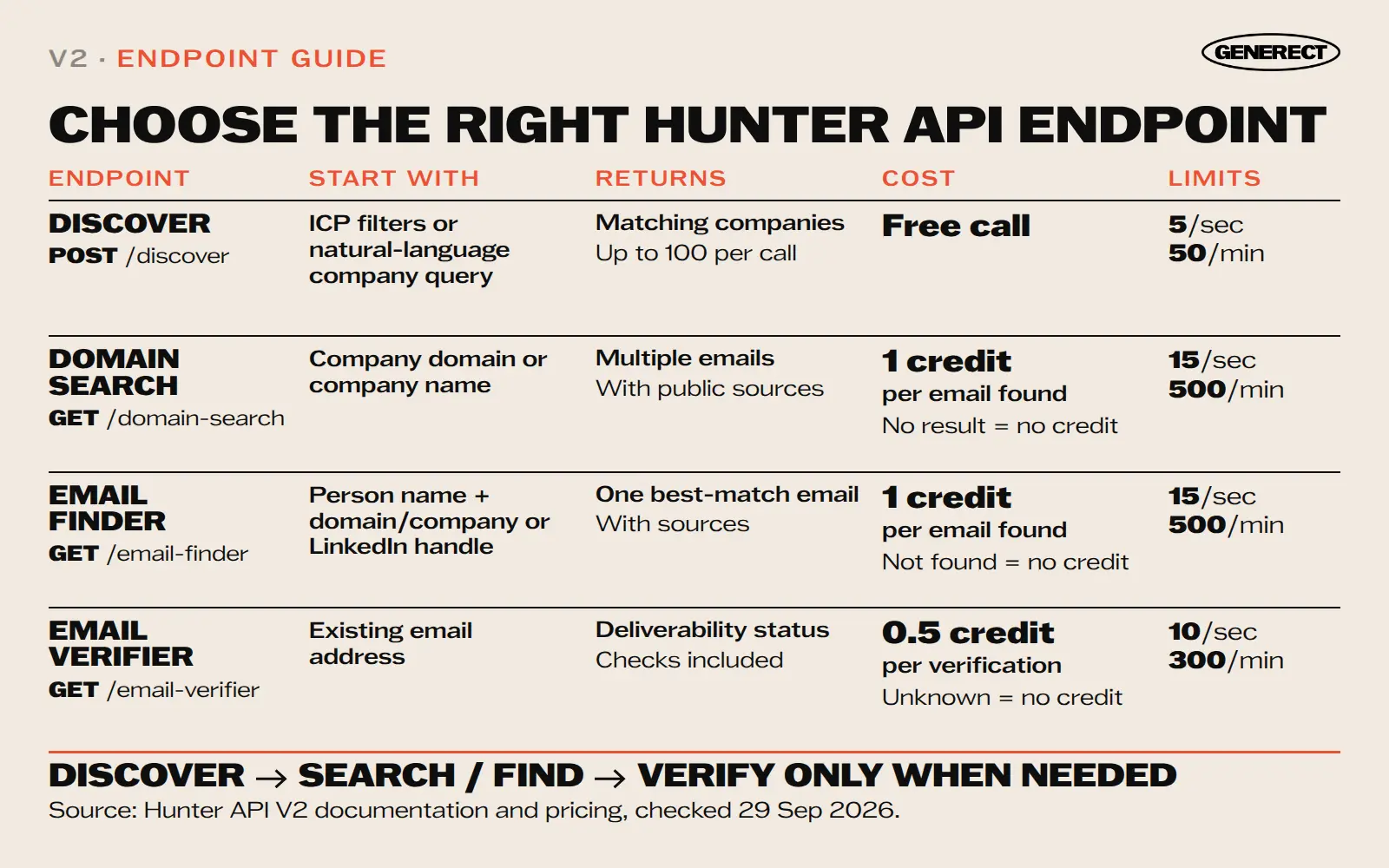
| Endpoint | Use it when | Important output or behavior |
|---|---|---|
POST /discover | You need companies matching ICP filters or a natural-language company query | Free call; up to 100 companies per response; 5 requests/second and 50/minute |
GET /domain-search | You know the company and want people or generic mailboxes at its domain | Emails, public sources, pattern, accept-all status, filters; 15 requests/second and 500/minute |
GET /email-finder | You know a person plus domain/company or have a LinkedIn handle | Email, score, source type, sources, accept-all flag, phone if available, verification summary; 15 requests/second and 500/minute |
GET /email-verifier | You already have an email and need current deliverability checks | Status, score, MX/SMTP checks, disposable/webmail/accept-all flags; 10 requests/second and 300/minute |
GET /combined/find | You want a combined enrichment route rather than stitching multiple calls together | Person and company context; enrichment is limited to 15 requests/second and 500/minute |
A response-safe Python example
This example avoids putting the key in the URL, sets a timeout, distinguishes “not found” from throttling, and reads fields that exist in Hunter’s current OpenAPI schema.
import os
import time
import requests

URL = "https://api.hunter.io/v2/email-finder"
HEADERS = {"X-API-KEY": os.environ["HUNTER_API_KEY"]}
PARAMS = {
    "domain": "example.com",
    "first_name": "John",
    "last_name": "Doe",
    "max_duration": 10,
}

for attempt in range(4):
    response = requests.get(URL, headers=HEADERS, params=PARAMS, timeout=20)
    if response.status_code == 403:
        time.sleep(2 ** attempt)
        continue
    if response.status_code == 429:
        raise RuntimeError("Hunter account usage limit reached")
    if response.status_code == 404:
        result = None
        break
    response.raise_for_status()
    data = response.json()["data"]
    result = {
        "email": data.get("email"),
        "score": data.get("score"),
        "accept_all": data.get("accept_all"),
        "source_type": data.get("source_type"),
        "verification_status": (data.get("verification") or {}).get("status"),
        "sources": data.get("sources", []),
    }
    break
else:
    raise RuntimeError("Hunter API request-rate limit persisted after retries")
Do not copy the old response example that described confidence: high and a top-level status. The current Email Finder schema uses fields such as score, accept_all, source_type, sources, and a nested verification object.
Rate limits and error handling
Hunter documents per-endpoint limits rather than one universal number. At publication time, Discover allows 5 requests per second and 50 per minute; Domain Search and Email Finder allow 15 per second and 500 per minute; Email Verifier allows 10 per second and 300 per minute; and enrichment allows 15 per second and 500 per minute. A 403 means the request rate limit was reached; a 429 means the account’s usage limit was reached. Handle those separately: retry a short burst with exponential backoff, but surface a quota alert instead of retrying a depleted account indefinitely.
400: invalid or missing parameter. Fix the request.401: missing or invalid API key. Stop and rotate/check the secret.403: request-rate limit. Back off and retry.404: no matching resource or profile. Record “not found,” not a server failure.429: monthly or plan usage exhausted. Alert the account owner.451: the person’s information cannot be processed for privacy reasons. Do not retry around it.
How to build a production-ready Hunter API integration
A production integration needs more than a successful lookup. It needs a deterministic input contract, endpoint-specific parsing, a conservative send policy, and observable credit usage. The safest design separates discovery, finding, verification, and activation instead of treating every returned address as an outreach-ready lead.
1. Normalize the input before calling Hunter
Start with a canonical company domain when possible. Remove protocols, paths, query strings, and common host prefixes; lowercase the host; and preserve the original input for debugging. For a person lookup, normalize whitespace and Unicode in the name, but do not invent a surname or split ambiguous multi-part names without retaining the original. If your source gives you a LinkedIn URL, extract only the documented handle format rather than sending an entire tracking URL.
- Use Domain Search when the known entity is a company and you want multiple associated addresses.
- Use Email Finder when the known entity is a person and you have a domain/company plus a name or a supported LinkedIn handle.
- Use Email Verifier when you already hold an address and need a current deliverability decision.
- Use Discover before the email endpoints when the starting point is an ICP rather than a known company.
Keep those routes explicit in your application. Sending every record through every endpoint wastes credits and makes it harder to explain why a contact was accepted. A simple routing field such as lookup_method (domain_search, email_finder or existing_email) makes later cost and quality analysis much easier.
2. Parse each response against its own schema
Do not force Domain Search and Email Finder into one raw model. Their envelopes are similar, but their data is not identical. Domain Search returns domain-level properties plus an array of email records. Its email records use confidence, while Email Finder returns a single best match with score. Both can expose source evidence and a verification summary, but the surrounding fields and nullability differ.
| Field | What it tells you | How to use it |
|---|---|---|
source_type | Whether the address was found in a public source or generated from a pattern | Keep it for provenance and quality analysis; do not turn it into a deliverability guarantee |
sources | Public pages and timestamps associated with the address | Store the source URL and observation dates needed for auditability |
score / confidence | Hunter’s endpoint-specific estimate of match confidence | Use as one feature in a policy, not as a substitute for verification |
accept_all | The mail server may accept mail for any recipient at the domain | Route to a more conservative queue because mailbox-level certainty is limited |
verification.status | The nested verification summary returned with a found address | Check recency and policy before deciding whether another verifier call is necessary |
phone_number | A phone number when Hunter has one and can return it | Treat as optional; never make the parser fail when it is null |
Generate a client from the OpenAPI document if that fits your stack, but still wrap the generated types in your own domain model. APIs evolve, optional fields remain optional, and a vendor response should not become your CRM schema. Save the raw response in a short-lived, access-controlled log for debugging only when your privacy policy permits it; persist the minimum normalized fields your workflow actually needs.
3. Separate match quality from deliverability
Match quality answers “is this likely the right person?” Deliverability answers “is this mailbox likely to receive mail now?” Those are different questions. A high finder score can still sit behind an accept-all domain or an inbox whose state changed after the last check. Conversely, an address can be technically deliverable but belong to the wrong person if the original inputs were poor.
A conservative policy uses multiple signals. Require a non-null email, confirm that the normalized domain matches the intended company, inspect the source type and evidence, and then evaluate verification status. Send-ready records should also pass your own suppression, consent, territory, role, and recency rules. Put catch-all, unknown, stale or otherwise ambiguous records into a hold queue rather than silently upgrading them to “valid.”
4. Make retries idempotent and quota-aware
Cache normalized request keys for the duration that makes sense for your data policy. The key can combine endpoint, normalized domain, normalized name or email, and the parameters that affect the result. This prevents two workers from spending credits on the same lookup at the same time. It also lets you record whether a repeated lookup reused a result or made a fresh API call.
Retry only transient failures. Use exponential backoff with jitter for request-rate throttling and network errors, cap the retry count, and move exhausted jobs to a dead-letter queue with the request identifier, not the API key. Do not retry invalid parameters, privacy-blocked results or an exhausted monthly usage allowance. Those need a data fix, policy action or account-owner decision.
| Condition | Automated action | What to record |
|---|---|---|
| Invalid parameter | Stop; fix the input or mapping | Endpoint, safe request fingerprint, validation message |
| Request-rate limit | Retry with bounded exponential backoff and jitter | Attempt count, delay, endpoint |
| Account usage exhausted | Stop retries and alert the budget owner | Plan/account reference and time detected |
| Not found | Store a negative result with a suitable expiry | Normalized input and lookup method |
| Privacy restriction | Suppress the record; do not route around the response | Policy reason without unnecessary personal data |
| Server/network error | Retry a limited number of times, then queue for review | Request ID, status, latency, final disposition |
5. Measure the funnel, not just API uptime
Operational dashboards should report more than HTTP success. Track requests, latency, found rate, no-result rate, accept-all share, verification-status mix, duplicate suppression, credits charged, and cost per unique usable contact. Then connect those records to downstream outcomes such as bounce, reply, unsubscribe, and qualified-opportunity rate. Without that link, a cheap high-volume API can look better than a more selective provider even when it creates more review work and fewer conversations.
- Coverage: unique people with an email divided by eligible input records.
- Usable rate: records that pass your send policy divided by unique emails found.
- Credit efficiency: unique usable contacts divided by credits consumed.
- Freshness: share of send-ready records whose verification is inside your chosen age window.
- Outcome quality: delivered, replied, and qualified records by source type and endpoint.
Security, privacy, and outreach controls
An API key should live in a server-side secret manager, not frontend JavaScript, a shared spreadsheet, a notebook committed to Git or a query string copied into tickets. Give production and development separate keys when the account supports that operating model, restrict who can view or rotate them, and remove response bodies from logs unless they are genuinely necessary. Monitoring should identify a request through an internal correlation ID rather than exposing personal data.
Finding a professional address does not by itself create permission to contact someone. Your lawful basis, disclosure, opt-out, suppression, retention, and regional outreach requirements remain your responsibility. Keep a global suppression list that runs before campaign activation, and make deletion or objection requests propagate to cached enrichment data and downstream tools. A 451 response should be treated as a policy stop, not as an invitation to query another route for the same person.
For human review, show enough evidence to make a decision: input company/person, normalized domain, lookup method, source type, verification status and date, accept-all state, and the reason the record was held. Avoid exposing the API key or full raw payload. This produces an auditable workflow without turning the review interface into another uncontrolled personal-data store.
Migration checklist for an older Hunter integration
If your integration was built from an older tutorial, audit it before changing plans or increasing volume. The highest-risk problems are usually a key in the URL, assumptions about obsolete response fields, retrying the wrong status code, and treating any found email as safe to send.
- Export representative fixtures from your current parser and compare them with the live OpenAPI schemas.
- Move authentication to
X-API-KEYor Bearer authorization and remove keys from URLs and historical logs. - Replace generic
confidence: highassumptions with endpoint-specificscoreorconfidencehandling. - Read nested verification data safely and tolerate null optional fields.
- Separate request-rate throttling from exhausted account usage in retry logic and alerts.
- Add idempotency, deduplication, and negative-result caching before raising concurrency.
- Run the same fixed benchmark through the old and new implementation, then compare usable-contact output and credits, not only found rate.
- Deploy behind a feature flag, monitor status mix and cost, and keep a rollback path until the new parser is stable.
How good is Hunter.io’s data quality?
Hunter’s most useful quality feature is transparency. Domain Search and Email Finder can return the public pages where an address was found, when it was extracted, when it was last seen, and whether it is still present. The Email Finder response also distinguishes a found address from a generated one and includes an accept_all flag plus a verification summary.
That evidence is more useful than an unsupported universal “accuracy” percentage. No provider can offer one number that applies equally to every geography, industry, company size, and mail-server policy. A fair test should measure your own ICP with a fixed, deduplicated sample.
How to benchmark Hunter against another API
- Sample at least 100 target people across the geographies and company sizes you actually sell to.
- Give each provider the same normalized name and domain inputs.
- Record find rate, verified-valid rate, catch-all/unknown share, latency, credits consumed, and cost.
- Deduplicate before sending and use the same verification/send policy for every provider.
- Compare cost per usable contact, not the sticker price per credit: total spend divided by unique contacts that pass your outreach rule.
A practical outreach rule is to send automatically only when the record passes your quality threshold, route accept-all and unknown addresses to a separate risk queue, and suppress invalid, disposable, privacy-blocked or previously opted-out contacts.
Hunter API pricing and credits in 2026
Hunter now presents one shared credit pool for Email Finder, Email Verifier, and Domain Search. The live pricing page lists Free, Starter, Growth, Scale, and Enterprise tiers. Prices below are annual-billing equivalents shown in euros on the page we checked; taxes, billing cadence, and regional currency can change the amount you see.
| Plan | Displayed price | Included credits | API access |
|---|---|---|---|
| Free | €0 | 50/month (600 shown annually) | Yes |
| Starter | €34/month billed yearly | 24,000/year | Yes |
| Growth | €104/month billed yearly | 120,000/year | Yes |
| Scale | €209/month billed yearly | 300,000/year | Yes |
| Enterprise | Custom | Custom | Yes |
The charging rules matter more than the headline pool:
- Email Finder: 1 credit for each email found; no charge when no email is found.
- Domain Search: 1 credit per email revealed; Bulk Domain Search charges 1 credit for up to 10 found emails per domain.
- Email Verifier: 0.5 credit per completed verification; an
Unknownresult is not charged. - Enrichment endpoints: 0.2 unified credit per enriched email or domain on All-in-one plans; Hunter documents separate Search-credit accounting for Data Platform plans.
- The same search or verification is counted once per billing period.
- All plans support unlimited users who share the account’s credit pool.
For a rough unit-cost comparison, Starter’s 24,000 annual credits at €408 works out to about €0.017 per credit before taxes or add-ons. That is not automatically €0.017 per usable contact: a workflow may consume a finder credit plus a verification fraction, and duplicates or catch-all results may not meet your send policy.
What do users tend to like, and where does Hunter fall short?
The recurring strengths are easy onboarding, a focused interface, public-source evidence, predictable REST endpoints, and the ability to move from finding to verification and sequencing in one product. The documentation is unusually useful for developers because Hunter publishes a live OpenAPI schema and a zero-cost test key.
The trade-offs come from that focus. Hunter is primarily an email workflow, not a complete sales-intelligence platform. Phone availability is conditional, broader people-database discovery may be less central than it is in database-first products, and the economics depend heavily on how many found contacts survive your verification and compliance rules. Discover People is also marked Beta in the current documentation, so integrations should expect possible breaking parameter or response changes.
Hunter API alternatives: which model fits?
Current high-ranking comparisons do not agree on one universal “best” tool. They segment the market by job: focused domain/person email finding, pay-per-verified waterfalls, database-led prospecting or multi-channel sales intelligence. Use this shortlist to choose what to test, then apply the same 100-record benchmark.
| Option | Best fit | Watch for |
|---|---|---|
| Hunter | Simple domain/person lookup, verification, public sources, and a documented API | Credit economics after verification; limited value if phone data is mandatory |
| Generect | ICP-based company/lead search plus email finding and validation in API-led workflows | Benchmark its live-data workflow against your exact market and latency tolerance |
| Apollo | Database-led prospecting plus engagement tools | Export/enrichment credits and data quality by segment |
| Snov.io | Email finding combined with campaign automation | Whether finder coverage or campaign features are the primary purchase driver |
| Findymail / Anymail Finder | Teams attracted to pay-for-verified or waterfall economics | Definition of a billable result, coverage, and latency |
| ZoomInfo | Enterprise sales intelligence, intent, and broader contact/company data | Contract cost, implementation overhead, and fit for smaller teams |
If your workflow starts with an ICP rather than a known name/domain pair, compare Hunter’s Discover flow with Generect’s B2B lead generation workflow. If you only need verification, compare dedicated services in our guide to the best email verification APIs. For implementation patterns, see our email finder API guide.
Is Hunter.io the best email finder API in 2026?
Hunter remains a top choice when your inputs are a person and company and your output is a professional email with source evidence. The V2 API is clear, the test key lowers integration friction, and the current product now covers more of the workflow than the older finder-only reputation suggests.
It is not automatically the best choice for every team. Choose a database-first platform if you need broad contact discovery, a phone-led provider if direct dials are mandatory or a waterfall/pay-per-verified service if your main objective is maximizing usable contacts per euro. The defensible answer comes from a representative benchmark, not a vendor’s global accuracy claim.
Frequently Asked Questions
Yes. Hunter’s Free plan includes API access and 50 credits per month. Hunter also provides a public test API key for Domain Search, Email Finder, and Email Verifier; it validates parameters and returns dummy data without consuming your credits.
Create or sign in to a Hunter account and open the API Keys area in the dashboard. Store the key as a secret and send it in the X-API-KEY or Authorization header rather than placing it in a URL.
The live pricing page lists a Free plan plus Starter at €34, Growth at €104, and Scale at €209 per month when billed yearly, with Enterprise priced separately. On All-in-one plans, one found email costs one credit, one completed verification costs half a credit, and an enriched email or domain costs 0.2 credit.
Limits vary by endpoint. Hunter currently documents 15 requests per second and 500 per minute for Domain Search and Email Finder, 10 per second and 300 per minute for Email Verifier, and 5 per second plus 50 per minute for Discover. Check the live API reference before setting production concurrency.
The current Email Finder endpoint accepts a LinkedIn handle as an alternative to name-and-domain inputs. Use the documented parameter and respect applicable privacy, platform, and outreach rules; do not build around undocumented scraping endpoints.
Email Finder can return a verification summary, but teams should inspect the nested verification status and accept-all flag rather than treating every found address as send-ready. The separate Email Verifier endpoint provides deeper current checks.
It depends on the job. Generect fits API-led ICP and lead-search workflows, Apollo fits database-led prospecting, Snov.io combines finding with campaigns, and pay-per-verified providers may suit teams optimizing cost per usable contact. Test the same representative sample before choosing.
Build the workflow around usable contacts
Whether you choose Hunter or an alternative, the durable workflow is the same: define the ICP, find the contact, inspect source and verification fields, suppress risky or opted-out records, and measure cost per unique usable contact. If you need ICP search, enrichment, and email validation behind one API, try Generect and benchmark it against Hunter on your own target list.