


The first time I connected ChatGPT Plus to Zapier MCP, it honestly felt a little surreal, like I’d stepped into the future without needing to learn a single line of complicated code. I remember sitting at my desk with my coffee, thinking, There’s no way it’s actually this simple.
But it was.
Zapier’s Model Context Protocol had just started rolling out after its launch alongside Anthropic’s MCP in late 2024, and I was curious. I’d heard it could link AI tools (ChatGPT, Claude.ai, and even dev environments like Cursor or Windsurf) straight into thousands of apps. No backend tinkering, no messy integrations.
Just… connect and go.
What I didn’t expect was how seamlessly everything clicked. Suddenly, the AI wasn’t just answering my questions. It was talking directly to my apps. It could fire off emails, update my CRM, create tasks, move files… all through Zapier’s 8,000-plus app ecosystem, tapping into over 30,000 actions. It felt like handing my workflow superpowers.
The magic, I realized, was that MCP acts like this incredibly smart bridge. Instead of me stitching together tedious automations or writing custom code, the AI just knew how to interact with the tools I already used. As someone who loves building systems but hates busywork, this was a game-changer.
And the best part? It didn’t matter whether I was in “business mode,” trying to scale processes without begging IT for help, or in “builder mode,” experimenting inside Cursor IDE. Everything just worked (and fast!).
If I had to sum it up, I’d say this: Zapier MCP makes automation feel lighter, smarter, and a whole lot more possible. It helps you:
- Build AI-powered workflows in minutes
- Scale automation across your business without the tech headache
It’s not just making automation easier. It’s making it better. Let me walk you through everything with this guide. Ready to roll?
What exactly is Zapier MCP and how does it work?
So, let’s start with the basics.
If you’re looking to streamline how your apps talk to each other without mucking around in complicated backend code, Zapier MCP is a game-changer. MCP stands for Model Context Protocol. At its core, it’s a smart communication layer that translates natural language AI requests (kind of like chatting with a bot) into real app actions.
This means you can set up powerful automations with plug-and-play ease.
Think of MCP as your reliable middleman. It handles a bunch of critical behind-the-scenes tasks so you don’t have to worry about them. For example, it manages authorization securely using OAuth 2.0 or API keys. It also encrypts your data with strong tools like TLS 1.3 when data is moving around, and AES-256 for info stored safely at rest.
In simple terms, here’s what MCP does for you behind the curtain:
- Checks who’s allowed in → verifies identity and access using secure methods like OAuth 2.0 or API keys.
- Keeps conversations private → protects data in motion with modern encryption standards like TLS 1.3.
- Locks up stored data → uses AES-256 encryption to secure information sitting in databases or storage.
- Simplifies communication → handles data exchange between systems so everything “just works” without manual setup.
- Monitors activity safely → keeps logs and traces for security audits, without exposing sensitive details.
- Manages tokens and secrets → rotates keys and access tokens automatically to reduce human error.
Plus, MCP keeps your workflows running smoothly by enforcing rate limits, automatically retrying when something goes wrong, and sticking to security best practices like request signing and audit logging.
What I really like about MCP is how accessible it makes building workflows. You can set everything up with zero code right from Zapier’s dashboard. Yet, if you’re a developer itching for some power, open APIs and client SDKs in Python or TypeScript are right there for you.
The interface uses clear, user-friendly action names, and even suggests inputs and parameters using AI to speed things up. Need to turn a step off temporarily? Just toggle it on or off. No need for complex edits.
Here’s a quick look at what makes MCP so practical:
- Zero-code setup with Zapier’s dashboard for quick builds
- Developer-friendly APIs and SDKs (Python and TypeScript) for customization
- AI suggestions that simplify choosing input fields
- Dynamic toggle controls for turning workflow steps on or off
It’s also important to know that every MCP call uses two Zapier tasks. This can affect your task quota and pricing, so keeping an eye on usage helps avoid surprises. You can find details on Zapier’s official task usage and pricing pages.
But we’ll talk about it a bit later.
Behind the scenes, Zapier MCP leverages a robust developer platform: the Zap editor and CLI, Zapier MCP OpenAI API integration (Responses API) and Zapier MCP Claude integration (Anthropic Messages API) standards, the Cursor IDE for interface scripting, plus Windsurf SDK libraries for Python and TypeScript.
Plus, built-in authentication and logging keep things secure and transparent.
One standout use case is integrating a professional lead generation api like Generect into your MCP workflows. By using OAuth 2.0 or API key authorization managed securely by Zapier, you can pull real-time lead data and enrich it right in your automation pipelines.
The Generect API fits perfectly with MCP’s security protocols and retry mechanisms, ensuring your workflows stay accurate and reliable even at enterprise scale.
Now that you’ve got a handle on what Zapier MCP is, let’s see how it stands out. You’ll learn how it compares to Zapier Agents and other AI assistants and why that difference really matters for your workflow.
Verified leads in seconds, right inside MCP
Stop chasing contacts. Let Generect feed your automations with real-time, validated B2B data that’s always fresh, accurate, and ready to act.
How is Zapier MCP different from Zapier Agents and other AI assistants?
If you’ve ever used Zapier Agents, you probably know they’re fantastic no-code helpers designed to tackle multi-step workflows without overwhelming you with complexity.
Picture them as friendly background assistants, quietly moving data and triggering actions across your favorite apps, all through a clean, user-friendly graphical interface. They’re perfect when you want to automate routine tasks like syncing contacts, sending reminders, or posting updates, all without leaving your desk.
Now, let’s talk about Zapier MCP. At first glance, it might sound similar, but it serves a different purpose. Think of MCP as a bridge between no-code ease and developer power right inside your chat environment.
No matter if you’re chatting in ChatGPT Developer Mode, using Claude by Anthropic, or another supported platform, MCP shines with its ability to trigger one-off, atomic actions or chain small workflows right where you’re brainstorming or collaborating.
Here’s what makes Zapier MCP so practical in everyday use:
- Acts as a seamless bridge → blends no-code simplicity with developer-level flexibility, so both beginners and coders can work efficiently in the same space.
- Works where you think → operates directly inside chat interfaces like GPT or Claude. No tab switching, no separate dashboards.
- Enables instant actions → lets you trigger one-off, atomic operations (like fetching data, sending a message, or updating a record) right within your conversation.
- Supports small chained workflows → you can connect multiple small actions together (like “get data → analyze → send summary”) without leaving chat.
- Integrates with your tools → connects securely to APIs, SDKs, and external services, extending what your chat model can actually do.
- Reduces friction → keeps your creative or problem-solving flow uninterrupted by running operations contextually in the same environment.
- Balances power and simplicity → gives you access to deeper integrations and code-based actions while still keeping setup approachable for no-code users.
Unlike full-blown Zapier Agents that handle multi-step automation on their own, MCP lets you, or your developers, dive deeper with programmatic APIs and SDKs if you want highly customized workflows and integrations.
One of the best things about MCP? It keeps you in the flow.
You don’t have to juggle apps or switch windows every few minutes. Instead, you perform actions directly inside your chat interface. For example, while chatting with your team or brainstorming, you can pull data, update records, or generate reports instantly without the usual disruptive app hopping. That’s a real productivity booster.
Here’s a quick side-by-side Zapier MCP vs Agents comparison to clear things up:
| Feature | Zapier Agents | Zapier MCP (Model Context Protocol) | Custom AI tools |
| User level | Everyday no-code users who want quick automations without coding. | No-code users and developers who want a mix of simplicity and flexibility. | Developers, data engineers, and AI specialists building domain-specific logic. |
| Workflow complexity | Multi-step automations linking common apps (e.g., Gmail → Sheets → Slack) with minimal setup. | Handles single or chained actions that combine no-code blocks with code execution inside AI chats. | Supports highly complex, bespoke workflows built from the ground up. |
| Interface | Visual drag-and-drop UI accessed via web dashboard or browser extensions. | Integrated directly inside chat interfaces like GPT or Claude = actions happen in context, no tab switching. | Custom-built interfaces or APIs integrated into existing systems or dashboards. |
| Extensibility | Limited to Zapier’s built-in app ecosystem and public connectors. | Extensible via APIs, SDKs (Python, TypeScript, Windsurf), and private service connectors. | Fully customizable = everything from logic to UI is developer-defined. |
| Disruptive app switching | Some context switching required between Zapier dashboard and connected apps. | Minimal = users stay inside the chat interface to perform tasks and view results. | Depends on implementation = some embed deeply into workflows, others require app switching. |
| Integration depth | Shallow-to-moderate = connects apps mainly through predefined triggers and actions. | Deep = allows direct API calls, custom auth, and data encryption via MCP’s secure channels. | As deep as needed = can connect to any internal or external API or service directly. |
| Security & data handling | Relies on Zapier’s managed environment; user credentials stored centrally. | Uses strong encryption (TLS 1.3, AES-256) and secure auth (OAuth 2.0, API keys) managed by MCP. | Fully customizable; depends on developer implementation and hosting security. |
| Setup time | Fast setup (minutes) with ready-made templates and automations. | Moderate = requires defining endpoints or importing available MCP services. | Long = development, deployment, and testing cycles required. |
| Maintenance | Minimal = handled by Zapier platform automatically. | Light = can update or extend through SDKs without full rebuilds. | High = custom updates, scaling, and debugging managed by dev teams. |
| Best use case | Quick automations between everyday SaaS apps (email, CRM, docs). | AI-augmented workflows where chat models directly trigger real-world actions securely. | Complex enterprise systems, proprietary AI logic, or internal business tools. |
The ecosystem supporting these tools is also quite rich. Zapier Agents give you a clean UI that feels approachable. Meanwhile, the ChatGPT Developer Mode lets you integrate plugins and use tools like the OpenAI Responses API or Anthropic Messages API to extend what’s possible in conversation.
If you’re a developer, the Cursor IDE and Zapier CLI tools help you build, test, and deploy these workflows efficiently.
Now, here’s where things get even more interesting – Generect. This specialized data provider plugs seamlessly into Zapier MCP workflows or Agents. What does that mean for you? Well, if you’re working in sales or marketing, automating lead generation with verified, real-time B2B data becomes a reality.
This goes beyond what typical AI assistants do. Instead of just fetching or summarizing data, Generect delivers actionable intelligence that powers smarter, more targeted campaigns. Here’s how Generect makes a real-world impact:
- Connects directly to MCP and Agents → integrates smoothly into your existing automation setup. No complex configuration required.
- Delivers verified, live B2B data → provides accurate, up-to-date business and contact information that teams can rely on instantly.
- Automates lead generation → enables real time lead generation to build and qualify prospect lists, cutting manual research час dramatically.
- Enables smarter targeting → feeds real-time insights into your CRM or marketing tools to drive personalized campaigns.
- Boosts data reliability → reduces bounce rates and wasted outreach by continuously validating company and contact details.
- Works across sales and marketing workflows → from identifying new leads to enriching existing records, it streamlines every stage of your funnel.
- Empowers AI-driven decisions → lets your AI assistant not just find data, but act on it intelligently, like launching tailored follow-ups or updates.
Think of Generect as the bridge between generic AI assistants and your very specific data needs. It fills a critical gap by injecting reliable lead data directly into AI-driven automation, making your workflows smarter and more efficient.
Whether it’s enriching customer profiles or triggering follow-ups, you get precise data that the usual “out of the box” AI solutions simply can’t provide.
Sooo, if you’re exploring how to get the most from these tools, learning about the tools and frameworks available is a smart move. You’ll find yourself working with:
- Zapier Agents’ graphical UI for straightforward automations.
- ChatGPT Developer Mode, Claude.ai, and their plugin and API capabilities.
- The OpenAI Responses and Anthropic Messages APIs for conversational intelligence.
- Developer tools like Cursor IDE, Python & TypeScript SDKs, Windsurf SDK, and Zapier CLI for building custom solutions.
- Generect, the specialized data provider that feeds real-time, verified B2B insights into your automations – perfect for automating lead generation, enriching CRM data, or powering smarter sales and marketing campaigns.
This toolkit lets you pick and choose depending on how much coding you want to do or how complex your needs are.
Once you understand what makes MCP unique, the next question is obvious: what can you actually do with it? Let’s walk through some real, ready-to-use workflows that businesses are already benefiting from.
Build once, enrich forever
Once you connect Generect, your workflows evolve with every lead: enriching, verifying, and qualifying automatically, so you never start from scratch.
What practical workflows can businesses build with Zapier MCP?
I know, you’re definitely juggling dozens of daily tasks: updating databases, managing community groups, handling emails, and keeping tabs on meetings. It’s easy to get overwhelmed.
That’s where Zapier MCP workflows come in, acting like your digital assistant across apps and channels seamlessly.
Let’s start by picturing a typical day and how Zapier MCP fits in.
First off, think about managing your data. Whether you use PostgreSQL or another SQL/NoSQL database, community-built Zaps empower you to automate database updates effortlessly.
Here’s how that looks in practice:
- Automate record updates → when a new lead arrives or a customer changes their info, Zapier updates your database instantly. No manual entry needed.
- Eliminate repetitive logins → you don’t have to sign in to your database every time you want to add or edit data.
- Trigger from real events → set Zaps to respond automatically when an email arrives, a form is filled, or a sale is made.
- Keep data always in sync → ensure your CRM, database, and other tools reflect real-time information across platforms.
- Reduce human error → automated actions handle routine updates precisely and consistently.
- Save time for analysis, not admin → spend more time making data-driven decisions, not maintaining spreadsheets or tables.
Think of it as a tireless assistant. It quietly runs in the background, keeping everything organized and up-to-date without missing a beat.
Next, calendar management is another game-changer. Zapier MCP integrates with Google Calendar and Outlook Calendar so you can create, update, or even cancel events directly from your chat interface.
Say you’re chatting with your team and agree on a meeting time – simply type a command, and your calendar updates instantly. No app switching, no double-checking your calendar.
Emails? Covered. Drafting, sending, and managing emails through Gmail or Outlook integrations become a breeze when triggered by AI chat commands.
Need to send a quick follow-up email after a chat? Zapier MCP handles it for you, keeping your communication timely and professional without the endless back-and-forth emails.
Now, here’s where things get even cooler. Think about advanced web content extraction. Using Web Parser by Zapier combined with Slack or email alerts, you can create real-time monitoring workflows for targeted websites or news feeds.
Here’s a practical breakdown of how you can use it:
| Zapier MCP use cases | What it does | How it works in practice | Real-world benefit |
| Competitor price tracking | Monitors competitor websites for pricing updates. | Web Parser extracts new price data; MCP sends it to Slack or updates a shared doc. | Stay ahead of market changes and adjust your offers quickly. |
| Industry news alerts | Tracks key publications or RSS feeds for relevant articles. | When new content appears, Zapier summarizes and sends it via Slack or email. | Saves hours of manual research – get insights as they happen. |
| Product availability monitoring | Watches e-commerce or supplier sites for restocks or new items. | Automatically checks product pages and alerts your team when stock changes. | Helps procurement or sales teams act fast on opportunities. |
| SEO and content research | Gathers competitor blog updates or keyword changes. | Web Parser pulls metadata or headings for analysis in Google Sheets. | Keeps your content strategy aligned with market trends. |
| Regulatory or policy tracking | Monitors government or industry portals for new documents. | Extracts new publications or updates and routes them to the right team. | Ensures compliance teams never miss critical updates. |
| Event or conference updates | Scrapes event websites for new sessions, speakers, or announcements. | Sends summarized updates to Slack channels. | Keeps teams informed of upcoming opportunities without manual checks. |
Beyond these simpler automations, multi-step AI assistant workflows make your life feel futuristic. Imagine booking a flight or hotel, updating your calendar, sending confirmations, and even managing payment or invoicing, all without ever leaving your chat interface.
These are all achievable within Zapier MCP, stitching together multiple actions into one smooth experience. It turns your chat into your command center.
Add voice commands into the mix, powered by speech recognition APIs like Google Speech-to-Text or Azure Speech Services, and your hands are free while your workflows run. Want to update a calendar event or send an email while cooking or walking? Just speak. Your MCP workflow listens and acts.
But it’s not just about connecting apps. It’s about handling real-world issues like errors and making workflows smarter. For example, Zapier MCP lets you build fallback actions. If an API call fails or a record isn’t found, you can set alternative steps so nothing breaks or you get notified immediately.
Conditional logic keeps your flows razor-sharp: “If X, then do Y; else, do Z.” This makes your automations adaptable, much like a thoughtful assistant who checks all options before acting. Here are some practical conditional logic examples you can use right away:
- If a customer’s email exists, update their record; else, create a new one automatically.
- If an API call returns an error, retry once after a short delay; else, trigger a Slack alert for manual review.
- If a payment succeeds, send a “Thank You” email; else, notify finance or flag the transaction for follow-up.
- If a form submission includes missing fields, send an automated request for clarification; else, pass it straight to your CRM.
- If a lead score is above a set threshold, assign it to a sales rep; else, add it to a nurture campaign.
- If a competitor’s price drops, trigger an internal pricing review; else, continue regular monitoring.
- If a file upload completes, store it in your database and confirm via chat; else, send a retry or error message.
- If an API returns no data, switch to a backup source like Generect to fetch verified B2B data.
One standout innovation is adding Generect into your Zapier MCP mix. Generect’s API automates lead search and validation, so you don’t have to do manual data entry for sales or marketing. Picture this workflow: a new lead is found and automatically enriched with details like company size or role. This verified lead data then triggers personalized outreach emails or follow-up reminders, all within the MCP ecosystem.
In fact, integrating Generect via Zapier MCP transforms lead generation from a tedious chore into an effortless routine. Once a lead passes validation, your CRM (no matter if Salesforce or HubSpot) can be updated automatically, keeping your sales pipeline fresh and accurate. This smart connection saves countless hours, allowing your team to focus on nurturing leads rather than hunting for them or copying contacts.
Let’s nail down the power of these workflows with two practical lists. First, here’s how a typical Zapier MCP workflow might look in lead management with Generect integration:
- Trigger: New lead entry from web form or ad campaign.
- Action: Send lead data to Generect API for validation and enrichment.
- Conditional: If lead is valid, update Salesforce or HubSpot CRM.
- Action: Send personalized outreach email via Gmail or Outlook.
- Follow-up: Schedule a reminder or notification in Slack for sales team.
- Error handling: If validation fails, notify marketing to review lead manually.
With workflows like that, you basically create a digital web that keeps every part of your business talking and acting smoothly together. The best part? You don’t need to write complicated code, just set up logical triggers and actions in Zapier MCP.
The platform handles the rest.
You’ve seen what’s possible. Now it’s time to roll up your sleeves and get started. Don’t worry – setting up your first MCP workflow is easier than you think. Here’s how to do it step by step.
Automate. Validate. Close.
Generect API transforms your MCP workflows into a lead engine: finding, enriching, and validating data so your team focuses on closing, not cleaning.
How can you get started with Zapier MCP easily?
If you’re new to Zapier MCP, jumping in might seem a bit intimidating at first. But I promise, it’s not rocket science. I’ve been there, fumbling through dashboards and options, and now I’m here to walk you through a straightforward way to get started (step by step and without needing a tech degree).
Let’s break it down in two parts: first, how non-technical users (that’s probably most of us) can start creating workflows quickly and easily. Then, we’ll glance at what developers should know if you want to go deeper.
Starting as a non-technical user
First things first, you want to head over to the Zapier MCP dashboard.
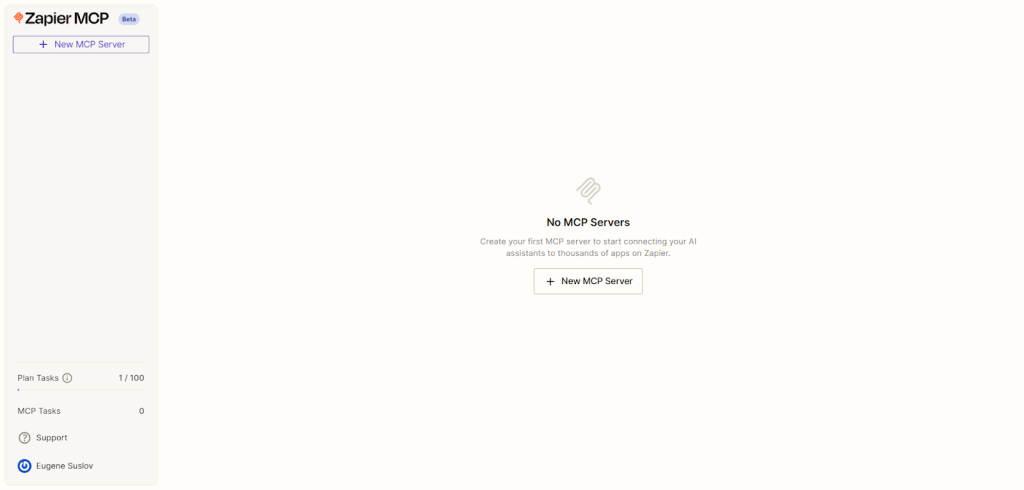
Once you log in, you’ll notice an option to create an Zapier MCP server instance. This is basically your workspace where all the magic happens. You get to pick your preferred client type here, either ChatGPT Plus with developer mode or Claude.ai.

Choose whichever you’re most comfortable with or plan to use down the line.
After setting up your MCP instance, it’s time to add your favorite apps and actions. One of Zapier’s biggest strengths is its massive library of pre-built connectors that make integration fast and intuitive.
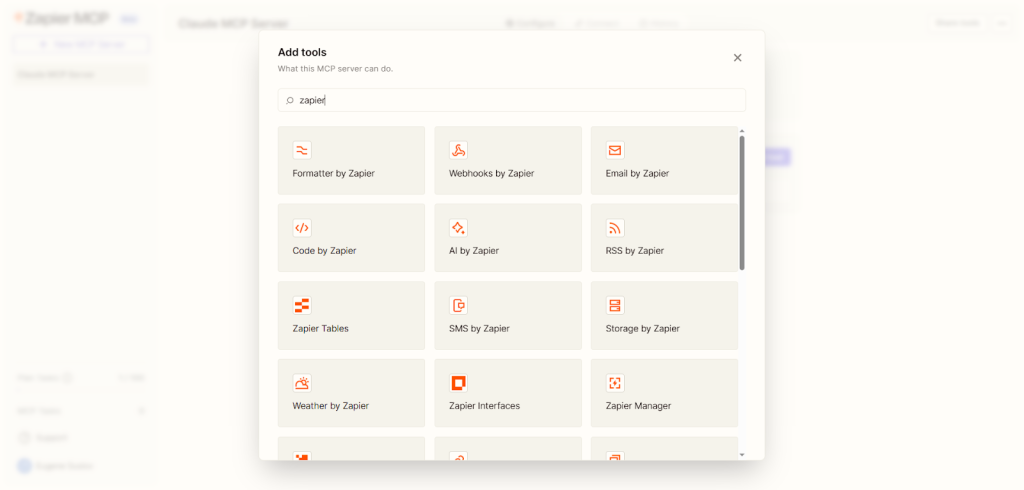
Here’s how to do it step by step:
- Pick your apps → open the MCP dashboard and select the apps or services you want to connect (like Gmail, Notion, Slack, or PostgreSQL).
- Authorize access → when prompted, allow Zapier MCP to connect securely to those apps.
- Use OAuth 2.0 or API keys → most apps use OAuth 2.0. You’ll just click “Allow.” For others, copy and paste the API key the app provides.
- Follow on-screen prompts → the setup process walks you through each step, so you won’t need any technical background.
- Test the connection → run a quick test to make sure MCP can talk to your app. It’ll confirm when everything’s working.
- Add actions or triggers → choose what you want to automate, for example, “When a new form is submitted in Typeform, create a record in PostgreSQL.”
- Relax! It’s all secure → MCP encrypts data in transit with TLS 1.3 and protects stored credentials using AES-256, so your connections stay safe.
Once your apps are connected, you’ll get access to AI-powered suggestions right inside the dashboard. These suggestions help you configure and validate your input fields accurately. Think of it as having a smart assistant guiding you so you don’t miss anything important.
There’s also handy toggle controls that let you manage dynamic inputs, meaning, you can adjust your workflows to handle different scenarios on the fly without redoing everything.
Now, here’s a feature I found super useful: saving sets of actions as reusable multi-step sequences. When you’ve combed through your workflow and it’s running smoothly, save it for later. Next time, you just load your saved sequence instead of starting from scratch, saving tons of time.
When you’re ready to connect your MCP workflow with your client apps or chatbots, head to the “Connect” tab. Copy the integration URL from there and paste it wherever you need to link your workflows. This is how Zapier MCP talks to your ChatGPT Plus or Claude.ai client effortlessly.

Speaking of ChatGPT and Claude, to really unlock the MCP features inside these platforms, make sure you follow their official integration docs and developer guides. These walk you through the optional but important step of enabling MCP functionality properly.
A quick but crucial note: for those using Claude.ai, MCP feature activation requires ownership of certain enterprise or team plans. If you’re unsure, it’s worth checking with your admin or their support to confirm you have the right plan for MCP workflows.
From workflow to revenue flow
Generect turns your MCP automations into ROI machines. Generate and enrich leads automatically, and watch conversions climb.
A quick developer setup overview
If you’re a developer or someone comfortable with coding, here’s a sneak peek at how you can leverage Zapier MCP programmatically.
You’ll be working with APIs like the OpenAI Responses API or the Anthropic Messages API. These let you send structured messages that invoke MCP workflows directly, giving you
powerful control without the dashboard. Here’s how you can put that power to work in real-world scenarios:
| Use case | How it works | Practical example | Result / Benefit |
| Automated report generation | The API sends a structured request to MCP to fetch data, summarize it, and return a formatted report. | A daily summary of new leads from PostgreSQL is sent to Slack every morning. | Saves time and ensures your team always has the latest insights. |
| Smart data enrichment | Triggers MCP to call Generect or another data source for real-time B2B enrichment. | When a new lead appears in your CRM, the API enriches it with company details instantly. | Keeps records accurate and complete without manual updates. |
| Error handling & recovery | Sends a message to MCP to retry or switch APIs when a request fails. | If an external API doesn’t respond, MCP automatically retries or uses a backup service. | Prevents workflow interruptions and keeps automations stable. |
| Dynamic content creation | Uses AI model responses to create tailored text, then routes output via MCP to another tool. | Generate personalized follow-up emails or blog snippets using the Responses API. | Produces consistent, high-quality content automatically. |
| Real-time notifications | Combines model output with MCP actions to send immediate alerts. | Detects a keyword or anomaly in a conversation and posts an alert to Slack. | Keeps teams informed instantly, improving response times. |
| Conversational workflows | The API allows AI chat responses to directly trigger connected actions. | While chatting in GPT, you can create a task in Asana or update a record in Airtable without leaving the chat. | Turns conversations into action instantly. No copy-pasting or context switching. |
| Custom data summaries | Uses structured prompts to request analytics or summaries via MCP. | Ask “Summarize all leads from this week by region,” and receive a compiled table instantly. | Transforms raw data into insights on demand. |
Plus, there’s the Cursor IDE, a visual interface where you can create workflows by dragging and dropping elements. It’s a brilliant way to build or tweak workflows with minimal code.
For the code buffs, Zapier MCP offers the Windsurf SDKs. Whether you prefer Python or TypeScript, these SDKs let you script your Zapier MCP integrations and add advanced customizations to your workflows. It’s perfect if you want your setup to be as unique and efficient as possible.
Integrating Generect API (a quick win for your MCP journey)
While you’re setting up your MCP workflows, consider adding the Generect API as a connected app. It uses OAuth 2.0 or API keys for easy credentialing through Zapier MCP. Why Generect? Because it’s a straightforward REST API that delivers real-time data – ideal for flexible workflows.
One use case I found really exciting was using Generect-powered lead generation. Imagine automating sales prospecting right from your MCP dashboard without manual work. It lets you test and get tangible results early on, helping you quickly see the value of Zapier MCP in your business. Here’s how you can start:
- Open your MCP dashboard → go to your active MCP instance inside Zapier or your chat-integrated environment (e.g., ChatGPT or Claude).
- Add a new connection → choose “Add Connected App” and search for Webhooks by Zapier option.
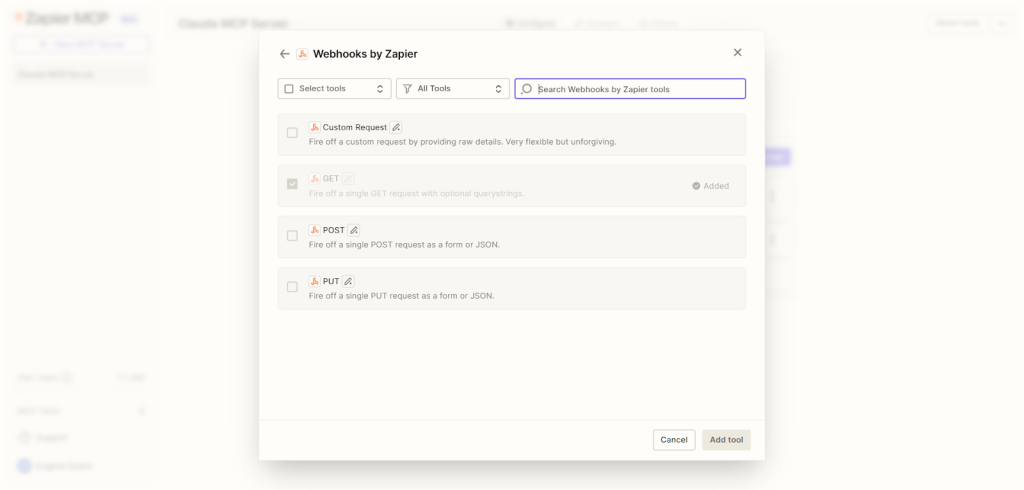
- Select your authentication method → pick between OAuth 2.0 or API Key.
- For OAuth 2.0, just sign in and click Allow Access.
- For API Key, copy your key from your Generect account and paste it in.
- Test the connection → run a quick test to confirm the integration works. You should see a “Connection Successful” message.
- Create your workflow → for example (oversimplified):
- Trigger: New lead in your CRM.
- Action: Fetch enriched company data via Generect API.
- Result: Updated CRM record with verified, real-time data.
With this setup, your lead generation runs automatically, giving you instant, high-quality insights without manual effort. And, one more thing: you can even use Generect MCP directly inside Claude, for example, to pull live company insights during a chat, enrich CRM records as you brainstorm outreach, or instantly qualify leads as they appear in your pipeline.
It’s fast, invisible automation that works where you already think and collaborate.
So, once your workflows are up and running, it’s natural to ask: is it safe, and what’s it going to cost? Let’s look at how Zapier MCP handles security and pricing so you know exactly what to expect.
Data that works as hard as you do
Generect API gives your Zapier MCP flows a data boost: verified emails, live firmographics, and real-time enrichment that powers better automation.
Is Zapier MCP secure and how is it priced?
You might be wondering, is Zapier MCP secure enough to trust with my business workflows?
The short answer: absolutely.
Zapier takes security seriously, layering multiple protections to keep your data safe. For starters, it uses strong authentication protocols like OAuth 2.0 and securely managed API keys to make sure only authorized users and apps connect to your workflows.
Every bit of data moving through the platform is encrypted – TLS 1.3 protects data in transit, while AES-256 keeps everything safe at rest. Plus, they add rate limiting and request signing to stop any abuse or tampering with your automation requests.
Zapier also provides detailed audit logs that help you track every action, which is a lifesaver for compliance with regulations like GDPR and CCPA. Before going live, you can test your workflows safely in a sandbox environment. This means you won’t accidentally mess with real data or waste valuable task runs.
Security can get abstract fast, so here’s a short, plain-English guide:
| Security feature | What it actually does | What it means for you |
| OAuth 2.0 / API keys | Verifies identity before anything runs | No one can trigger your workflows without permission |
| TLS 1.3 | Encrypts data while traveling | Your info stays private on the move |
| AES-256 | Encrypts stored credentials | Hackers can’t read your saved keys |
| Rate limiting | Keeps requests in safe bursts | No accidental overload or app locks |
| Request signing | Confirms requests are legit | Prevents tampering or fake signals |
| Audit logs | Tracks key events in workflows | Easy troubleshooting and compliance |
| Sandbox testing | Runs workflows safely before launch | You don’t break anything by accident |
Now, about pricing: it’s practical and transparent.

Each Zapier MCP call counts as two tasks, directly affecting your task quota and billing.
Good news is, starting September 17, 2025, Zapier has removed hard monthly task limits, giving you more flexibility to scale.
They also offer enterprise plans that include custom SLAs, dedicated support, and even on-premises deployments if your business needs more control or meets strict regulations.
If you want to dig deeper, Zapier’s task usage and pricing pages offer detailed info along with enterprise sales and security compliance contacts. For example, if you’re using Generect’s API within your Zapier MCP workflows for lead generation, their pay-as-you-go model is worth knowing: $0.03 per valid email found and $0.02 per export, plus a free tier of searches.
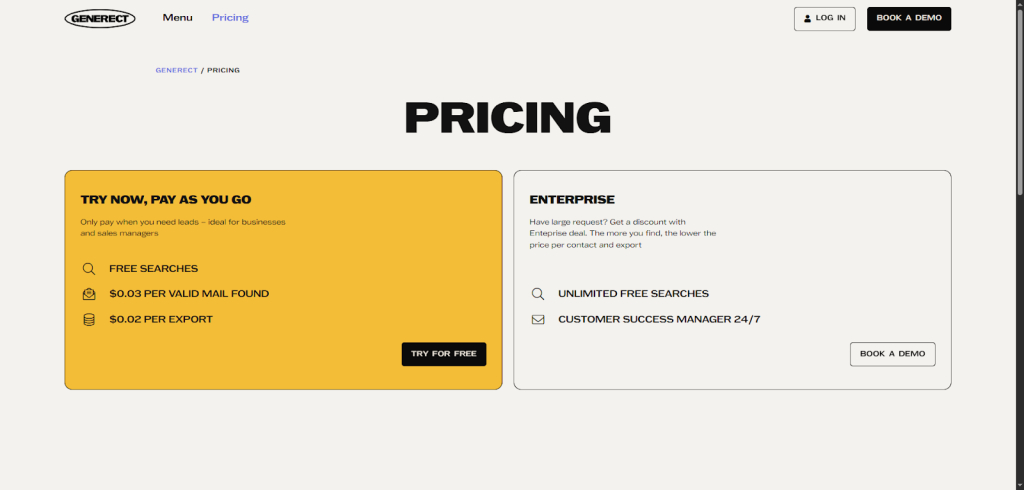
This Zapier MCP pricing approach means you only pay for what you use, keeping costs in check.
What’s more, accessing high-quality b2b leads data via Generect cuts down on wasted effort and boosts your ROI. This combo makes your Zapier MCP workflows not just secure and flexible, but also cost-effective and smart for business growth.
Now that you understand how MCP works, what it costs, and how secure it is, let’s bring it all together. Here’s why making Zapier MCP part of your 2026 strategy could be one of your smartest business moves.
Why Zapier MCP workflows should be part of your 2026 automation strategy
If you’re looking to simplify your business automation, Zapier MCP should be on your radar. It’s a powerful, scalable, and secure protocol that’s already changing how industries build AI-driven workflows. What makes it stand out? It’s easy to use, connects seamlessly with thousands of apps through Zapier’s ecosystem, and offers developers the freedom to customize and extend their automations exactly how they need.
From my experience, adopting Zapier MCP cuts through the usual complexity and speeds up setting things up. You’ll see your team’s productivity shoot up, and your operations get more agile in no time. Here’s a quick look at what you get:
- Simple integration with your favorite tools
- Faster deployment of workflows, including complex saas b2b lead generation strategies.
- Room to scale as your business grows
You don’t have to go it alone either. Dive into the Zapier MCP platform, join developer communities, and use official resources to get the most out of it.
If you’re looking to take things a step further, it’s worth exploring how tools like Generect fit into your Zapier MCP ecosystem. Their API connects directly to MCP, feeding your workflows with verified, real-time B2B data = no spreadsheets, no manual lookups. It’s one of those quiet upgrades that makes everything else you’ve built work just a little smarter.
You can even test it in minutes by integrating it through Zapier’s dashboard or booking a quick demo to see it in action.

