

Last updated: August 2026. Want to close more deals? Start by understanding the companies you sell to before you write the first line. Good research helps you qualify the account, find a credible reason to reach out, and ask questions the buyer cannot answer with a quick search.
TL;DR: To research a company for sales, check your CRM and ICP fit first; scan the company website, careers page, recent news, and official filings; identify trigger events, the tech stack, and the buying committee; verify the contact; then turn one evidence-backed signal into a relevant question. Time-box the first pass to 15 minutes for a typical mid-market account.
How do you research a company for sales in 15 minutes?
| Step | Time | Output |
|---|---|---|
| 1. Check CRM history and ICP fit | 2 min | Known relationships, prior objections, and a go/no-go decision |
| 2. Scan the website and careers page | 3 min | Business model, priorities, hiring themes, and language the company uses |
| 3. Check news and official records | 3 min | Funding, leadership, expansion, filings or other dated trigger events |
| 4. Map the buying committee | 2 min | Likely user, champion, blocker, and economic buyer |
| 5. Check tech and review signals | 2 min | Current tools, integration clues, and evidence of friction |
| 6. Verify the contact and write the brief | 3 min | One verified contact, one pain hypothesis, and one useful opening question |
For strategic enterprise accounts, expand the same workflow to 30–45 minutes and include annual reports, earnings calls, leadership interviews, and a fuller stakeholder map. The goal is not to collect everything; it is to find enough verified context to change your next action.
We’ll cover how to:
- Quickly gather key company details that actually matter for sales.
- Spot buying signals and decision influencers.
- Use free (and paid) tools to get insights without spending hours.
- Turn your research into smart, targeted outreach.
We’ll cover everything from the basics (like where to find company info) to deeper insights (like understanding company goals).
Curious? Then let’s start with the basics and see why you even need company data in the first place.
Why should you research a company before reaching out?
Before you send that email or make that call, pause for a moment. Ask yourself: Do I actually know who I’m reaching out to?
Researching a company isn’t just a checkbox. It’s your secret weapon. It helps you talk with people, not at them. When you show up informed, you’re starting a real conversation.
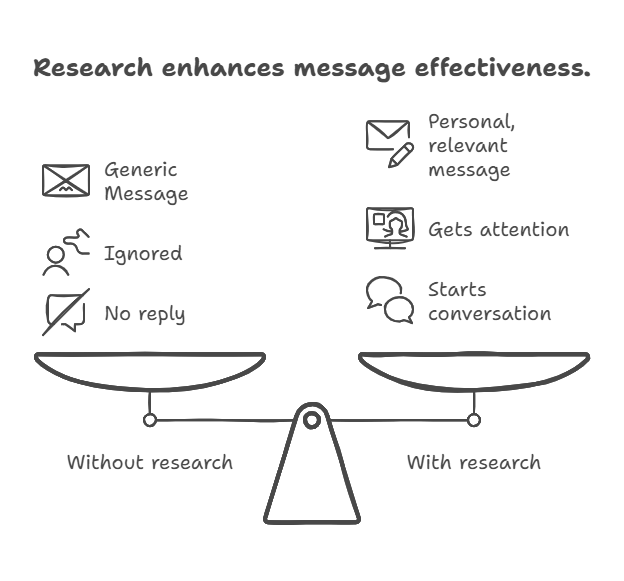
Let’s break down why doing a little homework up front makes a huge difference:
- You’ll build better conversations, not just sales pitches → Nobody wants to hear a generic spiel. But if you mention something specific (like a recent product launch or a change in leadership), you instantly sound like someone worth talking to. It’s how you go from “another salesperson” to “someone who gets us.”
- You’ll show you care about their business → People can tell when you’ve done your homework. It shows respect. It says, “I took the time to understand what you care about.”Instead of guessing their pain points, you’ll know what matters. Maybe they just raised funding. Maybe they’re hiring aggressively. These are clues that help you connect faster and with more meaning.
- You’ll avoid wasting time on the wrong leads → Not every company is a good fit, and that’s okay. A little research helps you spot red flags early. Maybe they just signed a deal with a competitor. Or maybe they’re shrinking, not growing. Spending five minutes upfront can save you hours of chasing the wrong prospect.
- You’ll boost your chances of closing the deal → The more relevant your message, the more likely it gets a response. Simple as that. When you tailor your outreach to their needs, they’re more likely to say yes.
So, instead of spraying the same message to 50 companies, you’ll focus on the right 10 and make each one count.
Know before you send.
Don’t be that rep sending generic emails. Use Generect to uncover insights and personalize every message.
Next, let’s look at what you need to do before the research = how to get yourself ready for it.
What should you know before you start?
Before you dive into researching a company, take a quick step back. The goal is to find useful info that helps you make smart, targeted outreach. To do this well, you first need to clarify a few things:
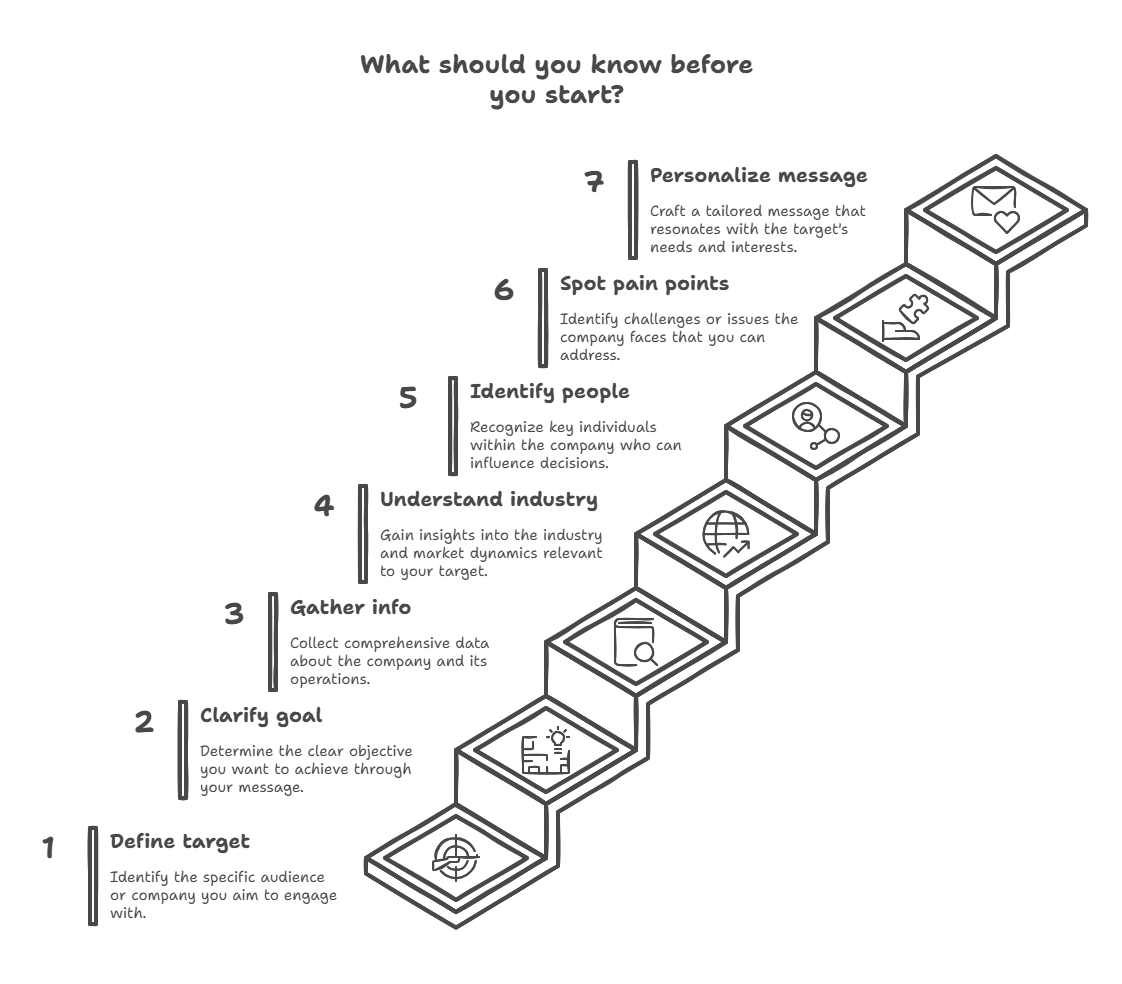
Let’s break down what they are.
Define who you’re looking for
Don’t waste time researching random companies. Focus only on the ones that fit your ICP = the kind of business that’s most likely to buy from you.
You’ll want to be clear on things like:
- Industry
- Company size
- Location (if it matters)
- Business model (e.g., is your focus on b2b saas lead generation or eCommerce?)
- Common challenges they face
Once you’ve nailed this down, every lead you research will be more relevant, and way more likely to turn into a real opportunity.
Be clear about your goal
Before you research, ask: What do I want this outreach to do? Are you trying to get a meeting? Send a useful resource? Start a conversation?
Your goal should shape what you look for.
If you’re offering a demo, for example, you’ll want to know what tools they’re using now or what’s slowing them down. That way, your message speaks directly to their reality.
Choose the company research tools that work for you
You don’t need expensive software to do solid research, but you do need to know where to look.
Professional profiles can give you insight into team structure, job changes, and hiring trends. A company’s website often reveals their mission, current priorities, and any big updates.
News articles and recent press can show you if they’ve raised funding, launched something new or entered a new market. And if you do have access to sales tools (like a dedicated b2b lead generation tool), they can speed up the process by pulling all this info into one place.
Once you’ve got your target, your reason, and your tools ready, then you’re set to research with purpose. No fluff! Just the info you actually need to connect with the right people.
So, what resources or platforms can help you find the right information? Let’s take a look.
Where can you find basic company information?
Use a source hierarchy instead of trusting whichever result appears first. Start with your CRM for relationship history, the company’s own site for positioning, and an official registry for legal facts. For U.S. public companies, use SEC EDGAR for filings; for U.K. companies, use the official Companies House register. Use third-party databases to discover leads and signals, then cross-check any claim that will shape qualification or outreach.
Now that you know who you’re targeting and why, it’s time to dig into the basics.
Luckily finding basic company info doesn’t take hours. You just need to know where to look, and what to look for.
Here’s a quick cheat sheet of where you’ll find the most useful insights:
| What you need | Where to look |
| Company mission & focus | Company website (About page, homepage) |
| Recent updates & big news | LinkedIn posts, Google News, company blog |
| Tech stack (tools they use) | BuiltWith, Wappalyzer, SimilarTech |
| Team size & structure | LinkedIn “People” tab, About page |
| Decision-makers & influencers | LinkedIn, Apollo, Generect |
| Pain points | Job ads, blogs, Glassdoor reviews, G2/Capterra |
Let’s break it down.
Start with the company’s website
Sounds basic, but many people skip this step or rush through it. A company’s website is their digital handshake + it’s where they tell the world what they do and what they care about.
Taking a few minutes to explore it properly gives you a real advantage.
Start with the homepage. Scan for headlines, featured products or calls to action. What are they promoting right now? Is there a new launch, a seasonal offer or a shift in messaging?
This gives you a snapshot of their current focus and priorities.
Visit the about page. This is where you’ll learn their origin story, mission, and values. You’ll often find leadership bios here too. Understanding this background helps you connect with the company on a more human level.
Also, check out their products or services page. Read how they describe what they offer. What words do they use? How do they position themselves? This can help you frame your pitch in a way that resonates. And if you notice a gap (something they don’t offer but might need), you’re already ahead.
Don’t forget the footer. It’s an underrated section where companies often link to hidden gems like their blog, press releases, careers page, and contact info.
It’s a goldmine if you’re trying to learn more without digging too deep.
Head over to LinkedIn
Think of LinkedIn as the company’s personality online. It’s more dynamic than their website and gives you a feel for how they communicate, who they hire, and what they care about.
Look at their “About” section. It’s usually just a short paragraph, but it gives you a quick snapshot of what the company does and how they describe themselves. It’s a great way to get aligned with their language and tone.
Scroll through their posts. This is where you’ll see what they’re proud of, promoting or working on right now. Whether it’s a product launch, a big milestone or thought leadership content, these updates tell you what’s top-of-mind for them.
Also, head over to the People tab. It shows you how big the company is, where employees are based, and what roles they have. You can spot decision-makers or team leads pretty quickly here. (This is also where you’ll find the right person to reach out to, which we’ll cover in the next section.)
You can even pick up on trends, like recent growth, new hires or team changes.
Dig into prospect databases
Sometimes you need structured data such as industry, headcount, location, funding context, technologies or relevant roles. A comprehensive B2B contact database can speed up discovery, but verify important claims against primary sources. Generect is one option built for this workflow.
Here is a concrete Generect workflow. Suppose your ICP is privately held software companies with 51–200 employees and you sell to sales leaders:
- Search companies by industry, headcount, location, and relevant keywords. Review the returned domain, description, location, founding year, technologies, and funding-related fields when available.
- Open a candidate and cross-check its website, careers page, and dated announcements. A database field establishes context; it does not prove current buying intent.
- Run a lead search for the likely buying roles (for example, VP, Head or Director titles in sales and RevOps) and map the user, champion, and economic buyer.
- Use the email finder or validator before outreach. Treat
exist: yesas a confirmed mailbox,exist: noas invalid, andexist: unknownas unconfirmed, often because the domain is catch-all. - Write the brief with one verified company fact, one dated trigger from a primary source, one relevant role, and one question. Do not turn a funding round or technology field into an unsupported pain claim.
This sequence separates fit data from timing evidence and contact verification. That distinction is the point: a matching account is not automatically an in-market account, and a plausible email is not automatically deliverable.
One platform. All the insights.
No more 10 tabs open. Generect brings all the company intel you need onto one clean page.
We’re sure Generect is just what you need. Still, it’s always a good idea to explore other tools too. Here are a few options:
- Crunchbase → great for financial info, leadership changes, and funding history.
- ZoomInfo → gives you org charts and decision-maker contacts (if you’ve got access).
- Apollo → perfect for pulling direct emails and seeing who’s in what role.
- BuiltWith or SimilarWeb → help if you’re selling SaaS or want to see what tools a company uses.
All these company research tools can help you quickly gather the information you need, assess a potential client or prepare for an important meeting.
Google it, but “the smart” way
A simple Google search can uncover a lot, if you know how to ask.
Here are a few quick tricks:
- “Company Name” + recent news → to find articles or press mentions.
- “Company Name” + competitors → to understand where they stand in the market.
- site:companyname.com blog OR press → to go straight to their updates.
Once you’ve got the basics, you’re approaching the company with context and confidence. And that makes all the difference.
We’ve figured out how and where to get the basic company info. But what if you need industry data?
How do you understand the company’s industry and market?
Knowing what a company does is just the start. To really connect, you’ve got to understand where they operate: their industry, competitors, and who they’re selling to. It’s the context that turns a generic pitch into a relevant one.
Before diving into the specifics of the company, zoom out. What’s going on in their space? Are there new trends, challenges or big shifts they’re likely dealing with?
You can find this out by:
- Searching Google News for recent headlines. Just type in the industry name + “news” (e.g., “logistics industry news”).
- Reading trade publications or blogs in their niche. These usually cover trends, pain points, and upcoming changes that can affect your prospect.
- Following industry hashtags on LinkedIn. This can surface posts from people in the field, not just news outlets.
That way, you can speak their language and show you understand what they’re up against.
Once you understand the broader industry, it’s time to zoom in and figure out where the company fits within it. That means knowing who their competitors are, how they position themselves in the market, and who their customers are.
This context helps you tailor your approach in a way that actually resonates.
Сheck out their competitors. A quick Google search like “Top [industry] companies” will usually surface a few big names. You can also look on comparison or review sites. Visit those competitors’ websites and take note:
- How do they describe their products?
- What kind of tone do they use?
- Is their pricing clear?
- Are they focused on small businesses or large enterprises?
These small details can show you how your target company is trying to stand out.
Study how the company talks about itself. Are they positioning themselves as a premium brand? Budget-friendly? Tech-savvy? Innovative?
This kind of messaging tells you a lot about who they want to attract and what kind of problems they think their customers are trying to solve.
Also, look at who they’re actually serving. Their website might list customers directly or you might find names in case studies, testimonials or partnership announcements. If not, poke around their LinkedIn posts or job listings.
A role like “Customer Success Manager for Enterprise Clients” tells you they’re working with large businesses. Details like that give you valuable insight into their target audience and help you figure out where your product or service could add real value.
Understanding the bigger picture helps you ask smarter questions, tailor your message, and show that you’ve done your homework.
Got that part covered. Now, what about the company’s structure and size? Let’s take a look.
How do you learn about the company’s size and structure?
Once you understand the industry and market, it’s time to zoom in.
You need to know who you’re actually selling to: how big they are, how they’re structured, and who makes the decisions. This helps you tailor your approach and avoid wasting time with the wrong contacts.
Let’s start with the basics.
Headcount gives you a rough idea of company size and complexity. The easiest place to check? LinkedIn.
Just search for the company, and LinkedIn will show you how many employees work there. You can even filter by department, location or title. That’s helpful if you’re targeting specific roles like marketing managers or IT directors.
If LinkedIn doesn’t give you a clear number, check the company’s About page. Many list their team size or say things like “over 500 employees worldwide.”
Next, get a feel for their financial weight.
You don’t always need exact numbers. Just a ballpark figure. Use sites like Generect, Growjo, Craft.co or RocketReach. These directories often estimate revenue based on employee count, funding, and growth indicators.
If the company is public, you’re in luck. Just search “[company name] investor relations” and read their annual or quarterly reports.
This gives you a sense of scale. A $5M company makes very different buying decisions than a $500M one.
Now that you know the size, figure out who’s who inside. Start with LinkedIn again. Look for department heads, directors, and decision-makers. Read their job titles and summaries to see who might be involved in the buying process.
Here’s what to focus on:
- Who owns the problem your solution solves?
- Who controls the budget?
- Who influences the decision?
Use LinkedIn filters or an email finder tool like Generect to get email addresses when you’re ready to reach out.
Your shortcut to smarter outreach.
In under a minute, Generect gives you the insights to write better emails and book more meetings.
Now let’s look at how you can quickly find the right contacts to start a conversation with.
Who are the key people to know?
You’ve got the company details. You understand their market and structure. Now it’s time to find the people who actually make the decisions.
If you can find them, understand what matters to them, and speak to their goals or challenges, you’re already ahead of most salespeople.
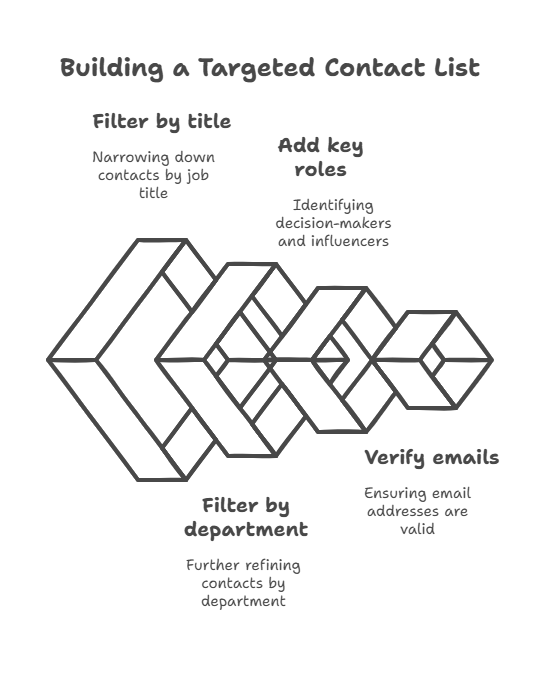
All you need to do is start with job titles. You’re looking for the people who own the problem your product solves. If you sell a marketing tool, look for CMOs, VPs of Marketing, Growth Leads. Selling a security platform? Try CISOs, IT Directors or Heads of Engineering.
Not sure who to target? Think about these roles:
- C-level execs for strategic decisions and budgets
- VPs and Directors for day-to-day oversight and execution
- Managers for influencing and championing solutions internally
Once you know what titles to look for, it’s time to search smart. Head to LinkedIn and search for the company. Then click “People” and use filters like Job Title, Location or Department. You’ll quickly build a list of key contacts.
Look for 1st or 2nd-degree connections = you might have a warm path in.
You can also see who’s active on LinkedIn. Are they posting? Commenting? That’s a great sign they’re open to conversations.
After you’ve got a shortlist, go one step further: research their background. Read their profile summaries. Check past roles. Notice patterns. Did they work at a competitor? Do they mention pain points your product solves?
Even a quick scan can give you powerful context.
For example, “This VP just joined six months ago, bet they’re looking to make an impact.” Or “This manager’s post talks about team burnout, maybe they need automation.”
Knowing who to talk to (and what matters to them), turns a cold outreach into a relevant, personal message. But how do you uncover the pain points your solution can actually solve?
Let’s explore that next.
What kind of challenges or pain points should you look for?
Finding pain points is one of the most valuable parts of company research. It tells you where the friction is: what’s slowing them down, stressing them out or stopping growth. If you can speak directly to that, you’re no longer just selling. You’re offering help.
So, how do you find them?
Companies often reveal more than they mean to through their own updates. You just have to know where to look. News articles, press releases, and announcements can be full of clues.
Here’s a quick guide to where you’ll spot pain points, and what they usually reveal:
| Where you look | What you’ll likely find |
| Blog posts | Current goals, internal challenges |
| Job ads | Bottlenecks, inefficiencies |
| Glassdoor / Indeed reviews | Employee frustrations, cultural issues |
| G2 / Capterra | Customer pain points, feature gaps |
| Social media mentions | Brand perception, public complaints |
You’re looking for patterns.
- Repeated complaints? That’s a clue.
- Consistent hiring in one area? That’s another.
By combining these signals, you’ll get a fuller picture of what they’re dealing with. And when you understand their real challenges, you can reach out with a solution that feels relevant, not random.
Want to find out what tools the company’s already using? No problem. Keep going! We’ll show you how.
How do you figure out their tech stack or tools?
If you’re selling software (or anything that plugs into other systems), you need to know what tools a company’s already using. It helps you understand if they’re a good fit, how to position your offer, and whether your solution can integrate easily.
Fortunately, it’s not that hard.
Some tools are built specifically to show you what technology a company’s using on their website. They’re fast, free (or freemium), and super useful.
Try one of these:
- BuiltWith → Just enter a company’s URL and get a full list of technologies powering their site (CMS, marketing tools, analytics, and more).
- Wappalyzer → Works similarly and even has a Chrome extension. Great for quick checks while browsing.
- SimilarTech → Gives insight into web tools and trends across companies, so you can compare what similar businesses are using.
These tools won’t show you everything, but they give you a solid starting point, especially if your product needs to work with certain platforms.
Want to know what tools they use internally, not just on their website? Job postings can tell you more than you think.
Look for listings on their Careers page or LinkedIn. If they’re hiring for roles like “Sales Ops,” “Data Analyst” or “Marketing Manager,” pay close attention to the tech skills listed. Mentions of Salesforce, HubSpot, Notion, Zapier or other platforms are all great clues.
Also, if your product is software, check if they list supported integrations on their website. If they already connect with the tools your product integrates with, that’s a strong sign you’re compatible. Even better, if they’re missing a key connection you do support, you’ve just found a potential value gap to highlight in your pitch.
But how can you get a sense upfront that the client might be interested in your offer? We’ll cover that next.
What signals show they might be ready to buy?
You’ve done the company market research. You know the company, the people, the pain points. Now comes the million-dollar question: Is this the right time to reach out?
Timing can make or break your pitch. Luckily, companies drop hints all the time when they’re open to new solutions/ You just have to spot them.
For example: when companies grow, they face new challenges. That often means new needs, and new company research tools to support them.
So, what kind of signs should you look for?
| Signal | What it might mean |
| New funding round | Ready to invest in growth & tools |
| Hiring for key roles | Building capacity, scaling up |
| Product launch or expansion | Facing new challenges, needs support |
| Job ads mentioning inefficiencies | Actively looking to fix internal issues |
| Negative customer reviews | Open to new solutions to improve experience |
| Employee reviews about “growing pains” | Likely experiencing process or tool gaps |
Spotting buying signals is about being present at the right moment. When you align your outreach with their momentum or pain, you dramatically increase your chances of getting a response.
Ready to get started? Then let’s figure out where to begin and how to move forward.
How do you organize your research?
Keep a one-page account brief, not a research dump. Record the source and date next to every claim so another rep can verify it. A useful brief has seven fields: ICP fit, business model, current priority, trigger event, likely pain, buying committee, and next-best question.
If you use an AI assistant, give it the source URLs or pasted evidence and require a citation for every factual statement. Ask it to label unsupported points as “unknown” instead of filling gaps. AI is useful for summarizing evidence; it is not a source of truth for funding, headcount, leadership or contact data.
Reusable AI brief prompt: “Using only the sources supplied, create a sales account brief with: ICP fit, business model, recent dated changes, likely priorities, buying committee, tools in use, risks, and three discovery questions. Cite every claim with its URL and date. Mark anything not supported by a source as unknown. Do not assess fit unless the evidence supports it.”
You’ve gathered a ton of valuable info. Now what? Research is only useful if you can actually use it. When you organize it well, you’ll walk into every sales call confident, focused, and ready to connect.
The goal here is to keep your notes short, clear, and easy to act on.
Because you don’t need anything fancy. Just a consistent way to track what matters. You can use a CRM, a Google Doc or a template in Notion or Excel.
The tool doesn’t matter. The structure does. Here’s what to include:
| Section | What to include |
| Company snapshot | Industry, size, location, tech stack |
| Key people | Names, roles, LinkedIn URLs, why they matter |
| Pain points | Top 1–2 issues (from reviews, posts, job ads) |
| Buying signals | Growth, hiring, product launches, funding |
| Personal notes | Small details to personalize your message (quote, event, post) |
Keep each section to a few bullet points max. You’re creating a cheat sheet you can glance at before hitting send or hopping on a call.
Also, the most helpful notes are short, focused, and easy to scan. Think about your future self…maybe you’re about to jump on a call or fire off a quick email.
You won’t have time to dig through a wall of text. What you’ll need is fast access to the key points that matter most.
To make your company’s market research instantly useful, start by highlighting what stands out. Use bold text, emojis or color-coding to flag key insights and buying signals. That way, your eyes go straight to the parts that actually help you move the conversation forward.
Avoid clutter. Skip over generic info like mission statements or boilerplate descriptions. Instead, focus on the unique details: what makes this company different, and what clues tell you they’re ready for a conversation.
Also, keep your notes skimmable. Break things up with clean formatting, headings or short bullet points. You should be able to scan your notes and find exactly what you need in 15 seconds or less.
Spending a few extra minutes organizing your research this way can save you tons of time later.
So how does research actually help you communicate more effectively? Let’s take a look.
How do you personalize your outreach using your company research?
Personalization is not repeating a fact; it is connecting a verified change to a relevant business question. Use this signal-to-message map to move from research to outreach without pretending you know the answer.
| Research finding | What it may indicate | Safer outreach angle |
|---|---|---|
| Funding or expansion announcement | New growth targets and execution pressure | Ask which part of the expansion is creating the most operational friction |
| New executive in the relevant function | Priorities, vendors or processes may be under review | Ask what the leader wants to change first rather than assuming a mandate |
| Several open roles in one team | Capacity gap or a new capability being built | Reference the hiring pattern and ask how the team is covering the gap now |
| Competitor or legacy tool in the stack | Integration constraint or replacement opportunity | Lead with interoperability or migration questions, not a teardown |
| Review or first-party engagement signal | Possible category interest or workflow pain | Ask about the underlying workflow; do not reveal sensitive tracking data |
| Leadership interview or earnings-call theme | A stated strategic priority | Quote the source briefly and connect your question to the stated outcome |
You’ve done the research: you know who they are, what they do, and what they might be struggling with. Now it’s time to turn that knowledge into a message that feels personal, relevant, and human.
This step is where generic outreach dies and real conversations begin.
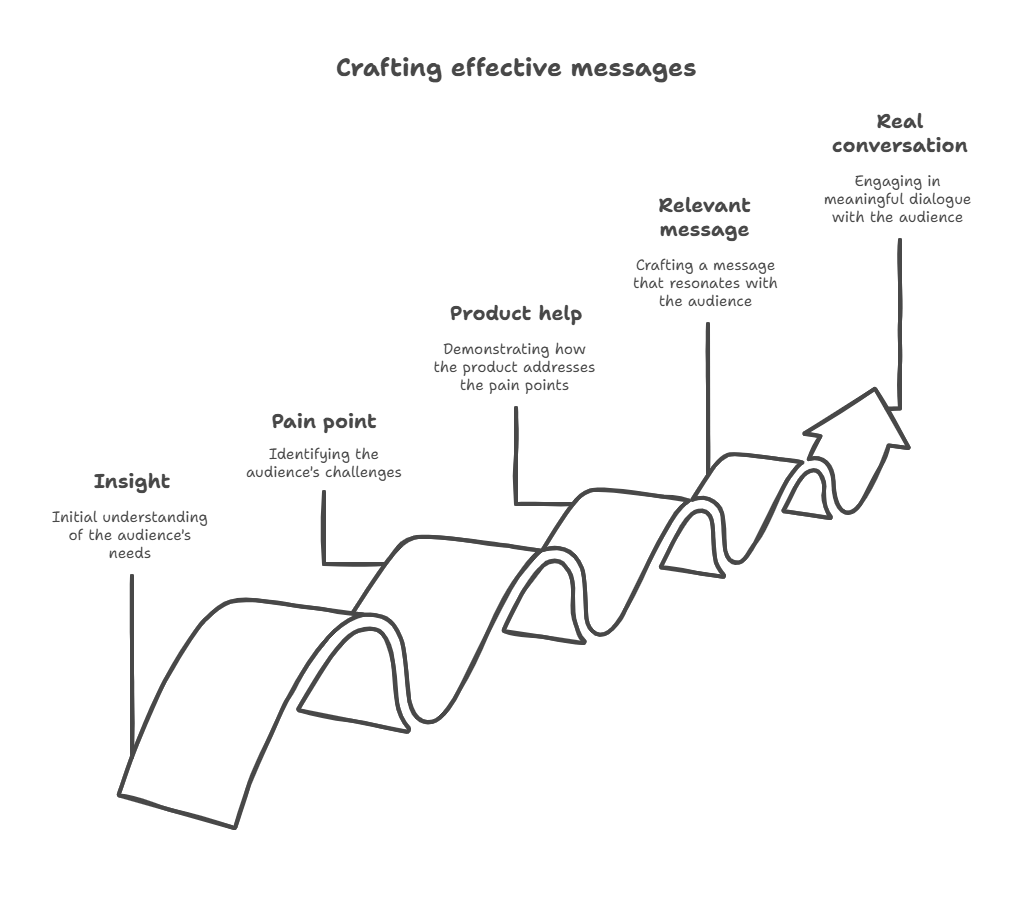
So, the best outreach messages feel like they were written just for that person, because they were. Personalization doesn’t have to be long or complicated, but it should be real.
Mention something specific. Maybe it’s a recent product launch, a blog post, a hiring spree or a challenge they’re facing. Even a short line like, “I saw you’re expanding into Europe, exciting move,” shows that you’ve done your homework and that this isn’t a mass email.
Keep it short, but sharp. You don’t need to pour on the compliments or write a full paragraph of context. One strong, relevant detail is enough to show that you’re paying attention and that this message is worth their time.
And make it sound natural. Write like you talk. Avoid stiff, formal intros like “To whom it may concern” or “Allow me to introduce myself.” You’re a human reaching out to another human. Let that come through in your tone.
Once you’ve grabbed their attention with something specific and real, you’re in a great spot to connect the dots and show them exactly how you can help.
Try to match your solution to their situation. This is where your research pays off. You’re not pitching into the void. You’re showing how you can help them, specifically.
To make it stick:
- Tie your product to their current goals or challenges. If they’re hiring a sales team, talk about how you help new reps ramp faster. If customers are complaining about slow onboarding, highlight how your tool shortens setup time.
- Use plain language. Don’t list features. Focus on benefits. How will it help their team, save time, reduce headaches or unlock growth?
- Make it easy to respond. End with a clear, casual call-to-action like “Worth a quick chat next week?” or “Want me to send over a quick case study?”
The more personal and relevant your message feels, the more likely you are to start a real conversation. When someone sees that you’ve taken the time to understand their business, they’re much more open to hearing what you have to say.
Next, let’s go over which best company research tools will be most useful for you this year.
What are the best company research tools in 2026?
The best stack depends on the question. Do not buy one database and treat it as the answer to every research problem. Combine internal history, primary sources, firmographic and people data, technographics, and verification.
| Research job | Useful tools and sources | What to capture |
|---|---|---|
| Internal history | Salesforce, HubSpot, your data warehouse | Prior conversations, engagement, objections, owners, and open opportunities |
| Company and people data | Generect, LinkedIn Sales Navigator, Crunchbase | Industry, headcount, location, funding context, roles, and professional profiles |
| Official company facts | SEC EDGAR, Companies House, local business registries | Legal entity, officers, filings, financial disclosures, and dated changes |
| Tech stack | BuiltWith, Wappalyzer, company job descriptions | Observed technologies and tools the company says its teams use |
| Trigger monitoring | Company newsroom, Google News, Google Alerts | Funding, acquisitions, partnerships, launches, hiring, and leadership changes |
| Customer and employee context | G2, Capterra, TrustRadius, Glassdoor | Recurring complaints and priorities (treated as hypotheses, not company-wide facts) |
| Summarization | ChatGPT, Claude, Gemini | A cited brief based only on evidence you provide and verify |
Generect can speed up the data layer: company search returns fields such as company name, domain, industry, headcount, location, description, website, founding year, company type, technologies, and funding-related data when available. Lead search helps map relevant roles, while the email finder and validator distinguish confirmed, invalid, and unknown mailboxes. See the Generect Live API documentation. These fields are research inputs (not proof of buying intent), so pair them with dated first-party or public signals.
Ready to stop cold emailing in the dark?
Generect helps you spot buying signals, decision-makers, and pain points, before you hit send.
If you’re spending time on LinkedIn or browsing company websites, a few browser extensions can make your company research a whole lot faster. These company research tools work right where you already are, so you don’t have to bounce between platforms. They surface insights instantly and keep you moving.
Start with LinkedIn Chrome extensions like Findy, Wiza or Magical. These let you quickly pull job titles, contact details, and profile summaries without manually copying and pasting.
It’s a huge time-saver, especially when you’re building prospect lists or prepping for outreach.
Try company insight tools like SimilarTech. These show you what tools a company is using, how big they are, and other key data, all from their homepage. It’s especially helpful if your product needs to integrate with their current tech stack.
And when you’re ready to reach out, use email enrichment tools like Generect. Just enter a name and company, and you can find and verify their professional email in seconds.
With the right company research tools in place, research doesn’t feel like a chore. You’ll get the info you need quickly, stay in your flow, and have more time to focus on what really matters = starting conversations that convert.
Before we wrap up, let’s take a look at a few more things to keep in mind while doing your research.
What mistakes should you avoid?
Even with all the right tools and tactics, it’s easy to fall into a few common traps. And in sales, small missteps can cost you attention, trust or even the deal.
We know, it’s tempting to grab the first piece of info you find and move on. After all, sales move fast. But surface-level research won’t help you stand out and it definitely won’t help you connect.
One common mistake is only skimming the company’s homepage or LinkedIn headline. Sure, that gives you the basics, but you’ll miss deeper insights hiding in places like blog posts, job listings, press releases or customer reviews. Those are the areas where real pain points and buying signals show up.
Another pitfall? Making assumptions without real evidence. For example, just because a company recently raised funding doesn’t automatically mean they’re ready to buy. They could be holding that cash for R&D, hiring or expanding into a new market. Always look for more context before drawing conclusions.
When in doubt, dig a little deeper. A few extra minutes can uncover what truly matters.
Also, keep in mind: Personalization matters, but only when it’s actually personal. If your message sounds like it could go to anyone, it probably shouldn’t go to anyone.
Watch out for these common slip-ups:
- Sending the same message to every prospect → People can spot a template a mile away. Use your research to add one or two custom lines that show you did your homework.
- Ignoring red flags → If you see signs of layoffs, budget cuts or unhappy customers, don’t ignore them. Acknowledging challenges (carefully) can help you frame your solution more thoughtfully or help you decide to move on.
Research is all about using it wisely. When you slow down just enough to avoid these easy-to-make mistakes, you’ll come across as thoughtful, relevant, and worth replying to.
We’ve now reached the end, and you know how to conduct research effectively and with minimal effort. Let’s quickly sum it all up.
Frequently Asked Questions
Use about 15 minutes for a first pass on a typical mid-market account and 30–45 minutes for a strategic enterprise account. Stop when you have verified ICP fit, one meaningful trigger, the likely buying roles, and a question that changes your outreach.
Confirm the business model, size, location, current priorities, recent trigger events, tools in use, relevant decision-makers, prior CRM history, and a verified contact method. Record a source and date for every fact that affects qualification.
Start with the company website, careers page, newsroom, LinkedIn page, Google News, official business registries, SEC EDGAR for U.S. public companies, and free views on review or technographic sites. Your own CRM is often the most valuable free source.
Official filings and registries are strongest for legal and financial facts; the company site is strongest for stated positioning; your CRM is strongest for relationship history. Use third-party databases for discovery, then verify high-impact claims against a primary source.
AI can summarize supplied pages, compare sources, and draft an account brief. It should not be trusted to invent or independently confirm current funding, headcount, leadership, contact details or buying intent. Require citations, dates, and an “unknown” label for unsupported claims.
Company research explains the account: its business, market, priorities, changes, and likely needs. Prospect research focuses on a specific person: their role, responsibilities, interests, and relationship to the buying decision. Effective outreach uses both.
What’s the bottom line?
If you take one thing from this guide, let it be this: good research is the foundation of good selling. When you understand the company, their challenges, and their goals, you stop pitching into the void and start having meaningful conversations that lead somewhere.
You don’t need to spend hours doing it. A focused approach can take 15 minutes. Use the workflow at the top of this guide, then deepen the research only when account value or deal complexity justifies it.
Keep this in mind as you go:
- Be smart, not scattered → Use templates, track what matters, and avoid going down endless rabbit holes.
- Look to offer value, not just a pitch → Your goal is to solve a problem or support a goal. If your outreach reflects that, you’ll stand out every time.
Every email you send, every call you make, every meeting you prep for = it all goes better when it’s backed by real, relevant insight. And when you show up informed, it shows you respect their time. That’s what earns replies, builds trust, and keeps the conversation going.
You’ve now got the full blueprint. Start small, stay curious, and let your research guide you toward smarter, more meaningful sales.
P.S. If you want a little help speeding up your research, Generect’s a great tool for pulling company insights quickly. It won’t do the selling for you, but it will help you show up informed.