


Back in early 2026, I noticed something shift across every sales and RevOps team I worked with: accurate, real-time B2B contact data stopped being a “nice-to-have” and became the quiet engine behind every smart go-to-market move.
Last updated: July 2026. Cognism API availability, field access, and usage terms are contract-specific. Validate the current API reference and your entitlements in Cognism before deploying an integration.
Deals were getting stuck not because of bad pitches, but because people were reaching out to the wrong contacts, or worse, risking compliance issues without realizing it.
That’s when the Cognism API kept showing up on my radar.
In project after project, I’d watch teams plug it in and suddenly get access to clean, global, GDPR-safe contact data that actually matched reality. From my own experience using it, Cognism became one of those tools you trust to quietly enrich your lists with verified leads and detailed profiles, without the usual headache of wondering where the data came from.
But here’s where the story takes an interesting turn.
A new contender started gaining momentum among clients I worked with: Generect. At first it was just a name that popped up in strategy calls. Then it became the tool teams were raving about. Real-time email verification, smooth CRM syncing, and a refreshingly flexible pay-as-you-go model made it feel like a modern, lightweight alternative that played nicely with an automated lead generation system and lead-search workflows.
So in this guide, you’ll get a close look at how Cognism’s enrichment API simplifies pulling verified B2B contacts straight into your process and why Generect is increasingly becoming the go-to for teams wanting speed, flexibility, and automated validation.
By the end, you’ll have a clear sense of which option aligns best with your workflow and data needs in 2026. Ready to get started?
What is contact data API and why does it matter?
Imagine having a tool that instantly finds, verifies, and updates business contact info without you lifting a finger.
That’s basically what a contact data API does.
It’s your behind-the-scenes helper to search, preview, enrich, and redeem verified business contacts and company details, all in real time.
Why does that matter? Because your sales and marketing teams don’t have time to manually look up emails, phone numbers, or company data. A contact data API powers everything from CRM enrichment to lead scoring, segmentation, and account-based marketing.
Instead of wrestling with spreadsheets, your CRM (think Salesforce or HubSpot) automatically fills itself with accurate info, so you can focus on what really counts – closing deals.
You’ll typically get data like verified emails, direct dials, job titles, LinkedIn profiles, firmographics (company size, industry, revenue), and even technographics (the tools a company uses).
Plus, these APIs make sure they keep everything compliant with laws like GDPR, CCPA, and PECR so you aren’t risking penalties.
Here’s a quick snapshot of how they help in practice:
- Instant CRM enrichment → automatically populate missing fields like emails, phone numbers, job titles, and company details.
- Lead qualification & scoring → enrich leads with firmographics and technographics to rank them accurately.
- Real-time email verification → validate emails before hitting “send” to protect your sender score.
- Prospecting automation → auto-generate fresh leads based on role, industry, location, or technologies used.
- Personalization at scale → add contextual data (company size, revenue, tools) to tailor messaging.
- Account-based marketing → identify and enrich contacts within target accounts to accelerate outreach.
- Data hygiene & deduplication → keep your b2b contact database clean by updating stale contact info.
- Territory & routing automation → assign leads to the right reps based on enriched metadata.
- RevOps reporting & forecasting → improve accuracy by working with verified data, not guesses.
Most work through RESTful APIs, sending JSON responses, with secure authentication like OAuth 2.0 and session management via JSON Web Tokens (JWT) for smooth integrations.
Speaking of real-world power, Generect’s API stands out by automating lead search and validation directly inside your sales stack, so no more exporting CSVs. It offers real-time email validation, cutting down bounce rates and boosting outreach success compared to other APIs.
Plus, its no-fuss lead enrichment keeps your sales cycles moving faster with fresher data. You can see a perfect example of how Cognism enrichment API features tie into smooth Cognism API sales automation integration in action, making daily workflows a breeze.
Now that you know why contact data matters, let’s look at how Cognism’s API actually delivers it. Think of this as the engine under the hood that keeps your pipeline moving.
Your lead engine, now fully automated
Imagine leads showing up in your pipeline without manual work. That’s exactly what Generect delivers — in real time.
How does the Cognism API work?
A useful way to evaluate the Cognism API is as a controlled data-enrichment workflow rather than a bulk-export shortcut. Your team defines the ICP and the fields it actually needs, searches or matches records, reviews what your subscription permits, and then writes only approved fields into the CRM.
| Integration stage | What to validate | Why it matters |
|---|---|---|
| Access and entitlements | Which contact, account, mobile, email, technographic, and compliance fields your contract exposes | A successful request is not proof that every field is licensed or available. |
| Search or match | How the API identifies a person or company from the identifiers you already hold | Use a work email, company domain, LinkedIn URL, name, and title where your workflow permits; stronger identifiers reduce bad matches. |
| Preview and redemption | Which calls are exploratory versus credit-consuming or otherwise billable | Build a review step before enriching a large CRM segment. |
| Write-back and suppression | CRM mapping, duplicate rules, opt-out handling, and a timestamp for each enriched field | Fresh data is useful only when the system can explain where it came from and when it was checked. |
| Monitoring | Usage limits, API errors, field completeness, and bounce or reply outcomes | Measure the quality of the data in your own market instead of trusting a headline accuracy number. |
Before production, ask Cognism for the current endpoint reference, authentication method, rate-limit policy, pagination behavior, and credit treatment for your contract. Those details can change by product and entitlement, so hard-coding an undocumented endpoint, a six-month key expiry, or a universal requests-per-minute figure is risky.
For a developer-led rollout, start with a small, consented test cohort, log the source and retrieval date for every field, and use retries with exponential backoff only for the transient errors documented by the API.
Stop exporting CSVs. Start scaling.
Skip spreadsheets forever. Generect syncs verified contacts directly into your tools with zero friction.
How to get started with Cognism API
1. Define the outcome before requesting access
Choose one measurable job: fill missing company domains, route accounts by firmographics, enrich a named-account list, or verify the contact data already in your CRM. A narrow first use case makes it easier to assess match quality, compliance, and cost.
2. Confirm the current contract and API reference
Have a Cognism administrator or support contact confirm the fields, regions, permitted purposes, authentication method, quotas, and consumption model available to your organisation. Do not copy endpoint paths or JSON payloads from old blog posts: API schemas and product access are not universal.
3. Map identifiers and destination fields
Document the identifiers you will send, the fields you will accept back, your confidence threshold, and the CRM owner for conflicts. Keep existing verified values when they are newer than an enrichment response, and record a source plus retrieved-at timestamp.
4. Test a small cohort, then automate safely
Run a limited sample through the approved Cognism workflow, inspect match quality manually, and compare outcomes by segment. Add idempotency, logging, error handling, and suppression rules before scheduling recurring enrichment.
5. Verify deliverability immediately before outreach
Contact-data enrichment and mailbox deliverability are related but different checks. If email is the next action, validate the address close to send time rather than assuming a historical enrichment record guarantees delivery.
curl -X POST https://api.generect.com/api/linkedin/email_validator/
  -H "Authorization: Token $GENERECT_API_KEY"
  -H "Content-Type: application/json"
  -d '["[email protected]"]'
Generect returns an exist value of yes, no, or unknown, plus the risk result and catch-all context. Treat unknown as a review decision, not as confirmation that a mailbox is safe to contact.
Real-time data you can actually trust
Tired of bounce rates? Generect verifies every email on the spot. No more gambling with stale data.
What does the data look like and how is quality ensured?
When you tap into the Cognism API for B2B contact data, you’re getting more than just names on a list. You’ll find a rich mix of personal and professional details.
On the contact side, expect to see fields like full name, job title, phone numbers, emails, and LinkedIn URLs. Going deeper, Cognism adds professional profiles with skills, education history, and key career events.
This way, you know not only who you’re targeting but also what makes them tick professionally.
For company or account data, Cognism shines by including firmographics such as industry, company size, location, and estimated revenue. It doesn’t stop there, either. You’ll get technographics (which means technologies they use) and updates on funding rounds or hiring events.
To make things simple, here’s a quick overview of all the firmographics Cognism can provide:
| Category | Data fields Cognism provides | How you use it |
| Core company identity | Name, Domain, Website, LinkedIn URL, Description, Short Description | Identify companies, enrich CRM, build account profiles |
| Industry & classification | Industry, SIC, ISIC, NAICS | Segment accounts, match ICP industry, build verticalized messaging |
| Company size & structure | Headcount, Size Range (sizeFrom / sizeTo), Founded Year | Score accounts, qualify ICP fit, personalize outreach |
| Revenue / financials | Estimated Revenue | Prioritize high-value accounts, tailor pitch based on company maturity |
| Location details | Country, State, City, ZIP, Street, HQ vs. Office Locations | Territory routing, geo-based segmentation, local campaigns |
| Company type | Public Company, Privately Held, Partnership, Government Agency, etc. | Target specific company types for compliance or strategy |
| Technographics | Technologies used by the company | Build tech-stack–based outreach, SDR personalization, intent-like triggers |
| Hiring events | Role hiring for, department, location, job date | Spot growth signals, trigger outbound campaigns |
| Funding events | Funding round type, series, date, amount, investors | Target fast-growing companies, align messaging to maturity |
| IPO events | IPO status, date, valuation, stock symbol | Target newly public companies, financial-focused campaigns |
| Acquisition events | Acquirer, Acquiree, Acquisition Date | Look for consolidation signals, cross-sell opportunities |
| Phone data | HQ phone numbers, Office numbers (with quality score) | Power outbound calling sequences, enrich CRM |
One standout feature is Cognism’s Diamond Data® verification process. This isn’t just fancy branding. It’s an advanced, multi-layered approach ensuring accuracy and compliance.
The data is sourced with consent in mind, filtered through stringent checks, and regularly verified to keep errors out. This makes a huge difference because, frankly, poor data wastes time and money.
To measure how good the data you get really is, Cognism uses something called a MatchScore. This score helps you quickly assess the quality of each contact or account record.
The default cutoff is 30, meaning only data that meets this quality bar is delivered to you, but you can customize it higher or lower based on your needs.
Here’s what MatchScore actually looks like in practice:
- Control data quality by raising the score when you need higher accuracy (e.g., identity resolution).
- Increase match rates by lowering the score when you’re doing broad enrichment or discovery.
- Avoid junk matches by keeping the default score when inputs are uncertain or partial.
- Quickly triage results by using the score as an instant “trust meter” for each profile.
- Tune enrichment workflows without changing the rest of your API request.
- Reduce manual cleanup since low-confidence results never make it into your pipeline.
How fresh is the data? Cognism updates its Prospector database continuously. The frequency varies but includes near-real-time updates, daily batches, and weekly syncs. Better still, they have a feedback loop where your usage and customer input inform ongoing data improvements.
Diving deeper into where this data actually comes from paints a clear picture. Cognism gathers info from public registries, corporate filings, social data, web crawlers, and integrations directly with partners.
On top of that, artificial intelligence runs proprietary validation and anomaly detection to spot inconsistencies or outdated info. This layered data lineage means you can trust the source and process behind the scenes.
Plus, you can implement delta updates through the API, so you’re only pulling changes, not entire datasets – saving you bandwidth and cost.
Finally, if you want to control how often you refresh and enrich your data, Cognism offers flexible options. You can choose real-time updating for instant accuracy, daily batches for regular syncing, or weekly updates when you want to balance cost and freshness. Using delta updates via API ensures you only transfer the changes, which optimizes performance and budget.
Now, compliance often feels like a hassle, but Cognism has it baked into the data. You’ll see embedded consent indicators, opt-outs, and do-not-call flags aligned with GDPR, CCPA, and PECR regulations.
This way, you stay on the right side of privacy laws while prospecting efficiently.
Speaking of quality, Generect’s involvement brings even more muscle. Their platform boasts a 98% lead data validity rate with bounce rates below 2%, thanks to real-time SMTP validation and domain analysis.
Each search on Generect triggers live data pulls from public records and social media, which prevents common problems with stale, static data. Generect also embeds consent metadata and automates opt-out handling to meet GDPR and CCPA requirements effortlessly.
Clients like BrightWave and LeadSync rave about how Generect boosted their lead discovery, cut bounce rates, and improved conversion accuracy. Generect’s continuous data refresh and built-in email verification keep deliverability high and reduce time wasted chasing faulty contacts.
Yet, remember: maintaining data quality is a shared effort. Cognism handles freshness and compliance, but your client-side setup maximizes accuracy and efficiency.
Once you see the data quality, it’s worth exploring the tools that make it even more powerful. These add-ons help you automate, enrich, and scale without extra manual work.
Turn your CRM into a lead machine
Generect fills your CRM with accurate, ready-to-contact leads without lifting a finger.
What additional Cognism tools complement the API?
When you start digging into what makes Cognism stand out in 2026, it’s clear the API is just one piece of a much bigger puzzle. What really elevates your experience are the extra tools Cognism offers, and trust me, they make a big difference.
First up is their Data-as-a-Service (DaaS). Here’s what that actually looks like in day-to-day operations:
- Keeps your CRM always updated by pushing new or refreshed contacts automatically.
- Maps fields correctly so your data lands in the right place without manual restructuring.
- Prevents duplicates by running automated and human-reviewed deduplication.
- Ensures compliance with GDPR/CCPA by tracking consent, notifications, and audit logs.
- Scores and prioritizes contacts using quality checks like MatchScore and data freshness.
- Cleans and enriches existing records to fix missing emails, job titles, phones, or company details.
- Feeds your warehouse or BI tools with standardized, analysis-ready datasets.
- Supports hybrid setups (API + SFTP + consulting) so your team doesn’t need to maintain the whole pipeline.
Think of it like a continuous data delivery pipeline, feeding fresh, clean B2B contact info straight into your CRM or data warehouse. It cleverly combines APIs, file transfers, and expert data consultants who handle everything from schema mapping to deduplication and compliance audit trails.
Beyond just plugging in data, you can set up custom transforms and enrichment wrangling using popular tools like Pandas or DBT. One neat detail is the ongoing data quality monitoring powered by the Great Expectations framework, meaning your data stays reliable without you sweating over it.
Next, you get the Sales Companion, a personalized sales assistant that’s like having a smart sidekick built right into your daily workflow. It’s pinned to your Chrome browser and pops up on platforms like Salesforce, LinkedIn, and HubSpot.
This tool enriches contact details in real time so you’re always working from the latest intel.
Plus, it hooks into Slack for instant alerts and even recommends vocal scripts tailored by AI based on the contact’s enriched profile. It’s a real timesaver that helps you keep the conversation relevant and smooth.
Then there’s Buyer Signals = a game-changer if you want to be proactive with your outreach. It surfaces vital signals:
| Signal type | What it includes | How you use it |
| Hiring signals | Job openings, job titles, departments, job types, cities, countries, job dates | Identify growing teams, trigger outbound to hiring managers, spot expansion into new regions |
| Technographic signals | List of technologies used by the company (e.g., CRM, marketing tools, dev stack) | Build tech-specific targeting, tailor messaging to a company’s stack, trigger outreach when they adopt or drop tools |
| Funding signals | Funding round type, series (A–K), announced date, amount raised, valuation, investors | Prioritize funded companies, identify fast-paced buyers, time outreach with growth milestones |
| IPO signals | IPO date, exchange, stock symbol, valuation, amount raised | Target newly public companies with new budgets and growth mandates |
| Acquisition signals | Acquisition date, acquirer, acquiree, acquisition type | Spot consolidation trends, identify cross-sell/upsell opportunities, engage companies going through M&A |
| Job movement signals | Job join events, job leave events, title changes, department changes | Alert SDRs when champions switch companies, trigger warm intro outreach, update CRM instantly |
| Location movement signals | Office relocations, new offices, HQ moves | Segment geographically, align regional sales teams, catch expansion signals |
| Data freshness signals | lastConfirmed timestamps on profiles | Prioritize newly validated data, improve routing accuracy, enrich stale CRM records |
| Compliance signals | Privacy notifications, consent tracking | Ensure campaigns follow GDPR/CCPA rules, automatically suppress non-contactable profiles |
The API also supports event-driven prospecting through dedicated endpoints and dashboards. And if you want to get really efficient, you can set up webhooks for real-time alerts straight into your sales engagement tools. This means you never miss a beat or a hot lead.
Now, let me introduce you (yep, one more time!) to Generect – a perfect complement to Cognism’s ecosystem. They specialize in infrastructure integration that automates lead search, enrichment, and validation, ideal for sales and leadgen agencies.
No matter if you’re part of a startup, marketing team, or enterprise, their solutions unlock new markets and boost lead conversions with automation that saves time and cuts costs. What’s really cool is their no-code and low-code options, which mean you can extend Cognism’s API without a heavy tech lift.
You’ll also appreciate Generect’s flexible pricing and easy wallet top-ups, so scaling your lead gen won’t get bogged down by long contracts or upfront fees. Their real-time verification tools keep your leads accurate and live, making sure your DaaS investments pay off handsomely.
Plus, their detailed API docs, sandbox, and client success managers speed up ramp-up time and troubleshooting.
With the full picture of Cognism’s capabilities, it’s natural to ask how it stacks up against the rest. Let’s compare it with the other major players so you can see where it truly stands out.
Why hunt for leads manually?
Automate prospecting today and free your team from tedious research. Let Generect handle the heavy lifting.
How does Cognism compare to alternatives?
When you’re choosing a B2B contact data API in 2026, you’ll inevitably run into the big legacy players: ZoomInfo, Apollo.io, and Lusha. They’ve been around for years, and they offer large datasets and broad feature sets.
But they also come with the usual trade-offs: locked-in subscriptions, slower data refresh cycles, and bulky platforms that aren’t always developer-friendly.
That’s where Generect is changing the game.
Instead of relying on static databases that age quickly, Generect focuses on real-time data retrieval, live verification, and API-first automation. Every request pulls fresh data, emails are validated on the spot, and you only pay for what you actually use.
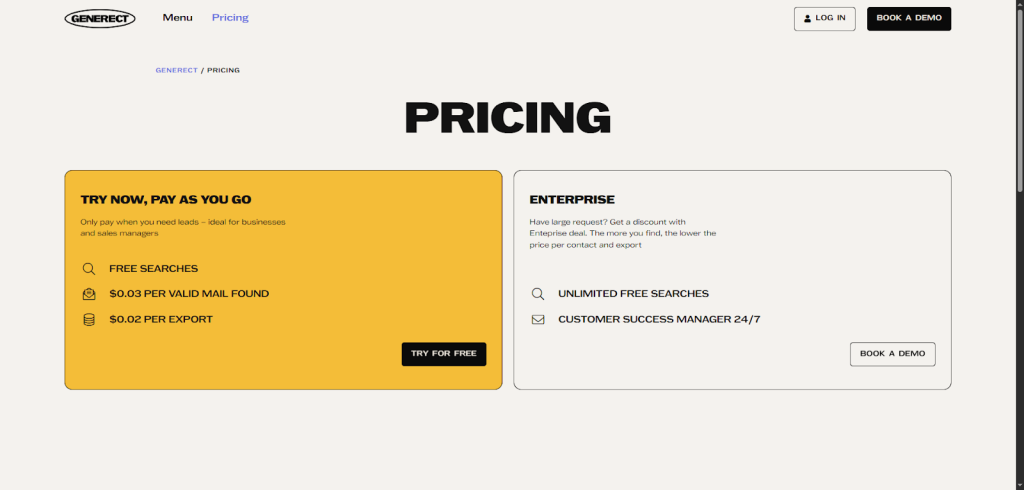
No contracts. No overpaying for stale contacts. No bloated entitlement systems.
And teams love it for exactly that reason – it works the way modern sales teams work. Fast, flexible, accurate, and built for automation.
Here’s why Generect increasingly wins against the traditional vendors:
- Real-time data scraping & verification → not periodic refreshes
- Pay-as-you-go → no annual commitments, no credit confusion
- API-native workflow → built for CRM syncing, enrichment, and automated lead search
- Higher email validity (98% reported by clients) → dramatically lower bounce rates
- Better ROI → you only pay for verified results
- Cleaner implementation → no permission complexity or entitlement layers
- Ideal for lean teams → founders, agencies, and early-stage companies scale without overhead
In other words: Generect gives you fresh, verified, ready-to-contact leads without the slow, heavy, expensive baggage of traditional data providers.
Below is a simple, ultra-practical comparison to make the differences clear:
| Category | Cognism | Generect | ZoomInfo | Apollo.io | Lusha |
| Data freshness | Frequent refresh cycles | Real-time data retrieval on every call | Periodic database updates | Mixed (database + scraping) | Database-based |
| Email verification | Strong verification | 98% validity, verified on request | Good but not real-time | Good | Basic |
| Global coverage | Strong global coverage | Global, real-time lead discovery | Strong US focus | Strong US/EU | US + partial EU |
| Pricing | Mid–high subscription | Pay-as-you-go + free searches | Expensive, annual contracts | Freemium + subscriptions | Credit-based |
| API quality | Scalable, robust | API-first, lightweight, extremely fast | Enterprise-focused, heavy | Good | Basic |
| Ease of integration | Smooth with support | Plug-and-play + CRM-native workflows | Complex setup | Moderate | Simple |
| Real-time scraping | No | Yes = core feature | No | Limited | No |
| Lead search automation | Strong | Excellent (ICP + live search) | Limited | Good | Basic filters |
| Compliance | Very strong | Strong, with real-time validation | Strong | Standard | Standard |
| Ideal users | Mid-market & EU teams | Startups, agencies, founders, modern RevOps teams | Large enterprises | Growth teams | Small teams |
| Contract requirements | Annual | None = usage-based | Multi-year | Optional | Monthly/annual |
| Best for | Global, compliant data | High-speed, automated, real-time lead gen | Huge teams with deep pockets | All-in-one sales platforms | Simple prospecting |
Choosing the right B2B contact data API in 2026 ultimately comes down to how you want to work. Traditional platforms like ZoomInfo, Apollo, Lusha, and Cognism offer large datasets and proven infrastructures, but they often come with subscription commitments, slower refresh cycles, and heavier systems built for old-school workflows.
Generect, on the other hand, is built for the way modern teams operate.
Once you choose a platform, the next step is running it smoothly. Here are practical tips to avoid common pitfalls and keep your API running fast and reliably.
Your team deserves better data
Give sales reps a head start with verified emails, direct dials, and real-time insights, all automated.
How to troubleshoot and optimize API usage?
When I first started using the Cognism API, troubleshooting felt like a maze.
But over time, I picked up some solid habits that made working with it smoother and way more efficient. You’ll find that understanding common error codes and smart optimization techniques can save you hours and maybe some credits too.
Let’s kick off with the usual suspects: error codes.
| Status code | Meaning | What it really means | How to fix it |
| 400 | Bad Request | Your request body or parameters are incorrect. | Validate JSON, check required fields, fix typos. |
| 401 | Unauthorized | Missing or invalid API key / authorization header. | Add/update Authorization: Bearer <API_KEY>. |
| 402 | Credit Limit Exceeded | You’ve used up your plan’s allocated credits. | Top up, upgrade, or wait for your quota to reset. |
| 429 | Too Many Requests | You’re sending requests faster than allowed. | Add rate limiting, retry with backoff, batch requests. |
| 500 | Internal Server Error | Something broke on the provider’s side. | Retry after a delay; contact support if consistent. |
From my experience, always using the authorization header correctly is non-negotiable. Validating your API key regularly and watching quotas via response headers will keep your integration happy and healthy.
Pagination is another lifesaver. Don’t try pulling huge datasets in one go. Handle those results in smaller, manageable chunks to avoid timeouts or dropped requests.
Before you dive too deep, check that your entitlements are set up properly. Without the right permissions, calls won’t succeed even if everything else looks good. If you’re ever stuck, Cognism’s Help Center and developer docs at https://developers.cognism.com are extremely helpful, plus you can always shoot them an email at [email protected].
On a practical note, I ran into headaches with the Chrome extension when downloading CSVs – duplicates were annoying. Make sure you’re using the latest extension version, and clear cache if data looks off.
Now, here’s where you can really get smarter with API calls:
- Cache frequent queries using tools like Redis or Memcached. This cuts down API load and speeds up response times.
- For bulk lead retrieval, try asynchronous task queues such as Celery or AWS Lambda. They let you process without blocking your app.
- Build retry logic with jitter. Instead of hammering the API when you hit a 429 rate limit, back off randomly and retry. That keeps you under the radar.
Also, run through this quick API health checklist regularly:
- Rotate your API keys to avoid outages.
- Sync entitlements and confirm they match your current needs.
- Track response schema changes so your integration doesn’t break unexpectedly.
Logging is another game-changer. Use Prometheus paired with Grafana dashboards to catch anomalies in latency or error rates early on. When you spot issues fast, you fix them faster.
Managing credits wisely is crucial – preview calls are your friends for initial screening before redeeming full contact data. Batch your redeem calls and consider dynamic thresholds on MatchScore filtering to keep costs optimized.
And with everything running well, we can finally answer the big question: is Cognism the top choice this year? Let’s wrap it up with a clear, honest conclusion.
Let Generect do the prospecting for you
Stop wasting hours chasing leads. Let the Generect API pull verified contacts straight into your CRM while you focus on closing.
Is Cognism the best B2B contact data API in 2026?
From my experience, Cognism stands out with its verified data quality and global, real-time coverage. It’s a solid choice for teams who value compliance and need an easy integration process.
Plus, their expert-managed Data-as-a-Service option adds that extra layer of support when you want it. Whether you’re choosing sales enablement software for sales, marketing, or RevOps, Cognism scales well from SMBs to large enterprises, making it practical across the board.
Here’s a quick look at what you get:
- Reliable, up-to-date contact data worldwide
- Simple API setup with strong compliance safeguards
- Managed services for hands-off quality control
That said, if your priority is real-time data, high email validity, automation-ready APIs, and flexible pay-as-you-go pricing, then Generect stands out as the most agile and cost-efficient choice.
It removes the friction of outdated lists, manual CSV work, and high-priced contracts, letting sales teams, founders, and agencies move faster with cleaner, fresher data.
In short:
- If you want speed, accuracy, and real-time enrichment → choose Generect.
- If you prefer large static databases and traditional enterprise setups → choose one of the legacy providers.
For the majority of teams looking to scale efficiently in 2026, Generect offers the smartest, leanest, and most automation-friendly approach to B2B data.
Frequently Asked Questions
Cognism can be a strong fit when its available fields, geographic coverage, compliance controls, and commercial model match your target market. The right answer depends on a measured pilot with your own ICP, not a generic vendor accuracy claim.
Confirm the current endpoint reference, authentication method, entitlements, field definitions, usage limits, pagination, permitted use, and data-retention requirements with Cognism. These details can differ by contract and may change over time.
Match with more than one trustworthy identifier where allowed, such as company domain plus name and title. Store the source and retrieval date, use a confidence threshold, and send ambiguous records to review instead of overwriting the CRM automatically.
No. A contact record can become stale and some domains are catch-all. Validate the actual address immediately before outreach, respect consent and suppression rules, and monitor bounce rates by source and segment.
Generect is useful when you need API-driven LinkedIn lead or company search plus email discovery and validation in one workflow. Its live API exposes concrete validation signals such as mailbox existence, catch-all status, and MX domain, so teams can decide whether an address is ready for outreach.
Choose the workflow that makes your data accountable
Compare vendors on the records you will actually use: coverage by market, match rate, field completeness, compliance process, cost per usable record, and downstream email deliverability. Then connect the winning workflow to a controlled enrichment process instead of treating a database as a one-time export.
Try Generect to search relevant leads and verify business emails before your next outreach sequence.

