15 Best Data Enrichment Tools for B2B Sales (2026)
Compare 15 data enrichment tools for B2B sales by coverage, freshness, integrations, pricing and fit. Use our practical scorecard before you buy.
 Updated
15 min read
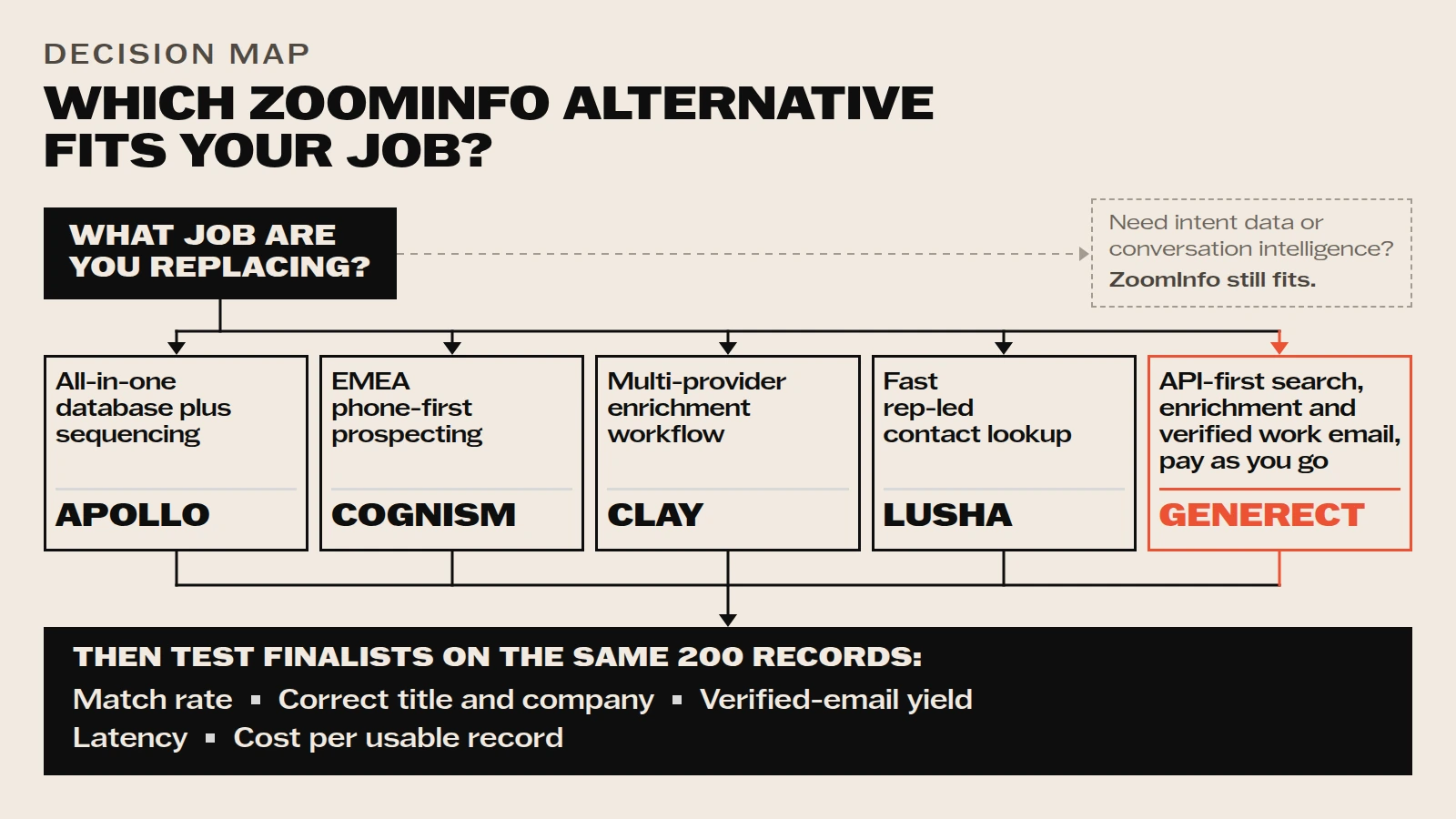
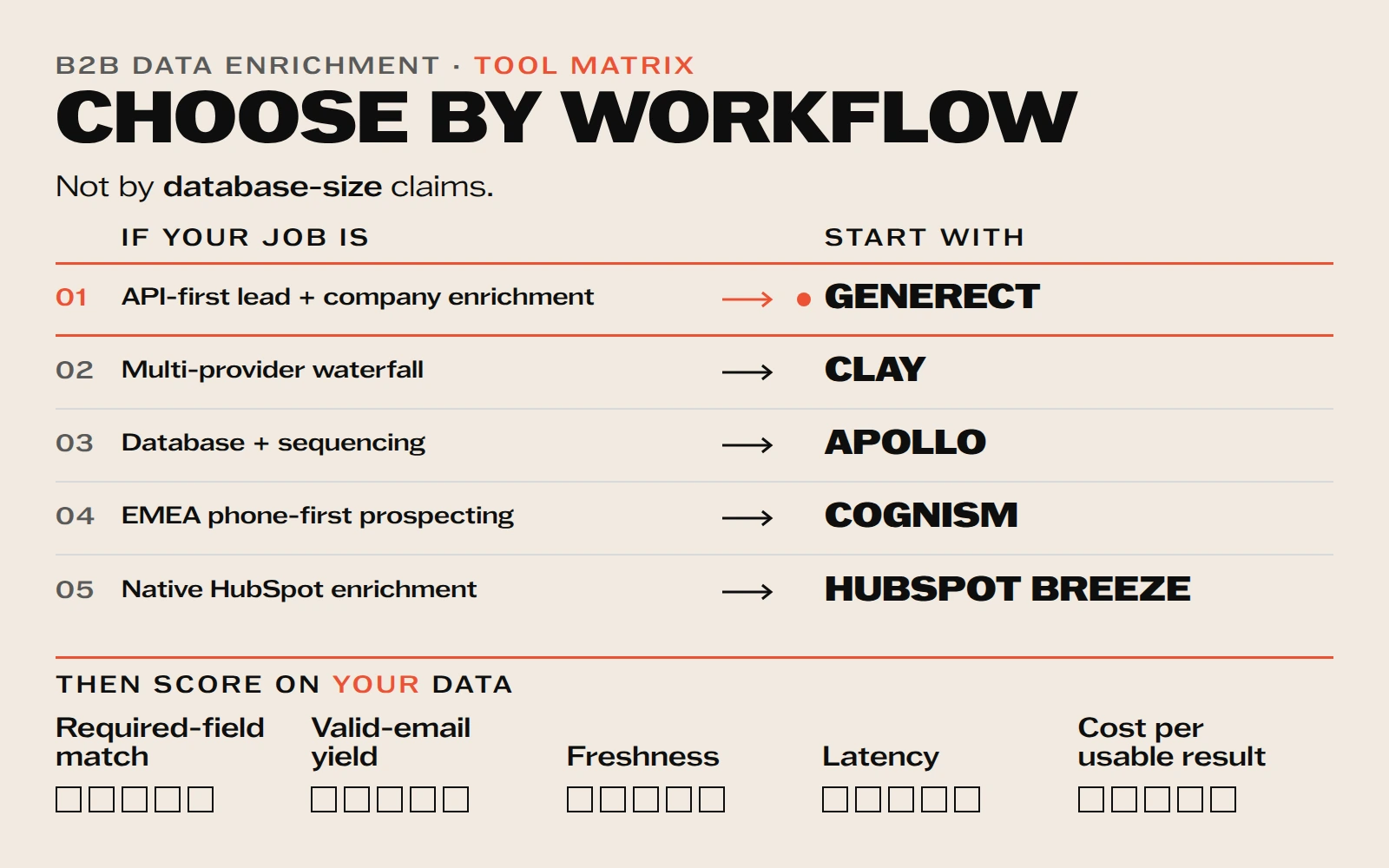
Data enrichment tools turn incomplete contact or company records into usable sales data. The best choice depends on the job: Generect for API-first lead and company search plus email finding and validation, Clay for configurable multi-provider workflows, Apollo for database plus outreach, Cognism for phone-first EMEA prospecting, and HubSpot Breeze for native HubSpot enrichment.
In this guide, we cover 15 contact data enrichment tools active sales teams use in 2026. Each entry explains what the tool does best, where it fits in a sales workflow, and what to verify before committing. These tools help you:
- Spend less time researching and more time selling
- Reach out with personalized, relevant messages
- Prioritize high-value leads without guessing
Which data enrichment tools are best for B2B sales?
For most teams, the useful shortlist is based on workflow rather than database size. Choose Generect when you need API-first search, enrichment and verified work-email discovery without a seat-based subscription. Choose Clay when you need to orchestrate several providers. Choose Apollo when prospecting and sequencing should live together. Choose Cognism when EMEA mobile coverage is central. Choose HubSpot Breeze when enrichment must stay inside HubSpot.
If your main need is net-new list building rather than updating records you already hold, compare our guide to B2B database providers. This article focuses on enriching partial contact and company records.
| Primary job | Start with | What to validate |
|---|---|---|
| API-first lead and company enrichment | Generect | Match rate, valid-email yield and latency on your ICP |
| Multi-provider enrichment waterfall | Clay | Credit cost, setup effort and fallback logic |
| Database plus outbound sequencing | Apollo | Coverage and verified-contact yield |
| EMEA phone-first prospecting | Cognism | Country-level mobile coverage |
| Native HubSpot record enrichment | HubSpot Breeze | Eligible objects, overwrite rules and workflow fit |
What is contact data enrichment?
Contact data enrichment adds, refreshes, or validates fields on a record you already hold. A partial record might contain a name, company, or work email; the enrichment step can add role, company size, location, profile URL, technology fields, and email status. Net-new database discovery is a separate job and should be tested separately.
Define the required output before choosing a provider. For an outbound workflow, that might be company match, current title, work email, and email status. For CRM routing, it might be industry, employee range, region, and account owner. A record is usable only when the required fields are present and pass the team’s validation rules.
What 365,000 email checks say about data quality
In a July 2026 Generect email-quality audit, approximately 365,000 verification checks classified 65.7% of addresses as valid, 26.9% as invalid, and 7.4% as catch-all or unknown. This was not a vendor bake-off and should not be read as a universal accuracy score. It shows why a provider’s headline database size or accuracy claim is not enough: the result changes with list source, geography, role mix, domain behavior, and the definition of a successful match.
| Observed status | Share of checks | Buyer action |
|---|---|---|
| Valid | 65.7% | Monitor delivery and role accuracy after export |
| Invalid | 26.9% | Do not pay for or send to these records |
| Catch-all or unknown | 7.4% | Route to a cautious workflow rather than treating as deliverable |
Apply the same rule to every tool test: use one fixed sample, define usable fields before the run, and report valid, invalid, catch-all, and unknown outcomes separately. Divide total test cost by usable records, not by credits consumed.
What features should you look for in a good tool?
Picking a contact data enrichment tool is about choosing a tool that actually makes your sales team faster, smarter, and more effective.
The best tools give you the right data, integrate with your workflow, and save you time. So before you invest in anything, here’s a quick cheat sheet. If a tool checks most of these boxes, you’re on the right track:
| Feature | Why it matters |
| Real-time data updates | Reach leads when they’re most responsive |
| Full contact profiles | Email, phone, LinkedIn, job title, etc. |
| Company insights | Industry, size, revenue, tech stack |
| Seamless CRM integration | No manual updates, no messy data |
| Automation capabilities | Save time, enrich leads automatically |
| GDPR/CCPA compliance | Stay safe and protect your reputation |
Get the right data, in real time
First things first: speed and coverage matter. You want a tool that delivers accurate info right when you need it, not hours later, when the lead’s gone cold or moved on.
A great enrichment tool gives you real-time updates, so you’re never waiting around for fresh data. It also provides complete contact details (functioning as an email finder tool with phone numbers and LinkedIn profiles) along with useful company insights like size, industry, and location.
Beyond the basics, look for firmographic and technographic data. That means things like company revenue, team size, and the tools they’re already using. These details help you qualify leads faster and know exactly who’s worth your time.
The more you know upfront, the easier it is to tailor your pitch and avoid chasing dead ends.
Make sure it fits seamlessly into your sales stack
Even the most powerful tool won’t help if it’s hard to use or doesn’t play well with your other systems.
Here’s what to check:
- CRM and sales tool integrations = It should sync smoothly with tools like Salesforce, HubSpot (+ HubSpot contact enrichment), Outreach or whatever you’re already using.
- Data accuracy and freshness = Stale or outdated info can do more harm than good. Pick a tool that keeps things current without you lifting a finger.
- Privacy compliance = Make sure it’s GDPR and CCPA friendly. Respecting your leads’ data literally protects your business.
- Ease of use and automation = The best tools work in the background. Set it up once, and let it enrich your leads automatically, no manual effort required.
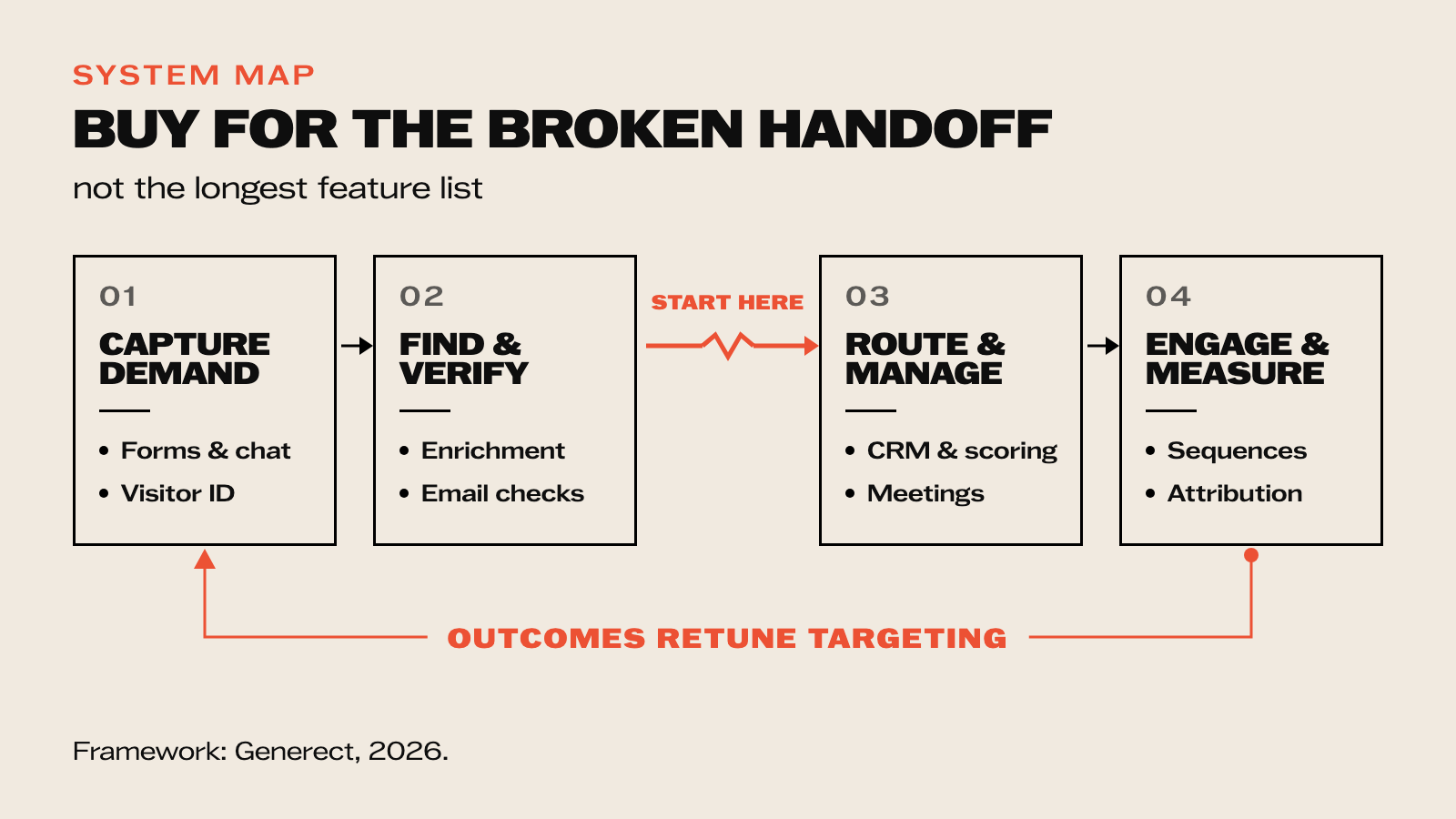
Wondering where enrichment actually fits in your day-to-day sales process? Here’s a simple view:

A great enrichment tool should make your job easier, not more complicated. If it saves you time, improves targeting, and keeps your CRM clean (all while running quietly in the background), you’ve found a winner.
How were these B2B contact enrichment tools assessed?
This is a workflow comparison, not a laboratory ranking. We reviewed published product capabilities, pricing, integrations, and stated geographic or channel focus, then mapped each tool to the job it is designed to perform. We did not run a controlled head-to-head accuracy benchmark across all 15 vendors, so the table does not assign unsupported accuracy scores.
- Coverage: required contact and company fields for the target segment.
- Validation: valid-email yield and treatment of catch-all or unknown results.
- Workflow fit: API, CRM, browser, sequencing, or multi-provider orchestration.
- Operating cost: setup effort, latency, and cost per usable record.
Use the shortlist to select finalists, then run the same representative records through each one. Vendor-wide claims cannot substitute for results on your ICP.
What are the 15 best contact enrichment tools in 2026?
The profiles below cover each tool’s primary use case, key capabilities, known limitations, and pricing as of 2026.
Generect
Generect is built for teams that need verified contact data without a seat-based subscription. Rather than tab-switching between research tools, Generect pulls live data from multiple verified sources and acts as a b2b leads database that enriches contacts automatically, adding work emails, phone numbers, social profiles, and company attributes in one pass.
Generect supports API-led enrichment and CRM workflows. Confirm field mapping, overwrite rules, rate limits, and latency in a sandbox before connecting production records.
Published Generect capabilities include:
- Real-time B2B contact enrichment from multiple verified data sources
- LinkedIn and CRM integrations that let you work where you already are
- Bulk enrichment so you can upload a list and get everything cleaned and filled in minutes
- Automated workflows that trigger based on contact activity or lead scoring
- GDPR-compliant processes so you’re safe from data headaches
Generect publishes pay-as-you-go pricing: searches are free, exports are $0.02 per lead, and a valid work email is $0.03. Check the live pricing page for current rates and volume discounts.
This model lets teams compare total spend directly with the number of usable records returned.
Generect is one candidate for API-first enrichment; compare its usable-result yield and latency with the same sample used for every finalist.
Your cold emails deserve better data
Don’t let outdated info kill your outreach. Supercharge it with Generect’s real-time enrichment.
The remaining 14 tools cover different workflow needs. The table below maps each to its primary use case, key features, and current pricing:
| Contact enrichment tools | Better suited for | Key features | Pros | Cons | Best for | Pricing |
| Reply.io | B2B email outreach + enrichment | Email finder, sequence automation, analytics | Combines outreach and enrichment in one | Email tool needed to get full value | SDR teams | Starts around $70/user/month |
| HubSpot | All-in-one CRM + native HubSpot contact enrichment | Contact scoring, lead insights, email updates | Seamless CRM integration | Can get pricey for full feature set | RevOps, scaling teams | Free version + paid tiers |
| Clay | Real‑time data workspace | Live profiles, integrations, tracking | Organizes all lead info in one place | Learning curve for advanced features | Account execs, operations | From $99/user/month |
| ZoomInfo | Deep firmographic insight | Company hierarchy, intent data, contact enrichment API | Large, accurate database | Expensive for small teams | Enterprise & large SDR teams | Custom, high-tier |
| Apollo | All‑around outreach + enrichment | Email list building, technographic data, dialer | Good balance of price and features | Data can vary in accuracy | SMB sales teams | Free tier + $49/user/month pro tier |
| Crunchbase | Company and funding intel | Funding history, investors, growth signals | Ideal for targeting funded companies | Not focused on personal contact data | Account execs, BDRs | Starts at ~$29/month |
| Adapt | Instant B2B contacts | Email/phone finder, Salesforce sync, intent data | Clean, accurate contacts | UX feels dated | SDRs, small teams | From ~$99/user/month |
| Datanyze | Technographic insights | Tech stack tracking, email/phone finder | Great for understanding tech choices at companies | Limited firmographic depth | Tech-focused SDRs | Custom |
| Pipl | Deep personal identity data | Personal email, phone, social profiles | Good for niche contacts | Compliance heavy, careful usage needed | Recruitment & specialized prospector teams | Quote-based |
| Lusha | Quick and easy contact lookup | Email/phone via Chrome extension, CRM sync | Fast, simple lookup in browser | Limited data depth | BDRs, quick prospecting | Free tier + ~€49/month pro |
| Snov.io | Email and drip sequences | Email finder, drip campaigns, verification | Affordable and feature-rich | Interface can be clunky | Small teams, agencies | From $39/month |
| Cognism | GDPR/CCPA compliant global data | B2B database, intent, mobile data | Legally compliant for multi-region outreach | U.S. data a bit weaker | Teams targeting EU/UK | Custom |
| Closely | Multi-channel automation + data | Email, LinkedIn, SMS, analytics | Great for true omni-channel outreach | Newer tool, smaller user base | SDRs using LinkedIn heavily | From $69/user/month |
| Dripify | LinkedIn campaign automation | Profile enrichment, drip sequences, analytics | Smooth LinkedIn integration | Outreach limited to LinkedIn | LinkedIn-focused BDR teams | Starts at $41/month |
| Generect | Real-time contact and company enrichment | ICP search, profile enrichment, email finding and validation, API access | Fresh retrieval and verification; usage-based pricing | No built-in multichannel sequencing | Lean GTM, RevOps, and API-led workflows | See live pricing |
Use the table to narrow the field, not to skip validation. Test only the vendors that match the required workflow and fields.
How do you test a tool before fully committing?
Choosing the right enrichment tool is about testing. You don’t have to jump in blindly or commit your whole team right away. Most tools offer a free tier, trial or limited number of credits so you can try before you buy.
Take full advantage of that.
When testing a tool, keep this checklist handy, it’ll help you find the best fit faster:
| What to test | Why it matters |
| Data accuracy (emails, phones) | Avoid bounce rates, save time |
| Coverage of job titles & industries | Target the right prospects |
| Real-time updates | Keep your pipeline fresh |
| CRM & outreach integration | Reduce manual work |
| Ease of use | Make adoption simple for your team |
| Support & onboarding | Get help when you need it |
The first piece of advice is to start small and stay focused.
See what actually fits into your workflow. A great first step is to upload a sample list, just a small batch of leads from your CRM or prospecting tool. Enrich them and take a close look at what comes back.
Don’t just check for volume; check for accuracy:
- Are the emails valid?
- Are job titles and company details correct?
- Is anything missing?
To take it a step further, compare a few tools side by side. Use the same lead list with two or three platforms and see how they perform.
Ask yourself:
- Which tool returned the most complete profiles?
- Which one gave you the most accurate, up-to-date info?
- And which one was easiest to use or connect with your CRM?
Testing like this helps you avoid surprises later, and ensures you choose a tool that actually supports the way your team sells.
How do you get the most out of your enrichment tool?
Buying an enrichment tool is just the first step. To see real results, you’ve got to put it to work the right way. That means setting it up to run smoothly in the background and making sure your team knows how to use the data it delivers.
Here are three ways to get the most value from your tool.
Train your team to use enriched fields in outreach
Don’t let all that great data sit unused. Show your reps how to personalize their messages using job titles, company size, location or tools the prospect already uses. Even small tweaks (like referencing the right tech stack) can double your reply rate.
Set up automation to enrich leads as they come in
You don’t need to enrich everything manually. Most tools can update new contacts automatically as they enter your CRM or lead lists. Set it up once, and the right data will be ready when your reps are.
Clean your CRM regularly using enrichment workflows
Outdated data slows your team down. Schedule enrichment updates to refresh old records, fill in missing info, and remove duplicates. A cleaner CRM means less friction and faster selling.
With these steps, your enrichment tool becomes more than just a data source. It becomes a revenue tool.
By now, you know almost everything about data enrichment, but what about how often you should do it?
How often should you update or enrich your data?
Data goes stale faster than you think. People change jobs, companies grow, tech stacks shift and if your CRM doesn’t keep up, your outreach suffers. The fix? Don’t wait for data to get old. Build enrichment into your workflow.
Here’s a simple guide for when to enrich your data:

Here’s how to stay on top of it:
- Enrich new leads as they come in → Whether it’s a form fill or a demo request, set up automated contact enrichment so inbound leads get updated instantly.
- Refresh before key moments → Check and enrich contact data before sending cold emails, calling prospects or walking into a meeting. A quick update can mean the difference between a generic pitch and a personal one.
- For your existing CRM records → Set a regular cleanup schedule. A good rule of thumb is every 30–90 days for active contacts, and every 90–180 days for less active or colder leads.
This keeps your pipeline clean, your messages relevant, and your reps confident that they’re working with real, usable info.
Frequently Asked Questions
Data enrichment tools add missing fields to contact or company records, such as job title, company size, domain, work email or phone. They can also refresh stale fields and validate whether contact details remain usable.
The best tool depends on your workflow. Test finalists on the same representative records and compare required-field match rate, valid-email yield, freshness, latency, integration effort and cost per usable result.
A B2B database helps you discover net-new companies and contacts. Data enrichment starts with a record you already have and adds, refreshes or validates fields. Many platforms support both jobs, but buyers should test each workflow separately.
Use a sample that represents your actual regions, industries and roles. Define required fields first, run the same records through every vendor, manually verify a subset, then calculate cost per usable result rather than cost per credit.
Enrich records at capture and before important outreach. Refresh active records on a regular schedule based on how quickly the fields change, and revalidate work emails before a campaign rather than assuming an old result is still valid.
What’s the bottom line?
The right contact data enrichment tool reduces manual research time, lowers bounce rates, and gives reps the context they need to open a conversation with relevance instead of guesswork.
If you’re guessing who to contact or digging through LinkedIn before every email, you’re wasting time. A good B2B contact enrichment tool puts the right info in front of you, exactly when you need it.
To get the most value, make sure you:
- Match the tool to your team → Think about your size, budget, and workflow. What works for a five-person SDR team might not suit a large RevOps department.
- Keep your data fresh → Enrich new leads automatically, and set regular check-ins for older records. Stale data = missed opportunities.
Accurate, enriched records translate to fewer bounces, higher reply rates, and reps who spend their time closing rather than researching.
Choose the tool that returns the highest number of usable records for the workflow at an acceptable cost and latency. Generect belongs on the shortlist for API-first search, enrichment, and verified work-email discovery; its result should still be measured on the same sample as every other finalist.